

Big event coming! 30,000+ users downloaded SMSF latest version on 9Apps for free every week! It is simply to learn how to use it. This hot app was released on 2018-07-14. Why not download and play it now?
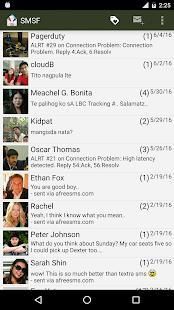
No registration required just install and start sending free text to all Philippine networks. Enjoy real free texting and the recipient does not need to install any application to receive your messages. No Load or SIM card credits needed.
We are not using your SIM load(Smart load / AutoloadMax ) or credits to send SMS but instead we are forwarding your message to our SMS servers via internet. Therefore, Internet is required for this app to work and our server's number will appear to your "ka text" in the Philippines.
The recipient can reply directly to whatever number used to deliver your message. Replies are charge 1 peso as regular SMS rate unless they are registered to any unlimited text promo.
SIM/FREE MODE
⦿ It is just one tap away to switch modes either SIM Mode or free mode. SIM mode will send using your device SIM card. Free Mode will send via online servers for free.
FAQs:
1. Why different numbers appear to the recipient instead of my own number?
⦿ SIM CARD numbers are business! You cannot use it without paying to SMART/GLOBE and of course we cannot make it free for you because that is STEALING and STEALING is AGAINST the law! We are using multiple numbers to send millions of messages every now and then to minimize delay. As much as possible we will deliver your messages with reasonable delay.
2. Why do I need to set SMSF as default SMS app?
⦿ Since the introduction of Android 4.4, Google allows only one app to run as default SMS app. Only your selected app is authorized to manage the SMS database entirely. The concept of one single default SMS app was introduced by Google and represents a change of the operating system that we are not able to influence.
3. How do I set SMSF as my default SMS app?
⦿ After installing the SMSF app on your phone, you’ll receive a popup to choose whether you want to set SMSF as your default app.
Contact us for help and support
⦿ https://s3.amazonaws.com/supportpage/help.html
Privacy Policy
⦿ https://goo.gl/77A9VA
Tidak dibutuhkan pendaftaran hanya menginstal dan mulai mengirim teks bebas untuk semua jaringan Filipina. Nikmati SMS gratis nyata dan penerima tidak perlu menginstal aplikasi untuk menerima pesan Anda. Tidak ada kredit beban atau SIM card yang dibutuhkan.
Kami tidak menggunakan beban Anda SIM (beban Smart / AutoloadMax) atau kredit untuk mengirim SMS tetapi kita meneruskan pesan Anda ke server SMS kami melalui internet. Oleh karena itu, Internet diperlukan untuk aplikasi ini untuk bekerja dan nomor server kami akan muncul untuk "ka teks" Anda di Filipina.
penerima dapat langsung membalas ke nomor apapun yang digunakan untuk menyampaikan pesan Anda. Balasan biaya 1 peso sebagai tarif SMS biasa kecuali mereka terdaftar untuk setiap promo teks terbatas.
SIM / GRATIS MODE
⦿ Itu hanya satu tekan pergi untuk beralih mode baik Modus SIM atau mode bebas. Modus SIM akan mengirim menggunakan kartu SIM perangkat Anda. Free Mode akan mengirimkan melalui server online secara gratis.
Tanya Jawab:
1. nomor Mengapa berbeda muncul ke penerima bukan nomor saya sendiri?
nomor CARD ⦿ SIM yang bisnis! Anda tidak dapat menggunakannya tanpa membayar untuk SMART / GLOBE dan tentu saja kita tidak bisa membuatnya gratis untuk Anda karena itu adalah MENCURI dan MENCURI adalah MELAWAN hukum! Kami menggunakan beberapa nomor untuk mengirim jutaan pesan setiap sekarang dan kemudian untuk meminimalkan penundaan. Sebisa mungkin kami akan menyampaikan pesan Anda dengan delay yang wajar.
2. Mengapa saya harus mengatur SMSF sebagai aplikasi default SMS?
⦿ Sejak diperkenalkannya Android 4.4, Google memungkinkan hanya satu aplikasi untuk dijalankan sebagai aplikasi default SMS. Hanya aplikasi yang dipilih berwenang untuk mengelola database SMS seluruhnya. Konsep satu pun aplikasi default SMS diperkenalkan oleh Google dan merupakan perubahan dari sistem operasi yang kita tidak mampu mempengaruhi.
3. Bagaimana cara menetapkan SMSF sebagai aplikasi SMS default saya?
⦿ Setelah menginstal aplikasi SMSF di ponsel Anda, Anda akan menerima popup untuk memilih apakah Anda ingin mengatur SMSF sebagai aplikasi default.
Hubungi kami untuk bantuan dan dukungan
⦿ https://s3.amazonaws.com/supportpage/help.html
Kebijakan pribadi
⦿ https://goo.gl/77A9VA
- Minor enhancements




9Apps 4.9











