


It is said that 30,000+ users downloaded Open Chat In WhatsApp latest version on 9Apps for free every week! The app has also been given a bit of a visual makeover, too This hot app was released on 2018-07-23. And it takes your phone small room to run it.
Open in Whatsapp=open chat with click=click to chat
with open in wahtsapp you can open chat in whatsapp easly,and you can open chat in whatsapp just with send message by number without saving in whatsapp:
,so,this is exactly an open chat in whatsapp,click to chat,open a chat with any number phone,chat in whatsapp or in whatsapp business,open chat in whatsapp directly without save the number,open in whatsapp free,
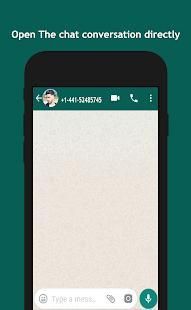
"What,when,how you can use this app?" All this questions can be answered in this description of open in whatsapp app,open your mind:with this app you can open a chat or conversation directly to official Whatsapp app quikly by number of your contact who will be start a chat with him,This app using a methode of whatsapp to open a direct chat just with writing the number phone of the contact,this is the principal feature,just open the chat in whatsapp,this will not have any feature like'hide your number","Spy another conversation of your friends" ,"hiden blue ticks", "hide last seen", "Ghost Mode".This is like a door ,you have a number phone,and you want to start a conversation with it,you use this app to start chat without save the number in your phone.
Why i adviced you to use this app,of course you have the choice to download or no,but let me tell you why you need my app to install it in your phone.The first thing you want to start a conversation in whatsapp,but you dont save the number in your phone,now i tell you,uou can use this app to start your chat,just writ the number phone,after that,click the open chat button,to open the convesrsation directly in whatsapp,this not a magic,but a tool to quikly save your time,his is simple but it's important for you.The second thing,open in whatsapp just a litle app with few capacite,without permission,free,and simple,so now im sure you want to install it in your phone and start your chat all time.
- App service
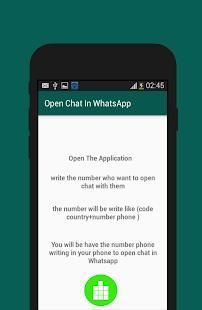
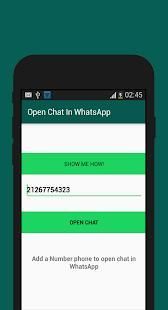
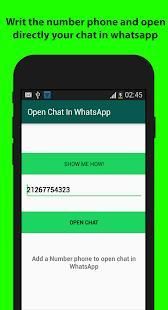
Tis app is a tool for whatsapp app,and if you have a business whatsapp you can us it,it's compatible with the both app,so by click to chat you can open your convesrsation quikly,by number phone.Now you are not sure if are saving the number phone in you phone or no,don't worry ,open in whatsapp have a system to notify you if the number is not save in your phone,so,if the number between your contact phone,the app directly open the chat without any error.so open the app,enter the number phone,click the green open button(you find it in the app),and the conversation chat start.
When you can use Open in whatsapp app,
- if you have an incoming call,and you want to chat or cantact it by whatsapp,so,you have the number,just copy it,and paste in the app,and click open the chat,it's easy!
- if you need to chat with someone but you dont want to save his number in your phone.
Astuce to write the number:
To correctly use open in whatsapp,you will be entre the number phone,but with the prefix of your country,some countr have a prefix for number,us it,this is the only way to open in whatsapp accept your number without any error.
contact us:if you need any question related'open in wahtsapp','how to use',just contact us in marstore0@gmail.com
Disclamer: This app is not affiliated with WhatsApp Inc.
Buka di Whatsapp = terbuka chatting dengan klik = klik untuk chatting
dengan terbuka di wahtsapp Anda dapat membuka obrolan di whatsapp easly, dan Anda dapat membuka obrolan di whatsapp hanya dengan pesan kirim oleh nomor tanpa menyimpan di whatsapp:
, Jadi, ini adalah persis chat terbuka di whatsapp, klik untuk chatting, membuka obrolan dengan nomor telepon, chatting di whatsapp atau dalam bisnis whatsapp, terbuka chatting di whatsapp langsung tanpa menyimpan nomor, terbuka di whatsapp gratis,
"Apa, kapan, bagaimana Anda dapat menggunakan aplikasi ini?" Semua pertanyaan ini dapat dijawab dalam deskripsi ini terbuka di aplikasi whatsapp, membuka pikiran Anda: dengan aplikasi ini Anda dapat membuka obrolan atau percakapan langsung ke aplikasi resmi Whatsapp secara cepat dengan nomor kontak yang akan memulai obrolan dengan dia, ini aplikasi menggunakan metode dari whatsapp untuk membuka chat langsung hanya dengan menulis nomor telepon kontak, ini adalah fitur utama, hanya membuka obrolan di whatsapp, ini tidak akan memiliki fitur setiap like'hide nomor Anda "" Spy lain percakapan dari teman", 'kutu biru hiden', 'hide terakhir terlihat', 'Ghost mode' .Ini adalah seperti pintu, Anda memiliki nomor telepon, dan Anda ingin memulai percakapan dengan itu, Anda menggunakan aplikasi ini untuk mulai chatting tanpa menyimpan nomor di telepon Anda.
Mengapa saya disarankan Anda untuk menggunakan aplikasi ini, tentu saja Anda memiliki pilihan untuk men-download atau tidak, tapi biarkan aku memberitahu Anda mengapa Anda perlu aplikasi saya untuk menginstalnya di hal pertama phone.The Anda Anda ingin memulai percakapan di whatsapp, tapi Anda tidak menyimpan nomor di telepon Anda, sekarang saya memberitahu Anda, you dapat menggunakan aplikasi ini untuk memulai chat Anda, hanya writ telepon nomor, setelah itu, klik terbuka tombol chatting, untuk membuka convesrsation langsung di whatsapp, ini bukan sihir, tapi alat untuk secara cepat menghemat waktu Anda, itu sederhana tetapi penting untuk you.The hal kedua, terbuka di whatsapp hanya aplikasi litle dengan beberapa capacite, tanpa izin, bebas, dan sederhana, jadi sekarang im yakin Anda ingin menginstalnya di ponsel Anda dan mulai chatting Anda sepanjang waktu.
- layanan App
Tis aplikasi adalah alat untuk aplikasi whatsapp, dan jika Anda memiliki bisnis whatsapp Anda dapat kami itu, itu kompatibel dengan kedua aplikasi, sehingga dengan klik untuk chatting Anda dapat membuka convesrsation Anda secara cepat, dengan nomor phone.Now Anda tidak yakin apakah yang menyimpan nomor telepon di telepon Anda atau tidak, jangan khawatir, terbuka di whatsapp memiliki sistem untuk memberitahu Anda jika nomor tersebut tidak disimpan dalam telepon Anda, sehingga, jika jumlah antara telepon kontak Anda, aplikasi langsung membuka chatting tanpa error.so membuka aplikasi, masukkan nomor telepon, klik tombol hijau terbuka (Anda menemukannya di app), dan percakapan chatting awal.
Ketika Anda dapat menggunakan Open di aplikasi whatsapp,
- jika Anda memiliki panggilan masuk, dan Anda ingin chatting atau cantact dengan whatsapp, sehingga, Anda memiliki nomor, hanya copy, dan paste aplikasi, dan klik membuka obrolan, itu mudah!
- jika Anda perlu untuk chatting dengan seseorang tetapi Anda tidak ingin menyimpan nomor di telepon Anda.
Astuce untuk menulis nomor:
Untuk benar menggunakan terbuka di whatsapp, Anda akan entre telepon nomor, tetapi dengan awalan negara Anda, beberapa countr memiliki awalan untuk nomor, kita itu, ini adalah satu-satunya cara untuk membuka di WhatsApp menerima nomor Anda tanpa kesalahan.
hubungi kami: jika Anda perlu pertanyaan related'open di wahtsapp', 'bagaimana menggunakan', hubungi kami di marstore0@gmail.com
Disclamer: Aplikasi ini tidak berafiliasi dengan WhatsApp Inc.




9Apps 4.9











