

I'm glad to tell you that 20,000+ users downloaded Navigation Keys - Home Back Button latest version on 9Apps for free every week! It works great even on 2G. This hot app was released on 2018-07-14. If you wanna more apps besides this, turn to 9Apps.
Navigation Keys - Soft Keys
Physical device buttons are broken? Soft Navigation Bar will help you by replacing those buttons. It will act same as your physical .
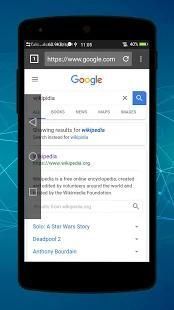
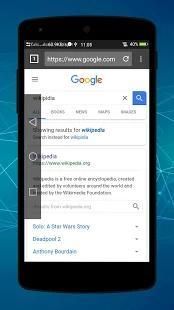
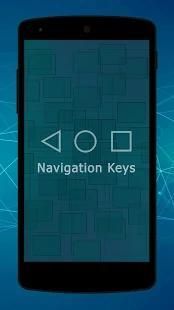
This app provides handy soft keys that simulate the three navigation buttons: Back, Home and Recent. It is easy to use and requires very low permission. It automatically starts when the device boots up and runs in the background.
The app consists of Trigger Spot and Pie Controls that shows up when Trigger Spot is pressed. Both of them are able to fade off automatically when you do not need it. It can be easily placed anywhere along the edges of the screen by drag and drop. The location of Trigger Spot can be set for landscape and portrait orientations respectively.
Soft Keys home back button (bottom navigation bar) application is for users who have trouble using buttons.
Custom Navigation Bar - navigation bar Customize application can replace a failed and broken button for those people who has trouble using buttons or navigation bar panel is not working properly. This app provides several features and colors to make awesome navigation bar.It is easy to swipe up and down navigation bar as assistive touch. Navigation Control bar is a nice little navigation bar which you can place anywhere on screen for easy access. it also enables you to customize your navigation bar by selecting and applying different themes on navigation bar. Navigation Control bar is designed to be as simple as possible.
Navigation control bar offers the back button, home button and recents button along with an added button to move the navigation bar animation to the area of screen where you want it. You can also navigation bar changer root and navigation bar color changer. This bottom navigation bar to easily use it. The navigation bottom is back button for touch mobile and custom navigation bar - navigation bar customize. The home back button app is most popular app in play store. The home back button key is navigation ba animation most popular. The home button and back button lock of control navigation bar. This is simple control navigation bar and simple navigation control of navigation bar background. It use simple control defense is one type of touch control. This custom navigation bar is soft key of this application. We can also change the arrow keys of bottom bar. This is all the controls of a navigation bar app. The custom navigation bar is use to disable soft key of quick navigation. The navigation app is bottom bar of your mobile.
Key Features:
- Auto hide navigation bar
- Easy to swipe up/down to show/hide navigation bar
- Functions: Home, Back, Recent
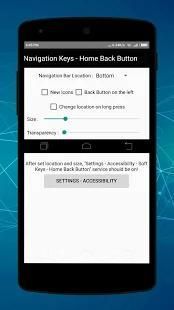
- Ability to change navigation bar with background and button color
- Ability to set navigation bar size with height
- Ability to Set vibrate on touch
- Options to lock navigation bar
- Long press action for back, home, recent buttons
Navigation control bar is a nice little navigation bar which you can place anywhere on screen for easy access. It also enables you to customize your navigation bar customize by selecting and applying different themes on navigation bar customizer. Navigation Control bar is designed to be as simple as possible. Navigation control bar offers the back button, home button and recent button along with an added button to move the navigation bar soft keys to the area of screen where you want it as custom navigation bar - navbar customize. In this navigation bar customize no root all functionality is custom set. Also navigation bar customize root and also navigation bar customize s8 of navigation bar colour changer. There are colour navigation bar also available and you can change navigation bar changer no root. The navbar apps in home back button no root and home back key. The home back and recent apps button under screen launcher of home button and back button.
Navigasi Keys - Tombol lunak
tombol perangkat fisik yang broken? Lembut Navigation Bar akan membantu Anda dengan mengganti tombol-tombol tersebut. Ini akan bertindak sama seperti fisik Anda.
Aplikasi ini menyediakan tombol berguna lembut yang mensimulasikan tombol navigasi tiga: Kembali, Rumah dan Terbaru. Hal ini mudah digunakan dan memerlukan izin sangat rendah. Secara otomatis dimulai saat booting perangkat dan berjalan di latar belakang.
Aplikasi ini terdiri dari Pemicu Spot dan Pie Kontrol yang muncul ketika Pemicu Spot ditekan. Keduanya mampu memudar secara otomatis ketika Anda tidak membutuhkannya. Hal ini dapat dengan mudah ditempatkan di mana saja di sepanjang tepi layar dengan drag dan drop. Lokasi Pemicu Spot dapat diatur untuk landscape dan portrait orientasi masing-masing.
Lembut Keys rumah kembali tombol (bawah navigasi bar) aplikasi yang bagi pengguna yang memiliki kesulitan menggunakan tombol.
Kustom Navigation Bar - bar navigasi Sesuaikan aplikasi dapat menggantikan tombol gagal dan rusak untuk orang-orang yang memiliki kesulitan menggunakan tombol atau bar navigasi panel tidak bekerja dengan benar. Aplikasi ini menyediakan beberapa fitur dan warna untuk membuat navigasi mengagumkan bar.It mudah untuk geser ke atas dan ke bawah bar navigasi sebagai sentuhan bantu. Navigasi Kontrol bar adalah bar navigasi kecil yang menyenangkan yang dapat Anda tempatkan di mana saja pada layar untuk memudahkan akses. juga memungkinkan Anda untuk menyesuaikan bar navigasi Anda dengan memilih dan menerapkan tema yang berbeda pada bar navigasi. Navigasi Kontrol bar dirancang untuk menjadi sesederhana mungkin.
Navigasi kontrol bar menawarkan tombol kembali, tombol home dan recents tombol bersama dengan tombol tambahan untuk memindahkan bar navigasi animasi ke daerah layar di mana Anda inginkan. Anda juga bisa navigasi bar changer akar dan navigasi bar warna changer. navigasi bawah ini untuk dengan mudah menggunakannya. Bagian bawah navigasi tombol kembali untuk sentuhan ponsel dan adat navigasi bar - bar navigasi menyesuaikan. Rumah kembali tombol aplikasi adalah aplikasi yang paling populer di toko bermain. Kunci tombol home kembali adalah navigasi ba animasi yang paling populer. Tombol home dan kunci tombol kembali dari bar navigasi kontrol. Ini adalah sederhana bar navigasi kontrol dan kontrol navigasi yang sederhana dari bar navigasi latar belakang. Ini menggunakan pertahanan kontrol sederhana adalah salah satu jenis kontrol sentuh. bar navigasi kustom ini adalah kunci lembut aplikasi ini. Kami juga dapat mengubah tombol panah bar bawah. Ini semua kontrol dari aplikasi navigasi bar. Kebiasaan navigasi bar digunakan untuk menonaktifkan tombol lunak navigasi cepat. Aplikasi navigasi bawah bar dari ponsel Anda.
Fitur Utama:
- bar Auto hide navigasi
- Mudah untuk geser ke atas / bawah untuk menampilkan / menyembunyikan navigasi bar
- Fungsi: Home, Back, Terbaru
- Kemampuan untuk mengubah navigasi bar dengan latar belakang dan warna tombol
- Kemampuan untuk mengatur ukuran bar navigasi dengan tinggi
- Kemampuan untuk mengatur bergetar pada sentuhan
- Pilihan untuk mengunci bar navigasi
- Tindakan Tekan lama untuk back, home, tombol baru-baru ini
Navigasi kontrol bar adalah bar navigasi kecil yang menyenangkan yang dapat Anda tempatkan di mana saja pada layar untuk memudahkan akses. Hal ini juga memungkinkan Anda untuk menyesuaikan bar navigasi Anda menyesuaikan dengan memilih dan menerapkan tema yang berbeda pada navigasi bar penyesuai. Navigasi Kontrol bar dirancang untuk menjadi sesederhana mungkin. Navigasi kontrol bar menawarkan tombol kembali, tombol home dan tombol baru-baru ini bersama dengan tombol tambahan untuk memindahkan tombol lembut navigasi ke area layar di mana Anda ingin sebagai bar navigasi kustom - navbar menyesuaikan. Di bar navigasi ini menyesuaikan tidak berakar semua fungsi custom set. Juga bar navigasi menyesuaikan root dan juga bar navigasi menyesuaikan s8 navigasi bar warna changer. Ada warna bar navigasi juga tersedia dan Anda dapat mengubah navigasi bar changer tidak berakar. Navbar aplikasi di rumah kembali tombol tidak berakar dan tombol home kembali. Rumah kembali dan tombol recent apps bawah layar peluncur dari tombol home dan tombol kembali.

![Best Apps & Mods For Hiding Android's Soft Keys [How-To] screenshot 2](https://i.ytimg.com/vi/-xPFcW8V_Lo/mqdefault.jpg)



9Apps 4.9










