


It’s time to update your mobile application. 20,000+ users downloaded Musjid A-Silent latest version on 9Apps for free every week! It is an excellent app and the fact it is! This hot app was released on 2018-05-22. It is available as a free download on 9Apps.
The App is meant for the Whole Muslim Ummah to pray to their Allah swt without the noise of phones.The app is based on location so for its smooth working you need to put the location option of your phone ON. Use it and share it with your friends.
How It Works
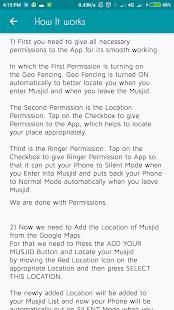
First you need to give all necessary permissions to the App for its smooth working. In which the First Permission is turning on the Geo Fencing. Geo Fencing is turned ON automatically to better locate you when you enter Musjid and when you leave the Musjid.
The Second Permission is the Location Permission. Tap on the Checkbox to give Permission to the App, which helps to locate your place appropriately.
Third is the Ringer Permission. Tap on the Checkbox to give Ringer Permission to App so that it can put your Phone to Silent Mode when you Enter Into Musjid and puts back your Phone to Normal Mode automatically when you leave Musjid
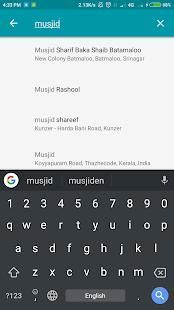
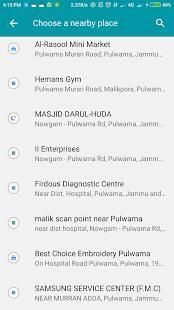
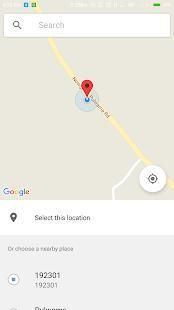
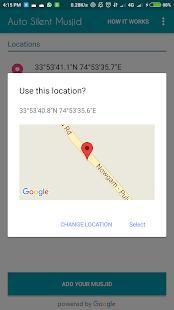
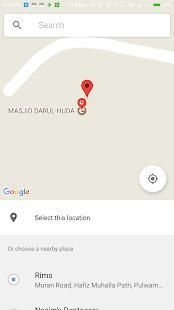
Now we need to Add the Location of Musjid from the Google Maps. For that we need to Press the ADD YOUR MUSJID Button and Locate your Musjid by moving the Red Location Icon on the appropriate Location and then press SELECT THIS LOCATION.
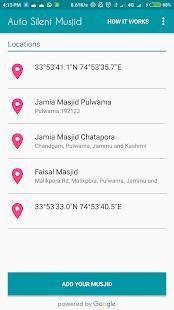
The newly added Location will be added to your Musjid List and now your Phone will be automatically put on SILENT Mode when you Enter into Musjid and Put back on NORMAL Mode when You leave Musjid. You can add as many Musjids as you want.
To better use this app you should enter the location of Musjid when you are in Musjid for the First time so that there will be 100 percent Positive Results
App ini dimaksudkan untuk Whole umat Islam untuk berdoa kepada mereka Allah swt tanpa suara aplikasi phones.The didasarkan pada lokasi jadi untuk yang halus bekerja Anda harus menempatkan pilihan lokasi ON ponsel Anda. Menggunakannya dan berbagi dengan teman-teman Anda.
Bagaimana itu bekerja
Pertama, Anda perlu memberikan semua izin yang diperlukan untuk App untuk kerja halus. Di mana Izin Pertama menyalakan Geo Anggar. Geo Anggar AKTIF otomatis untuk lebih menemukan Anda ketika Anda memasukkan Musjid dan ketika Anda meninggalkan Musjid.
Izin Kedua adalah Lokasi Izin. Tekan pada Checkbox untuk memberikan Izin untuk App, yang membantu untuk menemukan tempat Anda tepat.
Ketiga adalah Izin Ringer. Tekan pada Checkbox untuk memberikan Ringer Izin untuk App sehingga dapat menempatkan Telepon Anda ke Mode Diam ketika Anda Masukkan Ke Musjid dan menempatkan kembali Phone Anda ke Normal Mode secara otomatis ketika Anda meninggalkan Musjid
Sekarang kita perlu Tambahkan Lokasi Musjid dari Google Maps. Untuk itu kita perlu Tekan ADD MUSJID ANDA Button dan Cari Musjid Anda dengan memindahkan Merah Lokasi Icon pada Lokasi yang tepat dan kemudian tekan PILIH LOKASI INI.
Lokasi baru ditambahkan akan ditambahkan ke Anda Musjid Daftar dan sekarang Telepon Anda akan secara otomatis dimasukkan Mode SILENT ketika Anda Masukkan ke dalam Musjid dan Pasang kembali Mode NORMAL ketika Anda meninggalkan Musjid. Anda dapat menambahkan sebanyak Musjids yang Anda inginkan.
Untuk lebih menggunakan aplikasi ini Anda harus memasukkan lokasi Musjid ketika Anda berada di Musjid untuk pertama kalinya sehingga akan ada 100 persen Hasil Positif
Auto Silent Your Phone On Entering Musjid and Back to Normal Mode On Leaving Musjid




9Apps 4.9










