

It can be said with certainty that 20,000+ users downloaded Multi WhatsApps latest version on 9Apps for free every week! In addition, the latest version of the app has updated a lot of features. This hot app was released on 2018-12-21. Don’t be hesitate, download and install it on your mobile phone now!
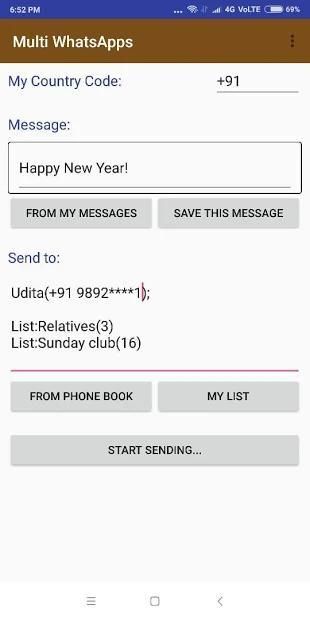
This App does NOT SEND message automatically. It will give your message typed into the required Whatsapp chat. You will have to Press SEND button. [Due to this manual effort, It does not require any special permission, apart from 'Read contacts' permission.]
Send multiple whatsapp messages to known / unknown numbers by
repetitive pressing ‘send-back-back’
buttons.
How to use:
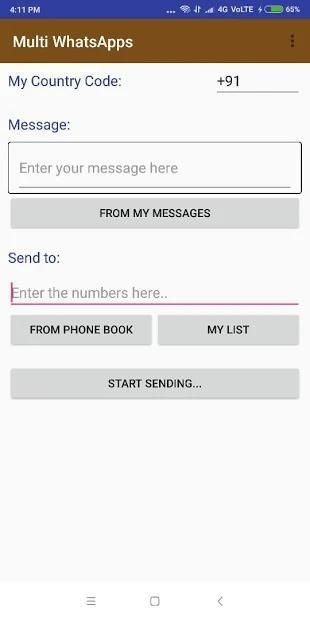
1. Enter the message.
2. Enter Senders: Type Or Paste (';' separated list) / select from phonebook/ stored lists
3. Press ‘send-back-back’ repetitively to send all the messages one by one.
Use this to:
1. Sending promotional messages to a number list (Paste your ‘;’ separated numbers and send message)
2. Send whatsapp to a number without storing it in the phonebook contact
3. Send greetings or ‘happy new year’ messages on personalized chats to many numbers.
4. Business professionals to manage the various clients group
5. Class/ educational institute owners to communicate with various batches of students.
6. Sending Any type of advertisement texts to the list of numbers
7. Shop owners/ sellers
8. Very easy to use. Very effective in function.
Aplikasi ini TIDAK MENGIRIMKAN pesan secara otomatis. Ini akan memberikan pesan Anda diketik ke dalam obrolan Whatsapp yang diperlukan. Anda harus menekan tombol KIRIM. [Karena upaya manual ini, Ini tidak memerlukan izin khusus, selain dari izin 'Baca kontak'.]
Kirim beberapa pesan whatsapp ke nomor yang diketahui / tidak dikenal dengan menekan tombol
berulang-ulang menekan tombol ‘kirim balik .
Cara menggunakan:
1. Masukkan pesan.
2. Masukkan Pengirim: Ketik Atau Tempel (';' daftar terpisah) / pilih dari buku telepon / daftar tersimpan
3. Tekan ‘kirim kembali rep berulang-ulang untuk mengirim semua pesan satu per satu.
Gunakan ini untuk:
1. Mengirim pesan promosi ke daftar nomor (Tempel ‘;’ Anda memisahkan nomor dan mengirim pesan)
2. Kirim whatsapp ke nomor tanpa menyimpannya dalam kontak buku telepon
3. Kirim pesan salam atau ‘selamat tahun baru’ pada obrolan yang dipersonalisasi ke banyak nomor.
4. Profesional bisnis untuk mengelola berbagai kelompok klien
5. Pelajar / pemilik lembaga pendidikan untuk berkomunikasi dengan berbagai kelompok siswa.
6. Mengirim jenis teks iklan ke daftar nomor
7. Pemilik / penjual toko
8. Sangat mudah digunakan. Sangat efektif dalam fungsi.
New Release



9Apps 4.9










