

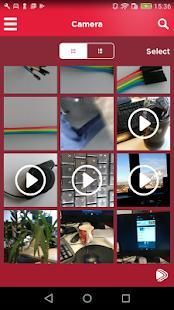
Recently, we found a very popular application. 20,000+ users downloaded Media Center for LG TV latest version on 9Apps for free every week! It works great even on 2G. This hot app was released on 2018-05-17. You can also find some other similar apps here.
Just bought your internet-connected LG Smart TV or already have one at home?
This Media Center for LG Smart TVs enhances your Smart TV Experience and lets you Enjoy Your TV the Way You want.
Download this app to:
• Enjoy Videos, Photos, and Music on your LG TV
• Access interesting Content from many Sources, currently not available on the LG Smart TV, including your Mobile Device and Home Network.
• Control Volume on your LG TV over Wi-Fi when Listening to Music or while Watching Videos.
• Share Photos and Videos via Facebook, Google Plus, Twitter, or Email.
With the Media Center for LG Smart TVs, you can do the following:
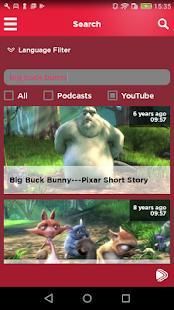
• SEARCH - Easily Search and Browse content and watch on your LG Smart TV or mobile device.
• DISCOVER - Discover new videos every day for you to enjoy. Browse channels using our latest intuitive designs.
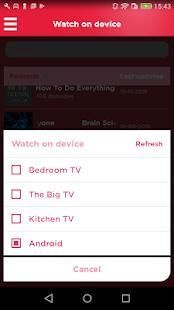
• PLAY2TV - Stream Videos, Photos, and Music directly to your LG Smart TV or mobile device. No additional installation or hardware is needed (except for this app).
• ACCESS MEDIA - Access your Photo and Social Networking accounts to Watch on your LG Smart TV.
• MANAGE PLAYLISTS - Create and Manage playlists of Videos, Photos, and Music and enjoy on your Mobile or LG Smart TV.
• FILTER CONTENT - Select location and preference to filter the Video content available to you.
FEATURES:
• Search and find your music, photos, and videos from multiple content sources including your iOS device, your home network or the Internet.
• Video Search
• Create and Manage Video and Music Playlists
• Add to your Favorites Channel
• Filter Video Content based on Location and Language
• Add Videos to your Favorites Channel
• Watch on TV (using our Play2TV functionality)
• Sharing via Facebook, Google Plus, Twitter, or Email
• Continuous Video and Music Play
• Create, Save, and Play Slideshows
• Access to your DLNA Home Media Servers
CONTENT SOURCES:
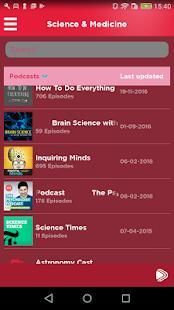
• Video and Audio Podcasts
• YouTube Videos
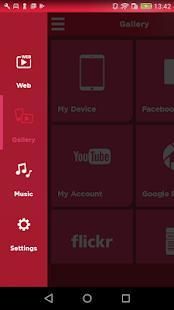
• Your Music, photos, and videos (only from Camera Roll) from your mobile device (phone or tablet)
• Internet Radio
• Facebook Videos and Photos from You and your Friends
• Flickr Photos
• Picasa Photos
• Local Media Servers, any DLNA or UPnP AV Media Servers in your home network
NOW PLAYING TOOLBAR:
• The “Now Playing” bar automatically appears when playing content to your Smart TV and provides information about the content that you are watching.
• Player Controls (i.e. previous, pause, play, next, and volume) appear, depending on the capabilities of your Smart TV.
SETTINGS:
• Link your Media Center app to your Accounts for easy access to your content.
• Set your language preference. Languages that are supported include (but are not limited to English, Dutch, French, Portuguese, Spanish, German, and Turkish)
• Submit Feedback and Application Logs to ZappoTV.
Read our Data Use Policy, Terms and other important info in the legal section of our App Store description.
We love to hear from our customers! Please contact us at info@zappo.tv for any suggestions and improvements.
Baru saja membeli internet-terhubung LG Smart TV atau sudah memiliki satu di rumah?
Ini Media Center untuk LG Smart TV meningkatkan Experience Smart TV Anda dan memungkinkan Anda Nikmati TV Anda Jalan Anda inginkan.
Download aplikasi ini untuk:
• Nikmati Video, Foto, dan Musik di TV LG Anda
• Akses Konten menarik dari berbagai Sumber, saat ini tidak tersedia pada LG Smart TV, termasuk Ponsel dan Jaringan Home.
• Kontrol Volume di TV LG Anda melalui Wi-Fi ketika Mendengarkan Musik atau saat Menonton Video.
• Berbagi Foto dan Video melalui Facebook, Google Plus, Twitter, atau Email.
Dengan Media Center untuk LG Smart TV, Anda dapat melakukan hal berikut:
• SEARCH - Mudah Cari dan Browse konten dan menonton di LG Smart TV atau perangkat mobile.
• TEMUKAN - Temukan video baru setiap hari untuk Anda nikmati. Isi saluran menggunakan desain intuitif terbaru kami.
• PLAY2TV - Video Streaming, Foto, dan Musik langsung ke LG Smart TV atau perangkat mobile. Tidak ada instalasi atau perangkat keras tambahan yang diperlukan (kecuali untuk aplikasi ini).
• AKSES MEDIA - Akses Foto dan Jaringan Sosial account untuk Menonton di LG Smart TV.
• mengatur playlist - Membuat dan Mengelola daftar putar Video, Foto, dan Musik dan menikmati Anda Mobile atau LG Smart TV.
• FILTER KONTEN - Pilih lokasi dan preferensi untuk menyaring konten Video tersedia untuk Anda.
FITUR:
• Cari dan temukan musik, foto, dan video dari sumber konten multiple termasuk perangkat iOS Anda, jaringan rumah atau Internet.
• Pencarian video
• Membuat dan Mengelola Video dan Musik Playlist
• Tambahkan ke Favorit Anda Saluran
• Content Filter Video berdasarkan Lokasi dan Bahasa
• Tambahkan Video ke Favorit Anda Saluran
• Menonton di TV (menggunakan fungsi Play2TV kami)
• Berbagi melalui Facebook, Google Plus, Twitter, atau Email
• berkelanjutan Video dan Music Play
• Membuat, Simpan, dan Play Slideshow
• Akses ke Anda Server DLNA Home Media
SUMBER KONTEN:
• Video dan Audio Podcast
• Video Youtube
• Musik Anda, foto, dan video (hanya dari Rol Kamera) dari perangkat mobile Anda (ponsel atau tablet)
• Radio Internet
• Facebook Video dan Foto dari Anda dan teman Anda
• Foto Flickr
• Foto Picasa
• Server Media lokal, setiap DLNA atau UPnP AV Server Media di jaringan rumah Anda
Dimainkan TOOLBAR:
• “Now Playing” bar otomatis muncul ketika memutar konten ke Smart TV Anda dan memberikan informasi tentang konten yang Anda menonton.
• Kontrol Player (yaitu sebelumnya, pause, play, next, dan volume) muncul, tergantung pada kemampuan Smart TV.
PENGATURAN:
• Tautkan aplikasi Media Center Anda untuk Account Anda untuk memudahkan akses ke konten Anda.
• Atur preferensi bahasa Anda. Bahasa yang didukung termasuk (namun tidak terbatas pada bahasa Inggris, Belanda, Perancis, Portugis, Spanyol, Jerman, dan Turki)
• Menyerahkan Umpan balik dan Aplikasi Log untuk ZappoTV.
Baca Kebijakan Penggunaan Data, Persyaratan dan info penting lainnya di bagian hukum dari deskripsi App Store kami.
Kami senang mendengar dari para pelanggan kami! Silahkan hubungi kami di info@zappo.tv untuk setiap saran dan perbaikan.
in-app video player: reser play/paue button state properly




9Apps 4.9











