

Free and secured download of Android apps on 9Apps. 30,000+ users downloaded Whatsapp Lock latest version on 9Apps for free every week! This indicates many people like this application. This hot app was released on 2018-06-23. More similar hot applications can be found here too.
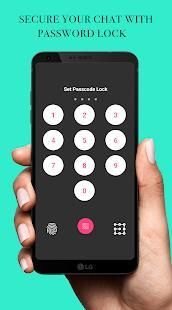
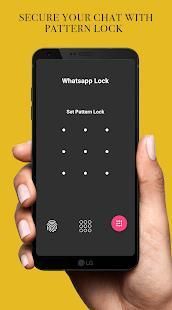
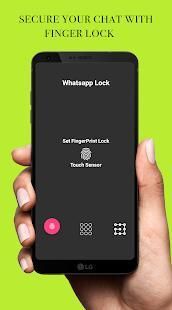
Application gives privacy to Whatsapp using three type of lock.
1. Fingerprint Lock
2. Passcode Lock
3. Pattern Lock
Features:
1. Easy to set lock in just three steps.
2. Never worry about unauthorized access.
3. Reset/Change lock.
4. Set security question, Used when you forgot passcode.
5. Easy to enable/disable lock.
* Very deferent from other similar App lock, we focus on protect WhatsApp, beautiful design.
* WhatsApp Lock will just protect your WhatsApp and other chat apps. It won't change any of your WhatsApp's information.
* Lock for WhatsApp can be activated or deactivated with a single keystroke.
* Image capture of failed intrusion attempts in WhatsApp.
* Password or pattern configuration.
* Image Gallery of attempts to access WhatsApp.
When you start WhatsLock for WhatsApp, you must set a 4-digit PIN.
FAQs:
1. How to set lock?
=> Use fingerprint or pattern or passcode to set the lock.
2. How to change lock type?
=> Click reset/change lock from setting, answer security question, then set new lock.
3. How to reset lock?
=> Click reset/change lock from setting, answer security question.
4. Enable/Disable lock?
=> Use checkbox from setting to enable/disable lock.
5. Enable accessibility service?
=> Click on checkbox from setting. It will open usage access permission setting. Find this app & turn it on.
Note : Fingerprint lock requires a device with fingerprint sensor & having any one finger registered. Application need usage access permission for android 5+ devices.
Disclaimer:
Application does not belongs to or related to Whatsapp Inc
Aplikasi memberikan privasi untuk Whatsapp menggunakan tiga jenis kunci.
1. Kunci Sidik Jari
2. Passcode Lock
3. Pola Lock
Fitur:
1. Mudah untuk mengatur kunci hanya dalam tiga langkah.
2. Jangan pernah khawatir tentang akses yang tidak sah.
3. Atur ulang / Ganti kunci.
4. Set pertanyaan keamanan, Digunakan ketika Anda lupa passcode.
5. Mudah untuk mengaktifkan / menonaktifkan kunci.
* Sangat deferent dari kunci App lain yang sejenis, kita fokus pada melindungi WhatsApp, desain yang indah.
* WhatsApp Lock hanya akan melindungi WhatsApp dan aplikasi chat lainnya. Ini tidak akan mengubah apapun informasi WhatsApp Anda.
* Lock untuk WhatsApp dapat diaktifkan atau dinonaktifkan dengan keystroke tunggal.
* Pengambilan gambar dari upaya penyusupan gagal dalam WhatsApp.
* Password atau konfigurasi pola.
* Gambar Galeri upaya untuk mengakses WhatsApp.
Ketika Anda mulai WhatsLock untuk WhatsApp, Anda harus menyetel PIN 4 digit.
Tanya Jawab:
1. Bagaimana mengatur kunci?
=> Gunakan sidik jari atau pola atau passcode untuk mengatur kunci.
2. Bagaimana mengubah jenis kunci?
=> Klik reset / perubahan kunci dari pengaturan, menjawab pertanyaan keamanan, kemudian mengatur kunci baru.
3. Cara reset kunci?
=> Klik reset / perubahan kunci dari pengaturan, menjawab pertanyaan keamanan.
4. Aktifkan / Nonaktifkan kunci?
=> Gunakan kotak centang dari pengaturan untuk mengaktifkan / menonaktifkan kunci.
5. Aktifkan layanan aksesibilitas?
=> Klik kotak centang dari pengaturan. Ini akan membuka penggunaan pengaturan izin akses. Cari aplikasi ini & menyalakannya.
Catatan: kunci Fingerprint membutuhkan perangkat dengan sensor sidik jari & memiliki salah satu jari terdaftar. Aplikasi memerlukan penggunaan izin akses untuk perangkat android 5 +.
Penolakan:
Aplikasi tidak milik atau terkait dengan Whatsapp Inc





9Apps 4.9









