
Welcome to our app recommend. 20,000+ users downloaded LocatedYou latest version on 9Apps for free every week! Fortunately, It's easy to get this popular app. This hot app was released on 2018-06-30. Download in official websites like 9apps and you'll never miss it!
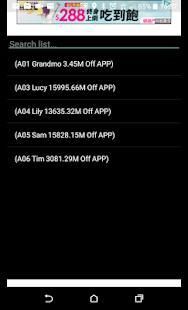
Get current location from your family or friends or group, and share your location with them.
As long as your app is running, you provide them your instant location.
As long as their app is running, you know where they are.
Good tool for taking care of your family.
Good tool for keeping eyes on your team member.
A really nice tool when you go out door with group.
How to "Turn on high-accuracy mode".
On your Android phone or tablet, open the Settings app.
Tap Location.
At the top, switch location on.
Tap Mode and then High accuracy.
Manual:
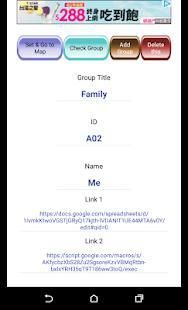
Join a group - just fill out 5 information which the group creator will provide you.
Reset or delete all group - go to "internal storage" and delete these 2 files "locatedyougroup" "locatedyouupdate' . Open app again.
Create a group (you need to have google account)
Step 1 – Make copies of spreadsheet file and app script file which I provided and save them in your google drive.
Download link - "https://drive.google.com/drive/folders/1IaZB6OgYVM2Bb7m1JcgpPJ_6CPCrlkzC?usp=sharing"
Step 2 - Open the spreadsheet, fill out the id and name in “location” sheet, go to the “TitleLink” sheet and give your group a title in 'A2' cell, go back to “location” sheet copy the URL and paste in 'B2' cell in “TitleLink” sheet.
Step 3 – Make spreadsheet shareable and copy the share link, open the app script file and paste the link in line 3 and line 8. (the middle of here(“ ”)). Make this app script published (deploy as a web app) and copy the published web app URL.
Step 4 – Go back to spreadsheet and paste the web app URL you just copied in 'C3' cell in “TitleLink” sheet.
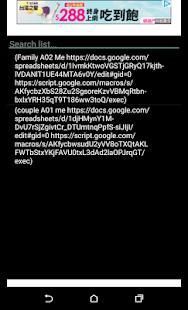
Step 5 – Tell your group member their 5 information (group title, ID, name, Link 1, Link 2) which show on the info sheet in spreadsheet. You also need to type your own 5 information in the app.
For more details about the manual, please referring to the following link in PDF format.
https://drive.google.com/file/d/1ZKu3CKEgDwB5mBvGh7uMLEP6TzDYTL1b/view?usp=sharing
Dapatkan lokasi saat ini dari keluarga atau teman-teman atau kelompok, dan berbagi lokasi Anda dengan mereka.
Selama aplikasi Anda berjalan, Anda memberikan mereka lokasi instan Anda.
Selama aplikasi mereka berjalan, Anda tahu di mana mereka berada.
alat yang baik untuk merawat keluarga Anda.
alat yang baik untuk menjaga mata pada anggota tim Anda.
Sebuah alat yang sangat bagus ketika Anda pergi keluar pintu dengan kelompok.
Cara "Aktifkan mode akurasi tinggi".
Di ponsel Android atau tablet, buka aplikasi Settings.
Ketuk Lokasi.
Di bagian atas, beralih lokasi di.
Tap Mode dan akurasi kemudian tinggi.
manual:
Bergabung dengan grup - hanya mengisi 5 informasi yang pencipta kelompok akan memberikan Anda.
Reset atau menghapus semua kelompok - pergi ke "penyimpanan internal" dan menghapus 2 file ini "locatedyougroup" "locatedyouupdate' Buka aplikasi lagi..
Membuat grup (Anda harus memiliki akun google)
Langkah 1 - Membuat salinan dari file spreadsheet dan file script aplikasi yang saya disediakan dan menyimpannya di google drive Anda.
Download link - "https://drive.google.com/drive/folders/1IaZB6OgYVM2Bb7m1JcgpPJ_6CPCrlkzC?usp=sharing"
Langkah 2 - Buka spreadsheet, mengisi id dan nama di “lokasi” lembar, pergi ke “TitleLink” lembar dan memberikan kelompok Anda judul di sel A2 ', kembali ke “lokasi” lembar copy URL dan tempel dalam sel 'B2' di “TitleLink” lembar.
Langkah 3 - Membuat spreadsheet dapat dibagikan dan copy link share, buka file script aplikasi dan paste link di baris 3 dan baris 8. (tengah di sini ( “”)). Membuat skrip aplikasi ini diterbitkan (menyebarkan sebagai aplikasi web) dan salin URL aplikasi web yang diterbitkan.
Langkah 4 - Kembali ke spreadsheet dan paste URL aplikasi web Anda hanya disalin dalam sel 'C3' di “TitleLink” lembar.
Langkah 5 - Katakan anggota grup Anda 5 informasi (judul kelompok, ID, nama, Link 1, Link 2) mereka yang ditampilkan di lembar info di spreadsheet. Anda juga harus mengetikkan 5 informasi Anda sendiri di app.
Untuk rincian lebih lanjut tentang panduan ini, silakan mengacu pada link berikut dalam format PDF.
https://drive.google.com/file/d/1ZKu3CKEgDwB5mBvGh7uMLEP6TzDYTL1b/view?usp=sharing
fix url

9Apps 4.9