
Some India application are update now! 20,000+ users downloaded Gold Prospecting New Tools latest version on 9Apps for free every week! Although you probably won't notice it at first. This hot app was released on 2018-03-29. I believe that if you are an android apps lover, you would not miss it.
Gold Prospecting New Tools - GPS tracking system, designed specifically for prospecting.
Please consider Pro Version - to support further development.
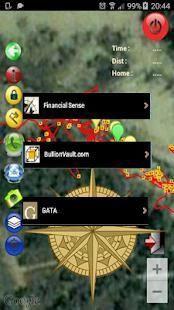
Shows a real-time map, with current and previous tracks, to help you explore new areas and find more gold. All data is stored on the phone and displayed using the Google Maps V2 API. Co-ordinates are not uploaded at any time. Each 'site' is stored against a Pin. Also includes a directional compass and mapping tools to mark locations, measure distances and ability to send a location as link to SMS or email.
Android 4 (Ice Cream Sandwich) and Google Maps are required to be installed on the Phone. It is recommended to cache potential areas in
Google Maps prior to going prospecting.
Please note:
-----------------
- The GPS must be working before maps will be displayed (ie you need to be outside)
-----------------
- It is only as accurate as your GPS (probably +/- 3 metres when in the open).
- Please use commonsense, and don't rely on GPS/Phone/Compass as only means of navigation.
- Sessions are stored against the selected PIN. It is recommended that different PIN's are used for different sites. If you use the same PIN, you will be able to see roughly where you have gone before, and hopefully where you have had success.
- The Green Marker is where you started (useful for finding your car ...).
- Having the app open will drain battery. It is recommended that you start the app, check that it is recording, and then lock the screen (using the power button).
- Buttons are on a Slider (drag across to show buttons)
- There is a separate mapping Tools sub menu, which allows you to add three Markers, which are used to calculate distances. (these will only appear if you create a marker).
- You can disable the compass in the settings menu
- Long Click Maker menu Buttons (eg M1) to send that location to the Share menu (can then SMS or email). This is a link to Google maps (you need to add a recipient, and can add messages etc)
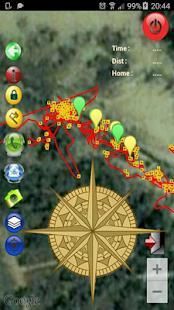
At the moment, the pin is just a site number. If you use the same pin, then previous tracks are shown in Red, and the current track is shown in Yellow. Green markers show where the GPS was activated (ie start). Yellow markers show where you have logged locations (hopefully gold). Dark blue dots are relatively accurate GPS points, Light Blue dots are inaccurate. Green dots are where the location hasn't changed much for approx 2 minutes. These can be handy, as they probably relate to spots that you have dug.
The PIN can be as long as you want, but there is no easy way to recover your pin...
It is recommended to pick a pin, say 123, and then an extra digit for different sites. If you are not worried about your mates looking at where you have gone, then you don't even need to enter a PIN, just click on 'enter' (The Gold Triangle).
Please let me know if you find this useful for Grid'ing. Whilst there are inaccuracies built into GPS, the relative data points are less effected - ie if you walk in a circle, then you will see a circle on your map.
DISCLAIMER:
This app is unofficial. The content in this app is not affiliated with, endorsed, sponsored, or specifically approved by any company.
All copyright and trademarks are owned by their respective owners.
The images in this application are collected from around the web
Gold Prospecting Alat Baru - sistem pelacakan GPS, yang dirancang khusus untuk calon pelanggan.
Silakan mempertimbangkan Pro Versi - untuk mendukung pengembangan lebih lanjut.
Menunjukkan peta real-time, dengan trek saat ini dan sebelumnya, untuk membantu Anda menjelajahi daerah-daerah baru dan menemukan lebih banyak emas. Semua data disimpan di telepon dan ditampilkan menggunakan Google Maps API V2. Koordinat tidak diunggah setiap saat. Setiap 'situs' disimpan melawan Pin. Juga termasuk kompas dan pemetaan arah alat untuk menandai lokasi, jarak ukuran dan kemampuan untuk mengirim lokasi sebagai link ke SMS atau email.
Android 4 (Ice Cream Sandwich) dan Google Maps yang diperlukan untuk diinstal di Telepon. Disarankan untuk cache potensi daerah di
Google Maps sebelum pergi calon.
Tolong dicatat:
-----------------
- GPS harus bekerja sebelum peta akan ditampilkan (yaitu Anda perlu berada di luar)
-----------------
- Hanya seakurat GPS Anda (mungkin +/- 3 meter ketika di tempat terbuka).
- Gunakan akal sehat, dan tidak bergantung pada GPS / Telepon / Kompas sebagai satu-satunya alat navigasi.
- Sesi disimpan terhadap PIN yang dipilih. Disarankan bahwa berbeda PIN ini digunakan untuk situs yang berbeda. Jika Anda menggunakan PIN yang sama, Anda akan dapat melihat kira-kira di mana Anda telah pergi sebelumnya, dan mudah-mudahan di mana Anda telah sukses.
- The Green Marker adalah di mana Anda mulai (berguna untuk menemukan mobil Anda ...).
- Memiliki aplikasi terbuka akan menguras baterai. Dianjurkan agar Anda memulai aplikasi, periksa bahwa itu rekaman, dan kemudian mengunci layar (menggunakan tombol power).
- Tombol berada di Slider (drag menyeberang ke tombol show)
- Ada sub menu pemetaan Alat yang terpisah, yang memungkinkan Anda untuk menambahkan tiga Marker, yang digunakan untuk menghitung jarak. (Ini hanya akan muncul jika Anda membuat penanda).
- Anda dapat menonaktifkan kompas di menu pengaturan
- Panjang Klik pembuat menu Buttons (misalnya M1) untuk mengirim lokasi yang ke menu Share (kemudian SMS atau email). Ini adalah link ke peta Google (Anda perlu untuk menambahkan penerima, dan dapat menambahkan pesan dll)
Pada saat ini, pin ini hanya sejumlah situs. Jika Anda menggunakan pin yang sama, trek maka sebelumnya akan ditampilkan di Red, dan trek saat ini ditampilkan di Yellow. spidol hijau menunjukkan di mana GPS diaktifkan (yaitu mulai). spidol kuning menunjukkan di mana Anda telah login lokasi (mudah-mudahan emas). titik biru gelap relatif akurat poin GPS, Light Blue titik yang tidak akurat. titik hijau di mana lokasi tidak banyak berubah selama sekitar 2 menit. Ini dapat berguna, karena mereka mungkin berhubungan dengan tempat yang telah Anda menggali.
PIN bisa sepanjang yang Anda inginkan, tetapi tidak ada cara mudah untuk memulihkan pin Anda ...
Disarankan untuk memilih pin, mengatakan 123, dan kemudian digit tambahan untuk situs yang berbeda. Jika Anda tidak khawatir tentang teman-teman Anda melihat di mana Anda pergi, maka Anda bahkan tidak perlu memasukkan PIN, klik pada 'masuk' (The Triangle Emas).
Tolong beritahu saya jika Anda menemukan ini berguna untuk Grid'ing. Sementara ada ketidakakuratan dibangun ke GPS, titik data relatif kurang dilakukan - yaitu jika Anda berjalan dalam lingkaran, maka Anda akan melihat lingkaran di peta Anda.
PENOLAKAN:
Aplikasi ini adalah tidak resmi. Konten dalam aplikasi ini tidak berafiliasi dengan, didukung, disponsori, atau secara khusus disetujui oleh setiap perusahaan.
Semua hak cipta dan merek dagang yang dimiliki oleh masing-masing pemilik.
Gambar dalam aplikasi ini dikumpulkan dari seluruh web



9Apps 4.9










