With the development of technology, more and more apps appeared in the mobile market. 30,000+ users downloaded Glance Plus latest version on 9Apps for free every week! The App has powerful functions. This hot app was released on 2018-07-15. Just download it and use on your android phone!
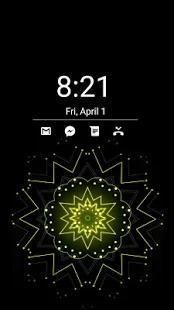
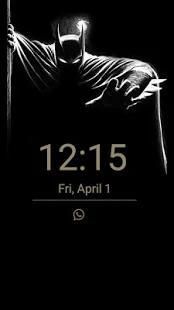
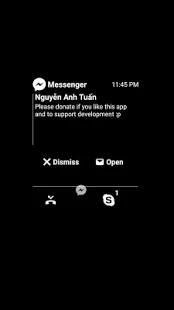
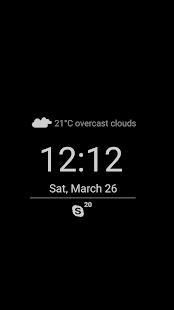
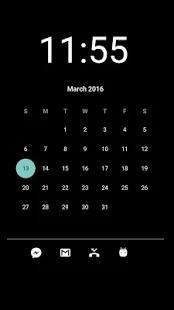
Sometime you just want wake your phone to watch time and some basic notification (battery, missed call, sms..) and don't want to drain battery for that.
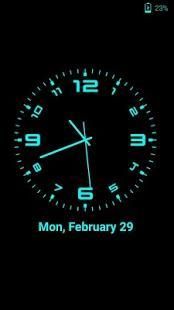
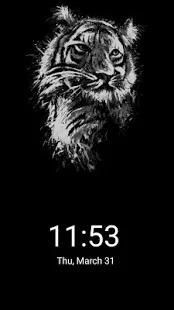
Glance Plus is designed for this propose, it shows some basic info in black screen when you waving your hand over proximity sensor or cover proximity sensor.
How to use this app:
1. Open Glance Plus, start service
2. Wave hand over proximity sensor 2 times OR just take out your phone from pocket :)
3. To weak up your phone, double tap on screen
4. To turn off glance screen just press power button
5. Choose 'Always on' from 'Glance Type' to get Glance screen persistency
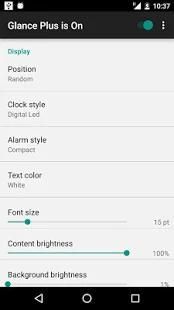
Some settings:
- Change font size, font color
- Enable/disable showing notification, weather..
- Change clock style (digital, analog)
- Change display position of info on screen
Warning:
For Samsung device: To prevent the app stoped by itself:
System Settings > Device Maintenance > Battery > Unmonitored apps > Add apps > checked Glance Plus
For Xiaomi smartphone: need manually grant "Draw over other apps" permission (Go to
Setting > Installed apps > Glance Plus > Permission manager > Display pop-up window > "Allow"
)
For Huawei smartphone:
Open Phone Manager apps (or Settings app) -> Permission Manager -> choose Applications tab -> select Glance Plus -> enable Draw over other apps
Permissions required:
- Location, Internet: get current location => weather information. Deny this permissions if you don't want show weather info
- Phone: Hide glance screen when incoming call
- Modify system setting: change time off screen
- Draw over other apps: need this permission to run app
- Run at startup: auto run Glance Plus when restart phone
This app uses the Device Administrator permission.
Frequently asked questions:
1. Notifications does not show up ?
- Access to notifications needs to be enabled (open Setting, click on the "Show notification" option for notifications and allow access to Glance Plus)
- try to restart the phone
2. Waving my hand over my phone doesn't work
- Try waving slowly
- Try waving after screen off > 1s
- Try increasing screen brightness in app settings
- You may need to wave very close to the proximity sensor (should be located just above the screen) on some devices
- Add Glance Plus to white list of optimization app (eg: battery saver..)
- Try reinstall app
3. Immersive mode on the Glance screen doesn't work
- This only works on Android 4.3 (JELLY_BEAN) and above
- You need grant "Display over other apps" permission to Glance Plus
4. Battery is drained more quickly
- Go to Glance Plus/Setting, reduce Brightness and Time before off screen
- Turn off weather info
- Check exactly how much milliampere that app consume (may be consume few milliamper but OS still showing it's take much battery percentage)
Inspired by Glance for Nokia Lumia (Windows Phone) devices.
Like & share us on:
G+: https://plus.google.com/communities/100796953080923703273
FB: https://facebook.com/thteamsoft
Support us: Please help us make Glance Plus available in your language. Contact us by post to G+ or email to thteamsoft@gmail.com
Language supported:
- English
- Vietnamese
- Dutch (thanks to Gertjan)
- Turkish (thanks to Mehmet)
- Russian (thanks to Sergey)
- Brazilian Portuguese (thanks to Alex)
- Finnish (thank to Teemu)
- Arabic (thank to Ahmad Al-obaidi)
- Polish (thank to Dawid Wąsowski)
- Hungarian (thank to Balázs Biró)
- Czech (thank to Ondrej Mahdalik)
- Bahasa Indonesia (Thank to Prasetya Totti Psychadelic)
Kadang-kadang Anda hanya ingin membangunkan telepon Anda untuk menonton waktu dan beberapa pemberitahuan dasar (baterai, panggilan tidak terjawab, sms ..) dan tidak ingin menguras baterai untuk itu.
Sekilas Plus dirancang untuk ini mengusulkan, itu menunjukkan beberapa info dasar di layar hitam ketika Anda melambaikan tangan Anda di atas sensor jarak atau menutupi sensor jarak.
Cara menggunakan aplikasi ini:
1. Buka Sekilas Plus, memulai layanan
2. Gelombang menyerahkan sensor jarak 2 kali OR hanya mengambil telepon Anda dari saku :)
3. Untuk lemah telepon, ketuk dua kali di layar
4. Untuk mematikan layar sekilas cukup tekan tombol power
5. Pilih 'Always on' dari 'Sekilas Type' untuk mendapatkan persistensi layar Sekilas
Beberapa pengaturan:
- Ubah ukuran font, warna font
- Mengaktifkan / menonaktifkan menampilkan pemberitahuan, cuaca ..
- Perubahan Jam gaya (digital, analog)
- Ubah posisi tampilan info di layar
PERINGATAN:
Untuk Samsung perangkat: Agar aplikasi stoped dengan sendirinya:
System Settings> Pemeliharaan Perangkat> Baterai> aplikasi dimonitor> Tambahkan aplikasi> diperiksa Sekilas Ditambah
Untuk smartphone Xiaomi: kebutuhan secara manual memberikan "Menggambar di atas aplikasi lain" izin (Buka
Pengaturan> Aplikasi terinstal> Sekilas Ditambah> Manajer Izin> Tampilan pop-up window> "Allow" )
Untuk Huawei smartphone:
aplikasi Terbuka Phone Manager (atau Pengaturan aplikasi) -> Izin Manager -> pilih tab Applications -> pilih Sekilas Plus -> mengaktifkan Menggambar di atas aplikasi lain
Izin yang diperlukan:
- Lokasi, Internet: mendapatkan lokasi => informasi cuaca saat ini. Deny izin ini jika Anda tidak ingin ditampilkan Info cuaca
- Telepon: Layar Hide sekilas saat panggilan masuk
- Memodifikasi pengaturan sistem: mengubah waktu off layar
- Menggambar di atas aplikasi lain: kebutuhan izin ini untuk menjalankan aplikasi
- Run at startup: auto run Sekilas Ditambah ketika HP restart
Aplikasi ini menggunakan izin Perangkat Administrator.
Pertanyaan yang sering diajukan:
1. Pemberitahuan tidak muncul?
- Akses ke pemberitahuan harus diaktifkan (Pengaturan terbuka, klik pada "Tampilkan pemberitahuan" pilihan untuk pemberitahuan dan memungkinkan akses ke Sekilas Plus)
- mencoba untuk me-restart telepon
2. Melambaikan tangan saya melalui telepon saya tidak bekerja
- Cobalah melambaikan perlahan
- Cobalah melambaikan setelah layar off> 1s
- Cobalah meningkatkan kecerahan layar di pengaturan aplikasi
- Anda mungkin perlu untuk gelombang sangat dekat dengan sensor jarak (harus terletak tepat di atas layar) pada beberapa perangkat
- Tambahkan Sekilas Plus untuk daftar putih aplikasi optimasi (misalnya: baterai saver ..)
- Cobalah menginstal ulang aplikasi
3. modus Immersive di layar Sekilas tidak bekerja
- ini hanya bekerja pada Android 4.3 (JELLY_BEAN) dan di atas
- Anda perlu memberikan "Tampilan di atas aplikasi lain" izin untuk Sekilas Ditambah
4. Baterai dikeringkan lebih cepat
- Pergi ke Sekilas Ditambah / Pengaturan, mengurangi Brightness dan Waktu sebelum dari layar
- Matikan Info cuaca
- Periksa persis berapa banyak milliampere aplikasi yang mengkonsumsi (mungkin mengkonsumsi beberapa milliamper tapi OS masih menunjukkan itu mengambil banyak persentase baterai)
Terinspirasi oleh Sekilas untuk Nokia Lumia (Windows Phone) perangkat.
Seperti & berbagi kami on:
G +: https://plus.google.com/communities/100796953080923703273
FB: https://facebook.com/thteamsoft
Dukung kami: Harap membantu kami melakukan Sekilas Ditambah tersedia dalam bahasa Anda. Hubungi kami melalui pos ke G + atau email ke thteamsoft@gmail.com
Bahasa yang didukung:
- English
- Vietnam
- Belanda (terima kasih kepada Gertjan)
- Turki (terima kasih kepada Mehmet)
- Rusia (terima kasih kepada Sergey)
- Portugis Brasil (terima kasih kepada Alex)
- Finlandia (terima kasih kepada Teemu)
- Arab (terima kasih kepada Ahmad Al-Obaidi)
- Polandia (terima kasih kepada Dawid Wąsowski)
- Hungaria (terima kasih kepada Balázs Biró)
- Czech (terima kasih kepada Ondrej Mahdalik)
- Bahasa Indonesia (Terima kasih untuk Prasetya Totti Psychadelic)
Improve stable!







9Apps 4.9