
Browse and download apps to your android phone from the App Store. 20,000+ users downloaded Wifi File Transfer - File Sharing latest version on 9Apps for free every week! All its functions are there and updated. This hot app was released on 2018-07-13. I believe you’ll enjoy it after use it.
Free File Transfer helps you to transfer files to your friends with Wi-Fi & Bluetooth & Hotspot, no data traffic, no limit. File Transfer (Wi-Fi-direct) app is used to copy files between 2 android devices using Wi-Fi-Direct platform. This application of file transfer lets you do all these by simply tapping send files and receive files, even if you did not connect to the Internet. With Free File Transfer, you can experience cross-platform transfer without data traffic, and the high share speed with Wi-Fi and Bluetooth transfer. Share files with file transfer are more convenient and faster.
So, you can use this data Transfer app at anywhere, without need for either local network or the internet.
- No need for the use of the local network
- No need of the internet access point
How to use Android file & data transfer:
File transfer was not as easier in the earlier days for mobile but now you can do it few taps of your smart phone. Below are the steps for content transfer.
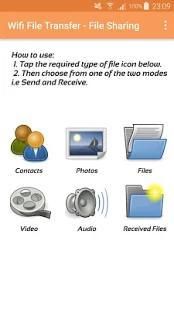
• Select the desired type of category from index screen (e.g. tap photos)
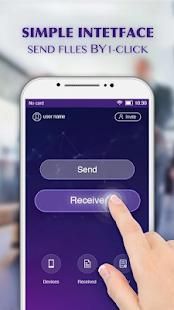
• Select from the two modes sender/Receiver
• If you select sender then select single or multiple files to share it
• Tap the “search devices” for content transfer
• Select Receiver device from the appeared list
• Tap send for data sharing
File Transfer is not a cloud. Free Files are transferred directly on your local network. No need to upload your files to the Internet, then download them on any device. If you select your device as receiver then just wait for the connectivity notification from sender. Accept the invitation and enjoy fast content transfer.
Why use File Transfer:
1. You can easy transfer files and folder with an easy and faster way (Wi-Fi & Bluetooth & Hotspot).
2. You can transfer files freely with your phone if you have Wi-Fi & Bluetooth & Hotspot.
3. Share files in existing Wi-Fi connect environment.
share via hotspot (share - transfer: files, apps, photos & music) :
our app can transfer files via offline junction just by quick share via hotspot with any internet connection. you have now one of the most fastest in the world quick transfer file share and data transfer app on your phone or we can call it as share phone with others.
Transfer all kind of files(share data and transfer files):
our apps is the fastest and quickest data transfer app that enables you to share videos, pictures via hotspot with easy data transfer facility anywhere
WIFI data sharing (Wi-Fi-Direct functionality):
To get Wi-Fi-Direct functionality to work you must turn on the general Wi-Fi function (if it is off) on your devices. Android File transfer is working on your phone WIFI connection and it’s needed only for connectivity. No internet is required for data sharing. Both the devices should be on the network to share it data. Nothing is complex, Easy connectivity and fast file transfer are the main features of this app.
Hope to make you satisfied with a better file transfer and data sharing app. If you like, then tell your beloved friends and family “how easy and quickly I copy my data through this file transfer”.
Gratis File Transfer membantu Anda untuk mentransfer file ke teman Anda dengan Wi-Fi & Bluetooth & Hotspot, tidak ada lalu lintas data, tidak ada batas. File Transfer (Wi-Fi-direct) aplikasi yang digunakan untuk menyalin file antara 2 perangkat android menggunakan platform yang Wi-Fi Direct. Aplikasi ini transfer file memungkinkan Anda melakukan semua ini dengan hanya menekan mengirim file dan menerima file, bahkan jika Anda tidak terhubung ke Internet. Dengan Free File Transfer, Anda dapat mengalami perpindahan lintas-platform tanpa lalu lintas data, dan kecepatan pangsa tinggi dengan Wi-Fi dan mentransfer Bluetooth. Berbagi file dengan transfer file yang lebih nyaman dan lebih cepat.
Jadi, Anda dapat menggunakan aplikasi transfer data ini di mana saja, tanpa perlu baik jaringan lokal atau internet.
- Tidak perlu untuk penggunaan jaringan lokal
- Tidak perlu titik akses internet
Cara menggunakan berkas & Data Android Transfer:
transfer file tidak begitu mudah dalam hari-hari sebelumnya untuk mobile tapi sekarang Anda bisa melakukannya beberapa PDAM dari ponsel pintar Anda. Berikut adalah langkah-langkah untuk transfer konten.
• Pilih jenis yang diinginkan dari kategori dari layar indeks (misalnya foto tap)
• Pilih dari dua mode pengirim / Receiver
• Jika Anda memilih pengirim kemudian pilih file tunggal atau ganda untuk berbagi
• Tekan “perangkat pencarian” untuk transfer konten
• Pilih perangkat Receiver dari daftar muncul
• Tekan kirim untuk berbagi data
File Transfer tidak awan. File Gratis ditransfer langsung pada jaringan lokal Anda. Tidak perlu meng-upload file ke internet, kemudian men-download mereka pada perangkat apapun. Jika Anda memilih perangkat sebagai penerima kemudian hanya menunggu pemberitahuan konektivitas dari pengirim. Menerima undangan dan menikmati mentransfer konten cepat.
Mengapa menggunakan File Transfer:
1. Anda dapat mentransfer file mudah dan folder dengan cara yang mudah dan cepat (Wi-Fi & Bluetooth & Hotspot).
2. Anda dapat mentransfer file secara bebas dengan ponsel Anda jika Anda memiliki Wi-Fi & Bluetooth & Hotspot.
3. Berbagi file di Wi-Fi yang ada menghubungkan lingkungan.
share via hotspot (share - Transfer: file, aplikasi, foto & musik):
app kami dapat mentransfer file melalui persimpangan secara offline hanya dengan berbagi cepat melalui hotspot dengan koneksi internet. Anda memiliki sekarang salah satu yang paling tercepat di dunia cepat transfer file berbagi dan transfer data aplikasi pada ponsel Anda atau kita bisa menyebutnya sebagai ponsel berbagi dengan orang lain.
Transfer semua jenis file (data saham dan file transfer):
aplikasi kami adalah yang tercepat dan tercepat transfer data aplikasi yang memungkinkan Anda untuk berbagi video, gambar via hotspot dengan mudah fasilitas transfer data di mana saja
berbagi WIFI data (Wi-Fi Direct fungsi):
Untuk mendapatkan fungsi Wi-Fi Direct untuk bekerja Anda harus mengaktifkan umum fungsi Wi-Fi (jika off) pada perangkat Anda. Transfer file Android bekerja pada koneksi WIFI ponsel Anda dan itu diperlukan hanya untuk konektivitas. Tidak ada internet diperlukan untuk berbagi data. Kedua perangkat harus pada jaringan untuk berbagi data. Tidak ada yang kompleks, konektivitas Mudah dan transfer file cepat adalah fitur utama dari aplikasi ini.
Harapan untuk membuat Anda puas dengan transfer file yang lebih baik dan berbagi data aplikasi. Jika Anda suka, kemudian memberitahu teman-teman tercinta dan keluarga “betapa mudah dan cepat saya menyalin data saya melalui transfer file ini”.



9Apps 4.9











