
It’s time to update your mobile application. 20,000+ users downloaded File Manager - Mac Style latest version on 9Apps for free every week! This app has been greatly welcomed in India. This hot app was released on 2018-05-26. For more mobile apps information, you can go to our official website - 9Apps.
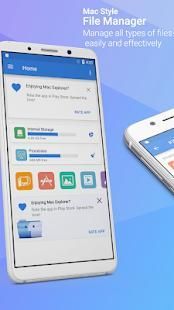
Mac Style File Manager
Features List:
* File Manager
Manage your files (file explorer) like you do on your desktop or laptop using Multiple Select, Cut/Copy/Paste, Move, Create, Delete, Rename, Search, Share, Send, Hide, Create Shortcut, and Bookmark;
* Application Manager – categorize, uninstall, backup, and create shortcuts to your apps
* 3 sets of commercial icons for 80+ different file types, toolbar and menu items
* Multiple resolutions support
* Support languages (coming soon)
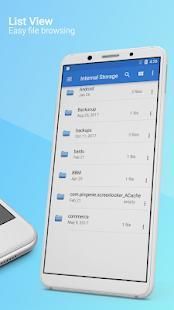
* List and grid view for file explorer
* Compress and decompress support
* Search and share files
* Multiple selection and various sorting support
* Thumbnail for photo, video and apk files
* Support file shortcut on Home screen for easily access
* Basic features like cut, copy, delete, compress, extract etc. easily accessible
- Work on multiple tabs at same time
- SMB(windows) file sharing
- Multiple themes with cool icons
- Navigation drawer for quick navigation
- App Manager to open, backup, or directly uninstall any app
- Quickly access history, access bookmarks or search for any file
- Root explorer for advanced users
- and the list goes on...
* Attractive material Design UI/UX
Light & smooth
Simple & clean
Multi themes support
* App Manager
Backup apps
Unistall apps
Share apps
Play store app link
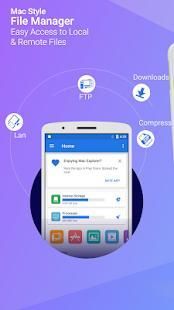
* FTP Server
Download files and folders from your phone
* Hidden Files
Hide any file on you device
File Manager Mac Style
Daftar fitur:
* File Manager
Mengelola file Anda (file explorer) seperti yang Anda lakukan pada desktop atau laptop menggunakan Beberapa Select, Cut / Copy / Paste, Pindah, Buat, Hapus, Ubah nama, Cari, Share, Kirim, Sembunyikan, Create Shortcut, dan Bookmark;
* Aplikasi Manager - mengkategorikan, uninstall, backup, dan membuat cara pintas ke aplikasi Anda
* 3 set ikon komersial untuk 80 + jenis file yang berbeda, toolbar dan menu item
* Dukungan Beberapa resolusi
* Bahasa Support (segera hadir)
* Daftar dan jaringan tampilan untuk file explorer
* Kompres dan dekompresi dukungan
* Cari dan berbagi file
* Beberapa seleksi dan berbagai dukungan menyortir
* Thumbnail untuk foto, video dan file APK
* Shortcut Dukungan file di layar Beranda untuk dengan mudah akses
* Fitur dasar seperti cut, copy, menghapus, kompres, ekstrak dll mudah diakses
- Bekerja pada beberapa tab pada waktu yang sama
- SMB (windows) file sharing
- Beberapa tema dengan ikon keren
- Navigasi laci untuk navigasi cepat
- App Manager untuk membuka, backup, atau langsung menghapus aplikasi apa saja
- sejarah akses cepat, akses bookmark atau mencari file apapun
- Root explorer untuk pengguna tingkat lanjut
- dan daftar goes on ...
* Bahan Menarik Desain UI / UX
Light & halus
Sederhana & bersih
dukungan tema multi
* App Manajer
aplikasi backup
aplikasi unistall
Berbagi aplikasi
Bermain Link app store
* FTP Server
Men-download file dan folder dari ponsel Anda
* Hidden Files
Menyembunyikan file di perangkat Anda
Version 1.0

9Apps 4.9