




Download and enjoy our service, 30,000+ users downloaded Video Downloader for Facebook latest version on 9Apps for free every week! It shouldn't be surprising to find a app popular faithfully This hot app was released on 2020-02-16. 9Apps has thousands of apps and updated daily!
The best thing about this
Facebook Video Downloader
app is you can download any videos from Facebook without login into your Facebook account
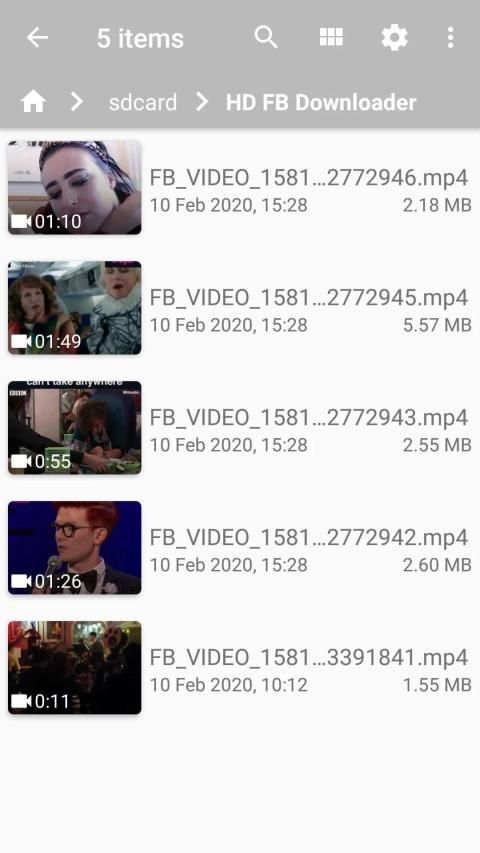
Save Facebook video online HD, this Downloader tool is to save Facebook videos as HD Quality as MP4. You can download multiple videos simultaneously and play them offline after downloading
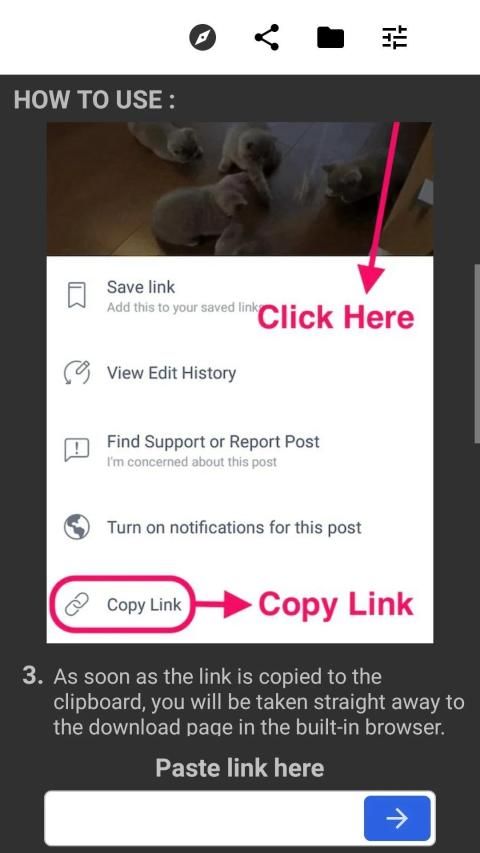
Cute animals videos or funny viral clips, any videos you came across on Facebook while browsing your news feed, pages, groups or friends, etc, can now be easily downloaded to your phone at just a click of a button with
Facebook Video Downloader
What set us quite unique from the rest of other similar apps is the availability of multiple video qualities like 360p, 480p, 720p, 1080p, 2040p etc which you can choose to download from. Facebook Video Downloader increases your download speeds by up to 500%, or even more! Facebook Video Downloader enables you to download 8K, 5K, 4K, 2K, HD 1080p, HD 720p, and HQ videos from internet easily.
Facebook Video Downloader is a tool to save any video on Facebook to your device's memory. If you want to enjoy something with no need to eat up your data allowance every time it streams, just downloads it with a click to view whenever you like.
Features
Download and forward HD videos from Facebook for free, as long as it is your favorite video, we can help you download for free
Download any videos from Facebook without login to your account
Can download HD videos
Availability of multiple video qualities to download from
Ability to resume/pause any interrupted downloads
Highly reliable and fast download speed
Dedicated download manager
Dedicated file manager where you can delete, rename, copy and move files around
Ability to download and save the file directly to your external SD card
⛳️ Frequently Asked Questions
✪ How does Facebook video downloader downloads videos from Facebook?
When you enter the link/URL to the Facebook video, Facebook video downloader's server sends the request to Facebook and gets the Facebook page which has facebook video in it. After that our Facebook video downloader script looks for the video links and extracts the HD quality links in MP4 format.
✪ Why does Facebook video start playing on clicking download button?
It starts playing the Facebook video rather than downloading it because security protocols of browsers do not allow download of the content of third-party websites, so the browser redirects to the resource location, In this case, Facebook video is opened. But you can get an option to download the Facebook video when it starts playing.
✪ Why I'm getting the error on Facebook video download?
Some of the videos are private and are not accessible without login. For those videos, you can use our Facebook private video downloader.
✪ What is the format of the downloaded Facebook video?
Depending upon the available quality of the Facebook video, our Facebook video downloader extracts HD quality and SD quality video links. You can choose to download whichever you want. However, in some cases, the video quality is poor and the only available video is of SD quality.
✪ In which format Facebook videos get downloaded?
Facebook stores the videos in MP4 format, so the downloaded Facebook videos are in MP4 format.
✪ How do I download live Facebook Videos?
To download any live Facebook video, you must wait until the streaming is finished, and then you can download them just like other videos by entering the video link in the online Facebook video downloader.
✪ Where are my Facebook videos getting saved after I download them?
When you use Facebook video downloader, downloaded Facebook videos are saved in the "Downloads" folder of your phone.
Hal terbaik tentang aplikasi
Pengunduh Video Facebook
ini adalah Anda dapat mengunduh video apa pun dari Facebook tanpa masuk ke akun Facebook Anda
Simpan video Facebook HD online, alat Pengunduh ini untuk menyimpan video Facebook sebagai Kualitas HD seperti MP4. Anda dapat mengunduh banyak video secara bersamaan dan memutarnya secara offline setelah mengunduh
Video binatang lucu atau klip viral lucu, semua video yang Anda temui di Facebook saat menjelajah feed berita, halaman, grup atau teman, dll, sekarang dapat dengan mudah diunduh ke ponsel Anda hanya dengan mengklik tombol dengan
Facebook Pengunduh Video
Yang membuat kami cukup unik dari aplikasi sejenis lainnya adalah ketersediaan beberapa kualitas video seperti 360p, 480p, 720p, 1080p, 2040p dll yang dapat Anda unduh. Facebook Video Downloader meningkatkan kecepatan unduhan Anda hingga 500%, atau bahkan lebih! Facebook Video Downloader memungkinkan Anda mengunduh video 8K, 5K, 4K, 2K, HD 1080p, HD 720p, dan HQ dari internet dengan mudah.
Pengunduh Video Facebook adalah alat untuk menyimpan video apa pun di Facebook ke memori perangkat Anda. Jika Anda ingin menikmati sesuatu tanpa perlu menghabiskan cadangan data Anda setiap kali ia mengalir, cukup unduh dengan klik untuk melihat kapan pun Anda mau.
Fitur
Unduh dan teruskan video HD dari Facebook secara gratis, asalkan itu adalah video favorit Anda, kami dapat membantu Anda mengunduh secara gratis
Unduh video apa pun dari Facebook tanpa masuk ke akun Anda
Dapat mengunduh video HD
Ketersediaan beberapa kualitas video untuk diunduh
Kemampuan untuk melanjutkan / menjeda setiap unduhan yang terputus
DownloadKecepatan unduhan yang sangat andal dan cepat
Download Manajer unduhan khusus
Manager Manajer file khusus tempat Anda dapat menghapus, mengganti nama, menyalin, dan memindahkan file
Kemampuan untuk mengunduh dan menyimpan file secara langsung ke kartu SD eksternal Anda
⛳️ Pertanyaan yang Sering Diajukan
✪ Bagaimana pengunduh video Facebook mengunduh video dari Facebook?
Ketika Anda memasukkan tautan / URL ke video Facebook, server pengunduh video Facebook mengirimkan permintaan ke Facebook dan mendapatkan halaman Facebook yang berisi video facebook di dalamnya. Setelah itu skrip pengunduh video Facebook kami mencari tautan video dan mengekstrak tautan kualitas HD dalam format MP4.
✪ Mengapa video Facebook mulai diputar dengan mengklik tombol unduh?
Itu mulai memutar video Facebook daripada mengunduhnya karena protokol keamanan browser tidak memungkinkan unduhan konten situs web pihak ketiga, sehingga browser mengalihkan ke lokasi sumber daya, Dalam hal ini, video Facebook dibuka. Tetapi Anda bisa mendapatkan opsi untuk mengunduh video Facebook saat mulai diputar.
✪ Mengapa saya mendapatkan kesalahan saat mengunduh video Facebook?
Beberapa video bersifat pribadi dan tidak dapat diakses tanpa login. Untuk video-video itu, Anda dapat menggunakan pengunduh video pribadi Facebook kami.
✪ Apa format video Facebook yang diunduh?
Bergantung pada kualitas video Facebook yang tersedia, pengunduh video Facebook kami mengekstraksi tautan video kualitas HD dan SD. Anda dapat memilih untuk mengunduh mana saja yang Anda inginkan. Namun, dalam beberapa kasus, kualitas video buruk dan satu-satunya video yang tersedia adalah kualitas SD.
✪ Dalam format apa video Facebook dapat diunduh?
Facebook menyimpan video dalam format MP4, sehingga video Facebook yang diunduh dalam format MP4.
✪ Bagaimana cara mengunduh Video Facebook langsung?
Untuk mengunduh video langsung Facebook, Anda harus menunggu sampai streaming selesai, dan kemudian Anda dapat mengunduhnya seperti video lainnya dengan memasukkan tautan video di pengunduh video Facebook online.
✪ Di mana video Facebook saya disimpan setelah saya mengunduhnya?
Saat Anda menggunakan pengunduh video Facebook, video Facebook yang diunduh disimpan di folder "Unduhan" di ponsel Anda.
![[ Tool ] Downloading any facebook video for free screenshot 1](https://i.ytimg.com/vi/rUUNfs2h7qE/mqdefault.jpg)




9Apps 4.9










