It’s time to update your mobile application. 20,000+ users downloaded DocFill latest version on 9Apps for free every week! When you click, the app will start downloading and wait till it completes installation you can start play. This hot app was released on 2018-09-15. Get the latest version now!
DocFill in a nutshell:
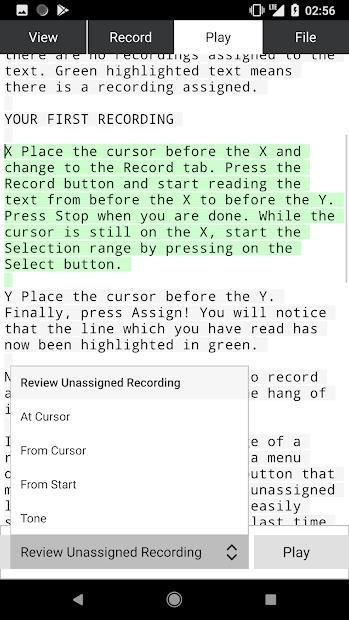
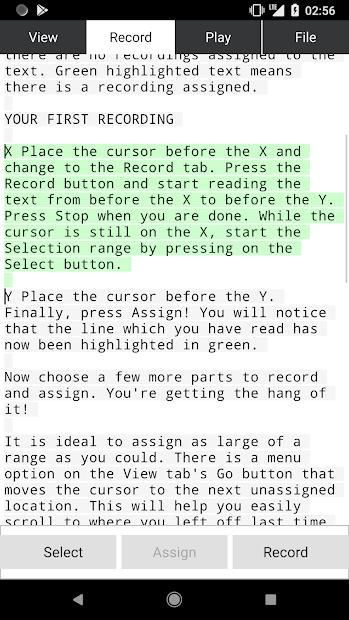
(1) Paste text into the application that you would like to record a dictation of
(2) Record yourself reading a part the text
(3) Preview your recording -- automatically, if you choose to
(4) Assign the recording to the part of the text
(5) Repeat until you've read the whole document
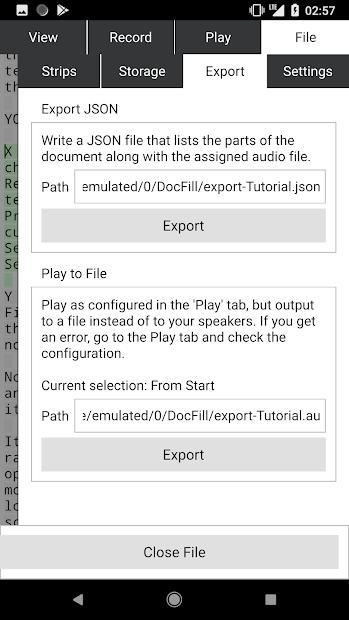
(6) Export the recording to a file, or export a JSON document describing the document along with a filename to the assigned recording
Please note that DocFill will store uncompressed audio files on your phone. Make sure that you have enough space to do so. If you wish to access the exported files, you must figure out how to copy files off your phone.
DocFill uses the Au file format, which can easily be converted into more popular formats using Audacity.
Files are stored in the "DocFill" folder on your phone's shared storage. Feel free to move files off the phone as long as you move the _data/ folder along with the .evseq file.
DocFill singkatnya:
(1) Tempel teks ke dalam aplikasi yang Anda inginkan untuk merekam dikte
(2) Rekam diri Anda membaca bagian teks
(3) Pratinjau rekaman Anda - secara otomatis, jika Anda memilih
(4) Tetapkan rekaman ke bagian teks
(5) Ulangi hingga Anda telah membaca seluruh dokumen
(6) Ekspor rekaman ke file, atau ekspor dokumen JSON yang menjelaskan dokumen bersama dengan nama file ke rekaman yang ditetapkan
Harap dicatat bahwa DocFill akan menyimpan file audio yang tidak dikompresi pada ponsel Anda. Pastikan Anda memiliki cukup ruang untuk melakukannya. Jika Anda ingin mengakses file yang diekspor, Anda harus mencari tahu cara menyalin file dari ponsel Anda.
DocFill menggunakan format file Au, yang dapat dengan mudah diubah menjadi format yang lebih populer menggunakan Audacity.
File disimpan di folder "DocFill" di penyimpanan bersama ponsel Anda. Jangan ragu untuk memindahkan file dari telepon selama Anda memindahkan _data / folder bersama dengan file .evseq.
You can now append text to a document. This will enable you to use a document as a journal, for example.

9Apps 4.9