
9Apps supports free android apps apk download. 30,000+ users downloaded Computer Launcher latest version on 9Apps for free every week! Therefore, people are willing to accept this latest version. This hot app was released on 2018-04-04. To know more information, read the paragraph below.
Looking for
Android launcher
on your Android desktop. Do you like the custom style of windows desktop
launcher windows 10
?
You can check this
computer launcher
is available for your device.
Custom your phone with the unique look and feel of the fastest
computer launcher
on the window. You can do entertainment like on your current computer with
computer launcher
for android.
With
windows launcher
, you can experience many features like:
✫
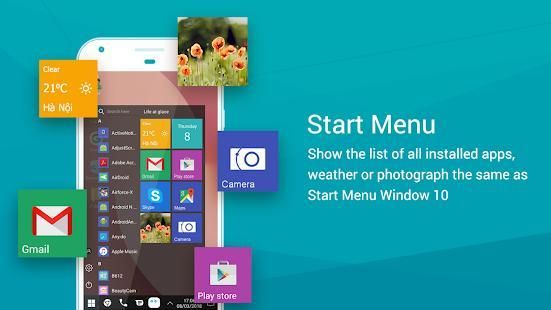
"Start" button on the Launcher computer
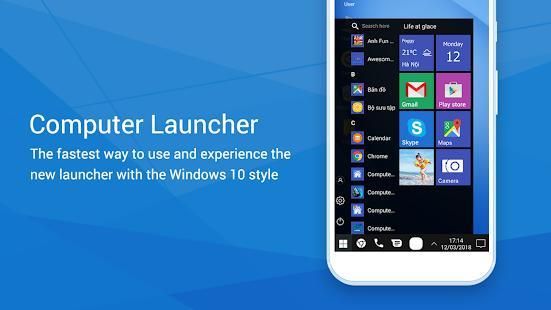
Click the "start" button to open the start menu. Swipe up and down to show the entire app. You can view the current weather, dates, open the app .....
✫
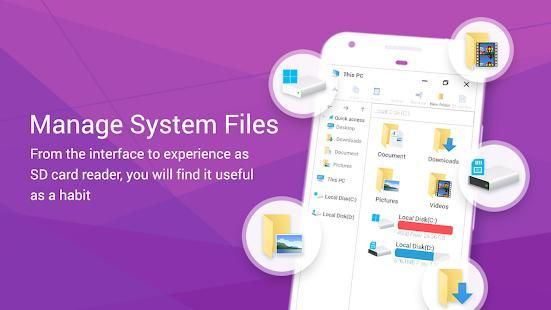
This computer
This computer is a feature that manages system files, disk partitions, local C, and D disks. The built-in computer supports File Explorer and File Manager. You can search and explore your files and Folder, Copy, Paste, Zip / Unzip, RAR, Delete Files and can do more ...
✫
Recycle Bin with Computer Launcher
The Recycle Bin is where temporary files or folders are stored in any version of Windows. Just go to the recycle bin directory in file manager and you can permanently delete files, photos ....
✫
Windows Launcher
The Windows launcher is a great app for you to experience the Windows Phone Interface style on your Android devices. It will make your Android phone's home screen look like a Windows Phone 10.
✫
Taskbar Launcher
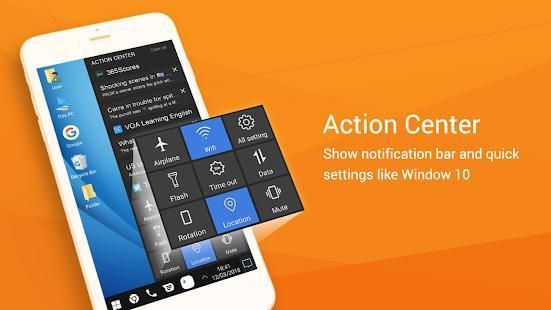
The Windows Launcher toolbar is designed like the taskbar in Windows 10 with features such as open applications, open recently opened applications, notifications, calendar view and on device functions be yours.
✫
Desktop Launcher
Can move the application on the screen, Edit icon on the screen, change the color of the screen with many icons, time, date, browser is the desktop startup screen in the computer.
✫
Create a folder for Desktop PC launcher
Click on the screen then select create a folder as the folder will be created on the desktop.
✔ In
android pc
, you can create Folders, Cut, Copy, Paste, Move, Share etc.
✔ Reading of all of your drives, SD Card, Storage, audio and video files and pictures in
pc launcher
style window 10.
✔
In file explorer
can put the files to Recycle Bin and delete later in
window launcher
style
✔
Android launcher
With the quick mode mode and see all messages when changing changes
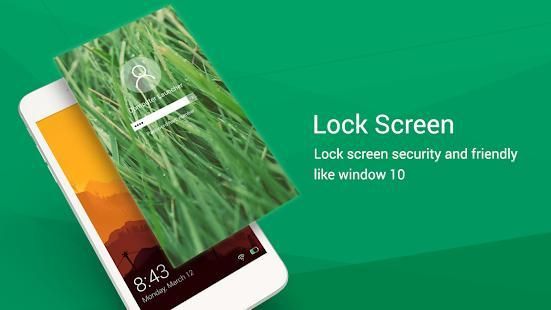
✔ Lock and open the
window launcher
style 10
✔ Desktop App Folders with
custom desktop window 10
✔ Weather, Calendar and Photos tiles Added in
pc computer
-----------------------------------------------
Our application is 100% free and 100% designer experience, very easy to use.
★★★ Enjoy
Computer launcher
then feedback us ★ ★ ★
We look forward to hearing from you!
Mencari
peluncur Android di desktop Android Anda. Apakah Anda menyukai gaya kustom dari jendela desktop
peluncur jendela 10 ?
Anda dapat memeriksa ini
peluncur komputer yang tersedia untuk perangkat Anda.
Kustom ponsel Anda dengan tampilan yang unik dan nuansa yang tercepat
peluncur komputer pada jendela. Anda dapat melakukan hiburan seperti pada komputer Anda saat ini dengan
peluncur komputer untuk android.
Dengan
peluncur jendela , Anda dapat mengalami banyak fitur seperti:
✫
tombol "Start" pada komputer Launcher
Klik "mulai" tombol untuk membuka menu start. Geser ke atas dan ke bawah untuk menampilkan seluruh aplikasi. Anda dapat melihat cuaca saat ini, tanggal, membuka aplikasi .....
✫
Komputer ini
Komputer ini adalah fitur yang mengelola file sistem, partisi disk, C lokal, dan D disk. built-in komputer mendukung File Explorer dan File Manager. Anda dapat mencari dan menjelajahi file dan Folder, Copy, Paste, Zip / Unzip, RAR, Hapus File dan dapat melakukan lebih ...
✫
Recycle Bin dengan Komputer Launcher
Recycle Bin adalah tempat file atau folder sementara disimpan dalam versi Windows. Hanya pergi ke direktori recycle bin di file manager dan Anda dapat menghapus file secara permanen, foto ....
✫
Windows Launcher
Windows peluncur adalah aplikasi bagus bagi Anda untuk mengalami gaya Windows Phone Interface pada perangkat Android Anda. Ini akan membuat tampilan layar awal ponsel Android Anda seperti Windows Phone 10.
✫
Taskbar Launcher
Windows Launcher toolbar dirancang seperti taskbar pada Windows 10 dengan fitur seperti aplikasi yang terbuka, buka aplikasi yang baru saja dibuka, pemberitahuan, tampilan kalender dan fungsi perangkat menjadi milik Anda.
✫
Desktop Launcher
Dapat memindahkan aplikasi di layar, ikon Edit di layar, mengubah warna layar dengan banyak ikon, waktu, tanggal, browser layar startup desktop komputer.
✫
Buat folder untuk Desktop PC peluncur
Klik pada layar kemudian pilih membuat folder sebagai folder akan dibuat pada desktop.
✔ Dalam
pc android , Anda dapat membuat Folder, Cut, Copy, Paste, Pindah, Berbagi dll
✔ Membaca dari semua drive Anda, SD Card, Storage, file audio dan video dan gambar di
peluncur pc gaya jendela 10.
✔
Dalam file explorer dapat menempatkan file ke Recycle Bin dan menghapus kemudian di
jendela peluncur gaya
✔
peluncur Android Dengan modus modus cepat dan melihat semua pesan ketika mengubah perubahan
✔ Lock dan membuka
jendela peluncur gaya 10
✔ Desktop App Folder dengan jendela
custom desktop 10
✔ Cuaca, Kalender dan Foto ubin Ditambahkan di
pc komputer
-----------------------------------------------
Aplikasi kami adalah 100% pengalaman desainer gratis dan 100%, sangat mudah digunakan.
★★★ Nikmati
peluncur Komputer kemudian masukan kepada kami ★ ★ ★
Kami berharap untuk mendengar dari Anda!



9Apps 4.9










