


This article is about hot apps for android. 20,000+ users downloaded Hidden Camera Detector and Scanner latest version on 9Apps for free every week! It has been a popular app for a long time. This hot app was released on 2018-05-24. I will tell you how to use this app in the following page.
Hidden camera detector
Protect your privacy from hidden camera lenses. This application is a tool to help you detect disguised
The camera lens that you suspect is present in a room. Equivalent to mobiles with camera detector, test
to detect using the magnetic sensor of your Android device if the magnetic activity looks similar to
that of the camera, this application will beep and activate the alarm so you can continue to investigate.
Hidden camera detector to detect hidden cameras, all the lenses you suspect are present in your location.
The Hidden Camera Detector protects your privacy against the hidden lenses of the hidden camera.
This application works best to detect all metal cameras at a distance of up to 15 cm from your device, and works best to detect ferromagnetic materials, such as cameras, and can not detect non-ferromagnetic materials such as aluminum or other material.
How to use this application How to find the camera?
Move the application near any device you have doubts about. For example, shower, pot, lens that is seen as part or mirror of the exchange room.
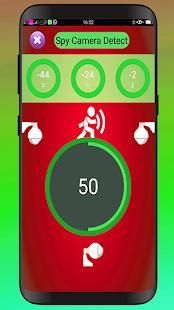
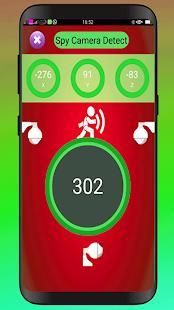
This application analyzes the magnetic activity around the device. If the magnetic activity seems similar to that of the camera, this application will beep and activate the alarm so you can investigate further.
Characteristics of the hidden camera detector:
<> Very easy interface
<> Special camera filter
<> Instructions on how to use it.
<> camera detectors
<> IR camera detector
<> helps to know all the cameras without fear of being spies.
<> Detect magnetic.
<> Discover the magnetic field.
Frequent questions
My phone does not have a magnetic sensor
This application analyzes the magnetic activity based on the magnetic sensor readings of your Android device. If this sensor is not available, you can only use the infrared detector function. Otherwise, you can try another device that has a magnetic sensor.
The application sounds close to metal or electronic -
This application is not designed to detect metals. Metals are a good conduit for electricity, so they have electromagnetism, but it is very weak and the application is designed to ignore it.
But sometimes, some types of metals depending on their length, material and temperature can exhibit the same magnetic activity as that of the camera. In that case, the application may beep. If so, look for the suspect's lens.
What is this application for? If I have to detect it manually
The application analyzes the magnetic activity and warns you if it finds a magnetic activity similar to that of the camera.
Then, if the application beeps, check if it has a lens.
The application can not see if the suspect has lenses, but can see and can not see their magnetic / electromagnetic activities, but the application can analyze it. The application will help you many times and may also fail sometimes. There you need your intervention.
The infrared detector is just an elegant green tool of the normal camera. The normal camera can also detect infrared
You are semi-correct. Along with this, the infrared detector has a luminescence effect to illuminate the white light. If you feel better with the normal camera, go for it. We never affirm something false. But, please, give credit to the application if you never knew that the IR camera can be detected using the digital camera. And, of course, it's a fast open camera feature with just one click.
The application does not open the infrared detector of the camera. It shows that it does not respond
Please remove all other applications from the camera. Many times we click on the middle button to exit the application, then it does not close, it runs in the background and does not give access to this application to the camera.
Note: If the application does not work as it should, then the problem is with the magnetic sensor of your device. Maybe your device does not have one. Or try to initialize the sensors by pointing your phone up and rotate it in a pattern of figure 8.
Thank You.
detektor kamera tersembunyi
Melindungi privasi Anda dari lensa kamera tersembunyi. Aplikasi ini adalah alat untuk membantu Anda mendeteksi menyamar
Lensa kamera yang Anda menduga hadir di sebuah ruangan. Setara dengan ponsel dengan kamera detektor, uji
untuk mendeteksi menggunakan sensor magnetik dari perangkat Android Anda jika aktivitas magnetik terlihat mirip dengan
bahwa kamera, aplikasi ini akan berbunyi dan mengaktifkan alarm sehingga Anda dapat terus menyelidiki.
detektor kamera tersembunyi untuk mendeteksi kamera tersembunyi, semua lensa Anda menduga hadir di lokasi Anda.
The Hidden Camera Detector melindungi privasi Anda terhadap lensa tersembunyi dari kamera tersembunyi.
Aplikasi ini bekerja terbaik untuk mendeteksi semua kamera logam pada jarak hingga 15 cm dari perangkat Anda, dan yang terbaik untuk mendeteksi bahan feromagnetik, seperti kamera, dan tidak dapat mendeteksi bahan non-feromagnetik seperti aluminium atau bahan lainnya.
Cara menggunakan aplikasi ini Bagaimana menemukan kamera?
Memindahkan aplikasi di dekat perangkat Anda memiliki keraguan tentang. Misalnya, mandi, pot, lensa yang dipandang sebagai bagian atau cermin dari ruang pertukaran.
Aplikasi ini menganalisa aktivitas magnetik di sekitar perangkat. Jika aktivitas magnetik tampaknya mirip dengan kamera, aplikasi ini akan berbunyi dan mengaktifkan alarm sehingga Anda dapat menyelidiki lebih lanjut.
Karakteristik detektor kamera tersembunyi:
<> Antarmuka Sangat mudah
<> Filter kamera khusus
<> Petunjuk tentang cara menggunakannya.
<> Detektor kamera
<> IR detektor kamera
<> Membantu untuk mengetahui semua kamera tanpa takut mata-mata.
<> Mendeteksi magnetik.
<> Temukan medan magnet.
pertanyaan yang sering
Ponsel saya tidak memiliki sensor magnetik
Aplikasi ini menganalisis aktivitas magnetik didasarkan pada pembacaan sensor magnetik dari perangkat Android Anda. Jika sensor ini tidak tersedia, Anda hanya dapat menggunakan fungsi detektor inframerah. Jika tidak, Anda dapat mencoba perangkat lain yang memiliki sensor magnetik.
Aplikasi ini terdengar dekat dengan logam atau elektronik -
Aplikasi ini tidak dirancang untuk mendeteksi logam. Logam adalah saluran yang baik untuk listrik, sehingga mereka memiliki elektromagnetisme, tapi sangat lemah dan aplikasi ini dirancang untuk mengabaikannya.
Tapi kadang-kadang, beberapa jenis logam tergantung pada panjangnya, material dan suhu dapat menunjukkan aktivitas magnetik sama dengan kamera. Dalam hal ini, aplikasi dapat berbunyi. Jika demikian, mencari lensa tersangka.
Apa aplikasi ini untuk? Jika saya harus mendeteksi secara manual
Aplikasi ini menganalisis aktivitas magnetik dan memperingatkan Anda jika menemukan aktivitas magnetik yang mirip dengan kamera.
Kemudian, jika aplikasi berbunyi, memeriksa apakah ia memiliki lensa.
aplikasi tidak dapat melihat apakah tersangka memiliki lensa, tetapi dapat melihat dan tidak dapat melihat aktivitas magnetik / elektromagnetik mereka, tetapi aplikasi dapat menganalisanya. Aplikasi ini akan membantu Anda berkali-kali dan juga mungkin gagal kadang-kadang. Ada yang Anda butuhkan campur tangan Anda.
Detektor inframerah hanya sebuah alat hijau elegan dari kamera normal. Kamera yang normal juga dapat mendeteksi inframerah
Anda adalah semi-benar. Seiring dengan ini, detektor inframerah memiliki efek pendaran untuk menerangi cahaya putih. Jika Anda merasa lebih baik dengan kamera normal, pergi untuk itu. Kami tidak pernah menegaskan sesuatu yang salah. Tapi, tolong, memberikan kredit kepada aplikasi jika Anda tidak pernah tahu bahwa kamera IR dapat dideteksi dengan menggunakan kamera digital. Dan, tentu saja, itu adalah fitur kamera terbuka cepat dengan hanya satu kali klik.
aplikasi tidak membuka detektor inframerah kamera. Ini menunjukkan bahwa itu tidak merespon
Hapus semua aplikasi lain dari kamera. Banyak kali kita klik pada tombol tengah untuk keluar dari aplikasi, maka tidak menutup, berjalan di latar belakang dan tidak memberikan akses ke aplikasi ini ke kamera.
Catatan: Jika aplikasi tidak bekerja sebagaimana mestinya, maka masalahnya adalah dengan sensor magnetik perangkat Anda. Mungkin perangkat Anda tidak memiliki satu. Atau mencoba untuk menginisialisasi sensor dengan mengarahkan telepon Anda dan putar dalam pola angka 8.
Terima kasih.




9Apps 4.9










