

Download and enjoy our service, 20,000+ users downloaded Bluetooth Audio Manager latest version on 9Apps for free every week! One thing you need to know that this app is unique. This hot app was released on 2018-08-02. To read more info about mobile apps, you can click on 9Apps.
While using Bluetooth headset, Android forces you to use headset for all the calls. This app provides better audio routing, similar to iPhone, by allowing calls to use Phone ear piece or on Bluetooth headset based on his/her preference
The in-app purchase features of this app can convert normal Bluetooth headset into a Smart headset. User can listen to time, date and notification with a press of the headset button.
Please note the limitations of this app before downloading:
- When call is routed back to the phone the prox sensor does not work (phone display stays on) as phone still thinks that the call is on the Bluetooth headset
- During call if user needs to switch to Bluetooth, he/she should select headset earpiece first and then select Bluetooth. This is due to the fact that phone thinks it is already in Bluetooth
- In the call screen, Bluetooth button is highlighted even after pulling the call to Phone. Toast is shown to indicate the audio change to phone. When routing is missed, this toast is not shown
- After new Bluetooth connection, TTS audio might not play first time with button press
Detailed instructions can be found at http://bamapp.weebly.com/user-guide.html
FIRST TIME RUN INSTRUCTIONS
- Open the app after installation. Select Google app (or any other voice command) as 2nd Default Voice Dialer. This app further invokes this 2nd default app when necessary.
- An Accessibility Alert will be shown. Go to accessibility screen and Enable Bluetooth Audio Manager to allow access to Notifications.
- In the Device name edit box, enter first 3-6 letters of the Bluetooth device name for which you want routing. If routing is needed for all paired devices, enter “all” as device name. After entering name, you should see Routing Enabled message (If routing does not get enabled, disconnect and reconnect your headset)
- Press Voice command/VR button on Headset (Long 2second function press on typical headsets). Select Bluetooth Audio Manager as the app to invoke and select always.
Details on Voice Command, Accessibility and TTS Settings on select phones can be found at http://bamapp.weebly.com/user-guide.html#Settings
AUDIO ROUTING FEATURES
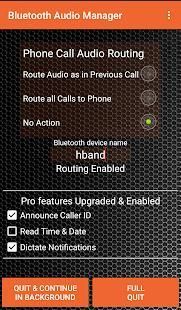
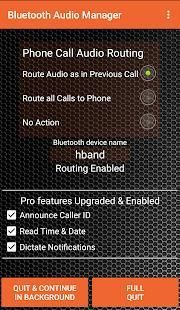
The app can place the audio on phone or headset, based on what the user selected in previous call.
Route Audio as in Previous Call:
The call stays on phone earpiece or headset based on his previous call usage. The states of incoming and outgoing calls are maintained separately.
Route all Calls to Phone:
All calls are routed to phone.
No Action:
The call will be routed to headset with default android behavior
SMART HEADSET FEATURES & USAGE (available with in app purchase)
Read out Time and Date
Long press Headset function button (Voice command/VR button), app reads time and date (when no notifications)
Read the Incoming Notification
If VR button is pressed (same as above) within 30 seconds of receiving notification, the headset will read the notification in headset
Read Incoming Caller Name
The app plays the caller ID during ringing. The caller id is played on the phone ear-piece (Due to Android limitation). This is played only when caller name is available
The 2nd default VR app (google now etc) is invoked in the below conditions
- Press the VR button immediately after a Time read is complete (within 10 seconds)
- Pressing VR button in idle condition when time read (or notification) is disabled
- Quit app with Full quit button
Text To Speech:
For better Text to speech, please select Google Text-to-Speech engine under Language and input options.
First time there may be delay or miss of the Text to Speech announcement. Try again after 20 seconds. Please try making a call to initialize the headset audio if you still don’t hear sound from text to speech.
“Quit and Continue in Background” (not recommended) button will quit the app with service continuing to run in the background.
“Full Quit” button will fully exit the app without any background action.
Saat menggunakan headset Bluetooth, pasukan Android Anda untuk menggunakan headset untuk semua panggilan. Aplikasi ini menyediakan routing audio yang lebih baik, mirip dengan iPhone, dengan memungkinkan panggilan untuk menggunakan potongan telinga Telepon atau headset Bluetooth berdasarkan / preferensinya
Dalam aplikasi fitur pembelian aplikasi ini dapat mengkonversi headset Bluetooth normal menjadi headset Cerdas. Pengguna dapat mendengarkan waktu, tanggal dan notifikasi dengan menekan tombol headset.
Harap dicatat keterbatasan aplikasi ini sebelum men-download:
- Bila panggilan dialihkan kembali ke telepon sensor prox tidak bekerja (layar ponsel tetap menyala) sebagai ponsel masih berpikir bahwa panggilan adalah pada headset Bluetooth
- Selama panggilan jika kebutuhan pengguna untuk beralih ke Bluetooth, ia / dia harus memilih lubang suara headset pertama dan kemudian pilih Bluetooth. Hal ini disebabkan fakta bahwa ponsel berpikir itu sudah dalam Bluetooth
- Pada layar panggilan, tombol Bluetooth disorot bahkan setelah menarik panggilan untuk Telepon. Toast ditampilkan untuk menunjukkan perubahan audio ke telepon. Ketika routing terjawab, roti ini tidak ditampilkan
- Setelah koneksi Bluetooth baru, TTS audio yang tidak mungkin bermain pertama kalinya dengan tekan tombol
Instruksi lengkap dapat ditemukan di http://bamapp.weebly.com/user-guide.html
PERTAMA KALI INSTRUKSI RUN
- Buka aplikasi setelah instalasi. Pilih aplikasi Google (atau perintah suara lainnya) sebagai 2nd default Voice Dialer. Aplikasi ini lebih lanjut memanggil aplikasi default 2 ini bila diperlukan.
- Sebuah Siaga Aksesibilitas akan ditampilkan. Pergi ke layar aksesibilitas dan Aktifkan Bluetooth Audio Manager untuk memungkinkan akses ke Pemberitahuan.
- Dalam Nama alat mengedit kotak, masukkan 3-6 huruf pertama dari nama perangkat Bluetooth yang Anda inginkan routing. Jika routing yang diperlukan untuk semua perangkat dipasangkan, masukkan “semua” sebagai nama perangkat. Setelah memasukkan nama, Anda akan melihat Routing Diaktifkan pesan (Jika routing tidak bisa diaktifkan, lepaskan dan hubungkan kembali headset)
- perintah Tekan Voice / tombol pada Headset (Long 2second fungsi pers pada headset khas) VR. Pilih Bluetooth Audio Manager sebagai aplikasi untuk memohon dan pilih selalu.
Rincian tentang Voice Command, Aksesibilitas dan Pengaturan TTS di pilih ponsel dapat ditemukan di http://bamapp.weebly.com/user-guide.html#Settings
AUDIO ROUTING FITUR
Aplikasi ini dapat menempatkan audio pada ponsel atau headset, berdasarkan apa yang dipilih pengguna dalam panggilan sebelumnya.
Route Audio seperti pada Sebelumnya Panggil:
panggilan tetap pada lubang suara telepon atau headset berdasarkan penggunaan panggilan sebelumnya. Negara bagian panggilan masuk dan keluar secara terpisah.
Route semua Panggilan ke Telepon:
Semua panggilan dialihkan ke telepon.
Tidak ada tindakan:
panggilan akan dialihkan ke headset dengan perilaku android bawaan
SMART HEADSET FITUR & PENGGUNAAN (tersedia dengan in app purchase)
Bacakan Waktu dan Tanggal
Tekan lama Headset tombol fungsi (perintah suara / tombol VR), aplikasi membaca waktu dan tanggal (ketika tidak ada pemberitahuan)
Baca Pemberitahuan masuk
Jika tombol VR ditekan (sama seperti di atas) dalam waktu 30 detik dari menerima pemberitahuan, headset akan membaca pemberitahuan di headset
Baca Nama masuk Caller
Aplikasi ini memainkan ID pemanggil selama dering. Penelepon id dimainkan di telepon telinga-piece (Karena keterbatasan Android). Ini hanya dimainkan ketika nama penelepon tersedia
2 standar VR aplikasi (google sekarang dll) dipanggil dalam kondisi di bawah ini
- Tekan tombol VR segera setelah waktu membaca selesai (dalam waktu 10 detik)
- Menekan tombol VR dalam kondisi siaga bila waktu membaca (atau pemberitahuan) dinonaktifkan
- Keluar aplikasi dengan tombol penuh berhenti
Teks pidato:
Untuk Teks yang lebih baik untuk berbicara, silahkan pilih Google mesin Text-to-Speech bawah Bahasa dan pilihan input.
Pertama kali mungkin ada keterlambatan atau kehilangan dari Text to Speech pengumuman. Coba lagi setelah 20 detik. Silakan coba membuat panggilan untuk menginisialisasi audio headset jika Anda masih tidak mendengar suara dari text to speech.
“Berhenti dan Lanjutkan di Latar Belakang” tombol (tidak disarankan) akan keluar dari aplikasi dengan layanan terus berjalan di latar belakang.
“Keluar Penuh” tombol akan sepenuhnya keluar dari aplikasi tanpa tindakan latar belakang.
- Enabled routing function on Smartwatches with Bluetooth HFP/SCO and that do not have A2DP Bluetooth audio





9Apps 4.9










