

As we all know, 20,000+ users downloaded Blue Point - Auto Clicker (NO ROOT) latest version on 9Apps for free every week! The application is severely widely use. This hot app was released on 2019-03-10. I believe that if you are an android apps lover, you would not miss it.
How to use video:
https://www.youtube.com/watch?v=_bIz8jZ6sV0&t
How to use:
1.Allow display over other apps
2. Allow Accessibility Service for the app
3. Open the app
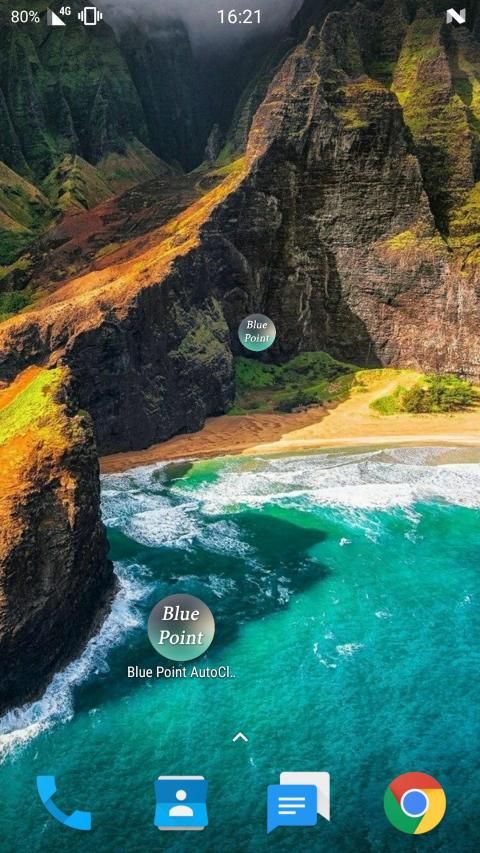
4. Place the Blue Point in the place you want to click
5. Touch the Blue point
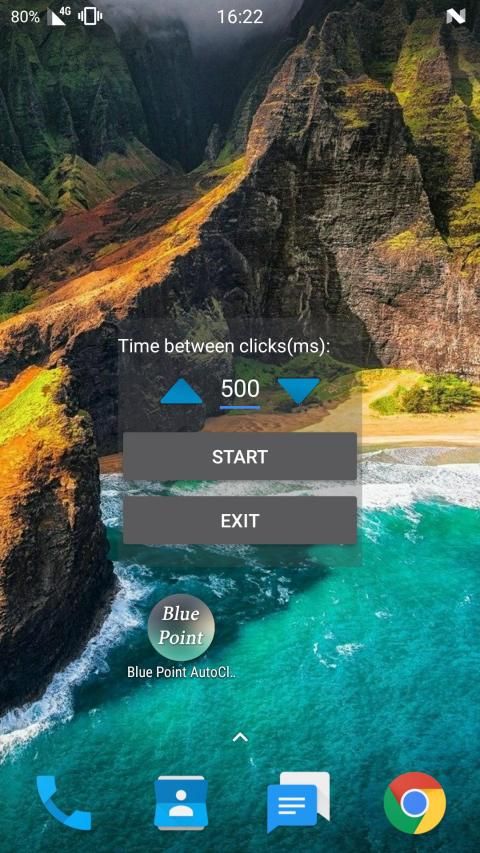
6. On the screen opened choose your click rate by long press or short press on the arrows
7. Click Start
(To stop the app click Stop and to close the app click Exit)
*the app is still on Beta
*requires Android 7 or above.
Cara menggunakan video:
https://www.youtube.com/watch?v=_bIz8jZ6sV0&t
Bagaimana cara menggunakan:
1. Izinkan tampilan di atas aplikasi lain
2. Izinkan Layanan Aksesibilitas untuk aplikasi
3. Buka aplikasi
4. Tempatkan Titik Biru di tempat yang ingin Anda klik
5. Sentuh titik Biru
6. Pada layar terbuka pilih tingkat klik Anda dengan tekan lama atau tekan sebentar pada panah
7. Klik Mulai
(Untuk menghentikan aplikasi, klik Stop dan tutup aplikasi klik Exit)
* Aplikasi ini masih di Beta
* membutuhkan Android 7 atau lebih tinggi.
bug fixes.











9Apps 4.9











