

Download the official version of India apps from 9apps now. 20,000+ users downloaded Assistive Touch latest version on 9Apps for free every week! It is a wonderful app that amazes every player. This hot app was released on 2018-03-23. Don’t wait any longer– the application will shock you.
Overview
Assistive Touch is an easy tool for Android devices. It's fast, it’s smooth, and it’s totally FREE.
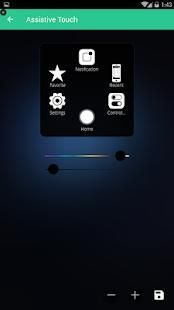
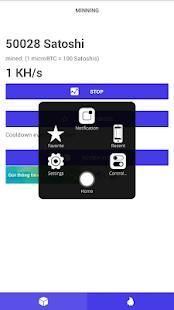
You can use AssistiveTouch to control your device. It contains the Android system most used switches and all your installed apps.
You can control your device or open your favorite app easily without exiting the app currently in use.
Assistive Touch is also an ideal app to protect the physical buttons (home button and volume button). It is very useful for big screen smart phone.
You can use smart clean function to clean running background apps, help your phone faster.
How to use
1. To turn on AssistiveTouch:
Open my app > Switch on AssistiveTouch.
2. To use more actions:
Go to Settings > Accessibility > Services and turn on AssistiveTouch.
Feature
• Screenshot, screen capture (OS 5.0 or above)
• Virtual home button
• Back button
• Easy touch to lock screen
• Control your device with Assistive Touch menu.
• Custom size and color Floating icon.
• Custom color Assistive Touch menu.
• Open recent task
• Virtual volume key button, quick touch to change volume key and change sound mode
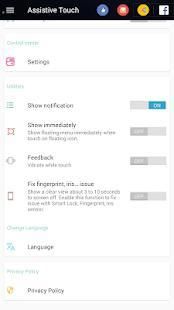
• Go to all settings very quick with a touch
• Clear ram, boost speed, one touch boost
• You can change color of background with your favorite color
• You can change icon of Assistive Touch with many pretty icon, totally free
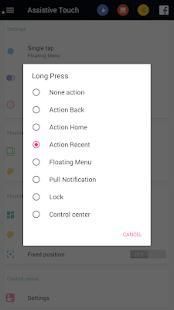
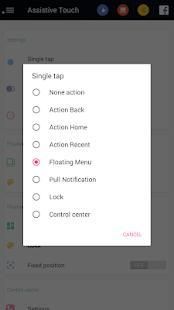
• Gesture Setting for Floating Button (One click, double click, long press)
Note
"This app uses the Device Administrator permission."
It is necessary and used only for locking the device when you use feature turn off the screen.
You need to enable Administration before it can be used that feature.
To uninstall the app, please open my app and click the "Uninstall" button.
If you have any suggestion feel free to rate and review the application and we will be happy to update the app and improve "Assistive Touch- Best Assistive Touch" together!
Ikhtisar
Bantu Touch adalah tool yang mudah untuk perangkat Android. Ini cepat, itu halus, dan itu benar-benar gratis.
Anda dapat menggunakan AssistiveTouch untuk mengontrol perangkat Anda. Ini berisi sistem Android switch yang paling banyak digunakan dan semua aplikasi yang diinstal Anda.
Anda dapat mengontrol perangkat Anda atau membuka aplikasi favorit Anda dengan mudah tanpa keluar aplikasi sedang digunakan.
Bantu Touch adalah juga sebuah aplikasi yang ideal untuk melindungi tombol fisik (tombol home dan tombol volume). Hal ini sangat berguna untuk layar besar ponsel pintar.
Anda dapat menggunakan fungsi bersih pintar untuk membersihkan aplikasi latar belakang berjalan, membantu ponsel Anda lebih cepat.
Cara menggunakan
1. Untuk mengaktifkan AssistiveTouch:
Buka aplikasi saya> Hidupkan AssistiveTouch.
2. Untuk menggunakan tindakan lebih:
Buka Pengaturan> Aksesibilitas> Layanan dan nyalakan AssistiveTouch.
Fitur
• Screenshot, screen capture (OS 5.0 atau di atas)
• tombol home Virtual
• Tombol kembali
• Mudah sentuh untuk mengunci layar
• Kontrol perangkat Anda dengan menu Assistive Touch.
• Custom size dan warna Mengambang ikon.
• warna Adat menu Assistive Touch.
• tugas baru-baru ini Terbuka
• Virtual tombol tombol volume, sentuhan cepat untuk mengubah tombol volume dan mengubah mode suara
• Buka semua pengaturan yang sangat cepat dengan sentuhan
• Clear ram, meningkatkan kecepatan, dorongan satu sentuhan
• Anda dapat mengubah warna latar belakang dengan warna favorit Anda
• Anda dapat mengubah icon dari Assistive Touch dengan banyak cukup ikon, benar-benar gratis
• Pengaturan Gesture untuk Floating Button (Satu kali klik, klik dua kali, tekan lama)
Catatan
"Aplikasi ini menggunakan izin Perangkat Administrator."
Hal ini diperlukan dan hanya digunakan untuk mengunci perangkat bila Anda menggunakan fitur mematikan layar.
Anda perlu mengaktifkan Administrasi sebelum dapat menggunakan fitur itu.
Untuk meng-uninstall aplikasi, silahkan buka aplikasi dan klik tombol "Uninstall".
Jika Anda memiliki saran jangan ragu untuk menilai dan meninjau aplikasi dan kami akan senang untuk memperbarui aplikasi dan meningkatkan "Assistive touch Terbaik Assistive Sentuh" bersama-sama!




9Apps 4.9










