

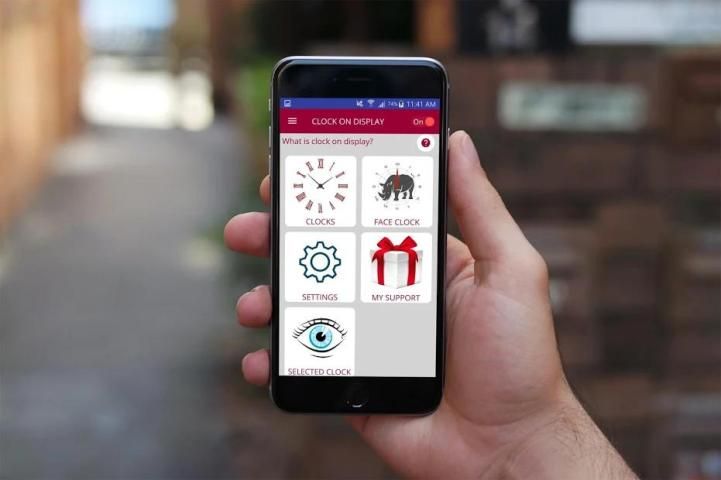
9Apps is the free store of application, 20,000+ users downloaded Clock On Display latest version on 9Apps for free every week! It is a wonderful app that amazes every player. This hot app was released on 2018-12-07. You can quickly get it from 9Apps!
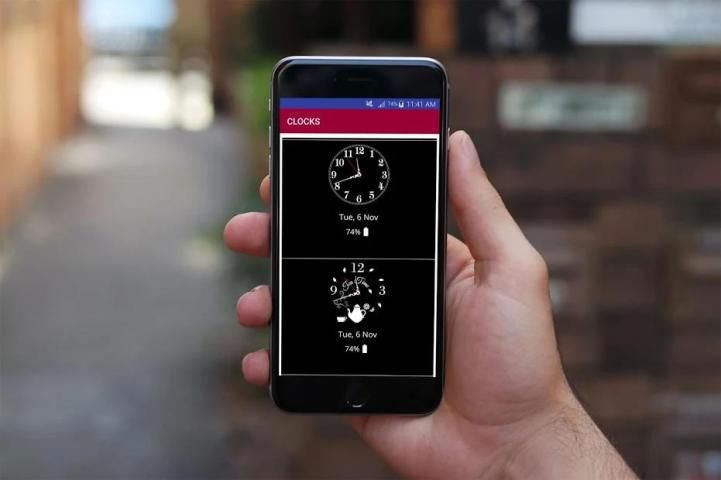
Always Clock On Display AMOLED Screen provides information about, time, date, notifications and more and all without having to touch the phone . Just by looking at it. This is made only possible thanks to Always Clock On Display . Most of the screen stays black except for a few pixels.
Super AMOLED Clock On Display Wallpapers (Always on Screen) is designed for this proposes to show some basic info in black screen whenever you want. All this information will be permanently displayed on your screen.
If you want to see what's going on your phone, you can simply take your phone out of your pocket to view all the latest notifications, in a similarly pleasing and minimalist manner by using this best Always on Display app.
Get an Clock On Display for your phone or tablet.
Keep your screen on all the time.
An Clock On Display for every device!
Glance at Clock On Display
. S8 Clock Style
. Add Preview Option
. Easy to use Always on clock display Amoled.
. Great design and awesome performance.
. Stylish and smart Watch - Always On Screen
. Enable/Disable showing notifications
. Automatic rules preserve battery using predefined rules
. Option to start display after screen lock activated
. Handle display during calling
. Change font size, color.
. Change clock style (analog).
. Display battery level.
. Display notifications information.
. Always on' screen on (double tap will turn screen the on).
. Select the information that will be displayed on the screen.
. Custom watch faces - Digital S7 style, Analog S7 style, Analog Pebble style and more!
. Always On Memo - write a reminder and make it show up on your screen all the time!
. Customization - change the text color, text size,font, brightness and more
. Change clock style there a vast variety of styles of clocks (Analogue).
. Auto ON/OFF Screen feature.
How to use this App (Always Clock On Display - AMOLED & Smart Watch):
1. Open Always on Display-AMOLED, start service
3. To weak up your phone, double tap on screen
4. To turn off screen just press power button
5. The user can on or off service.
Option Always Clock On Display- AMOLED & Watch Black Wallpapers
1- while charging and discharging
2- while only charging
3- while only discharging
Still Reading this?
Go get the App & start always clock on display
Hey wait,
Rate Us if you liked the App
Probably a 5 Star
Selalu Jam Di Layar Layar AMOLED memberikan informasi tentang, waktu, tanggal, pemberitahuan dan banyak lagi tanpa harus menyentuh telepon . Hanya dengan melihatnya saja. Ini hanya dimungkinkan berkat Always Clock On Display . Sebagian besar layar tetap hitam kecuali beberapa piksel.
Super AMOLED Clock On Display Wallpapers (Selalu di Layar) dirancang untuk ini mengusulkan untuk menampilkan beberapa info dasar di layar hitam kapan pun Anda mau. Semua informasi ini akan ditampilkan secara permanen di layar Anda.
Jika Anda ingin melihat apa yang terjadi pada ponsel Anda, Anda dapat mengeluarkan ponsel dari saku Anda untuk melihat semua pemberitahuan terbaru, dengan cara yang menyenangkan dan minimalis dengan menggunakan aplikasi Selalu di Display yang terbaik.
Dapatkan Jam Di Tampilan untuk ponsel atau tablet Anda.
Jaga layar Anda setiap saat.
Jam Di Tampilan untuk setiap perangkat!
Melirik Jam Di Layar
. Gaya Jam S8
. Tambahkan Opsi Pratinjau
. Mudah digunakan Selalu pada tampilan jam Amoled.
. Desain hebat dan kinerja luar biasa.
. Jam Tangan Stylish dan Cerdas - Selalu Di Layar
. Aktifkan / Nonaktifkan menampilkan notifikasi
. Aturan otomatis menghemat baterai menggunakan aturan yang telah ditetapkan
. Pilihan untuk mulai ditampilkan setelah kunci layar diaktifkan
. Tangani layar saat menelepon
. Ubah ukuran font, warna.
. Ubah gaya jam (analog).
. Tampilkan tingkat baterai.
. Tampilkan informasi pemberitahuan.
. Selalu aktif pada layar (ketuk ganda akan menyalakan layar).
. Pilih informasi yang akan ditampilkan di layar.
. Tampilan jam khusus - Gaya digital S7, gaya S7 Analog, gaya Pebble Analog, dan banyak lagi!
. Always On Memo - menulis pengingat dan membuatnya muncul di layar Anda setiap saat!
. Kustomisasi - mengubah warna teks, ukuran teks, font, kecerahan dan banyak lagi
. Ubah gaya jam di sana berbagai macam gaya jam (Analog).
. Fitur Layar ON / OFF Otomatis.
Cara menggunakan Aplikasi ini (Selalu Jam Aktif - AMOLED & Smart Watch):
1. Buka Selalu di Display-AMOLED, mulai layanan
3. Untuk memperlemah ponsel Anda, ketuk dua kali di layar
4. Untuk mematikan layar cukup tekan tombol power
5. Pengguna dapat mengaktifkan atau menonaktifkan layanan.
Option Always Clock On Display- AMOLED & Tonton Wallpaper Hitam
1- saat pengisian dan pemakaian
2- saat hanya mengisi daya
3 - saat hanya pemakaian
Masih Membaca ini?
Pergi dapatkan Aplikasi & mulai selalu jam di layar
Hei tunggu,
Beri kami peringkat jika Anda menyukai Aplikasi
Mungkin Bintang 5




9Apps 4.9









