
Here provides top Free Android Apps. 20,000+ users downloaded Double Tap Screen On 2019 latest version on 9Apps for free every week! Players who wants to play both because this app is good and because the app are response quickly at any time. This hot app was released on 2018-10-15. It is one of the popular Android apps in 2015.
Double Tap Screen On Off – Smart Screen Lock
is an app that help you turn on/off your screen without using the power button.
The double-click to enable monitors is almost exclusively for LG units, but you can now double-tap to turn on your monitor by just using this awesome app!
Double Tap Screen On Off – Smart Screen Lock
will help you reduce the intensity of the power button and will ensure that the power button is stable and operates smoothly for long periods of time. Double tap screen on tapping the screen twice (Double Tap Screen On) works based on the sensor of the phone recording actions on the screen, double to screen to help open Phone screen fast.
From now on you will not have to use the power button to turn on the screen and double tap wake up screen, you just need to tap the screen slightly to wake up the phone.
Double Tap Screen On Off – Smart Screen Lock
opens the screen quite lightly without taking up too much RAM. Using our advanced application technology will not cause excessive battery drain compared to the same application on CH Play.
You can use the disabled area to turn off your phone by using the application or the phone to turn off the display. Safety mode to turn off the phone screen will be active after 1-2 seconds you send the address.
In addition, you can also use the off screen by swiping in the notification bar and clicking the application icon.
Double Tap Screen On Off – Smart Screen Lock
is really a great touch to turn off the screen with 2 touches, since having an app like having a long-term help person will help reduce the situation that the power button fades and damages your phone. Now just touch the screen twice to lock or open the screen
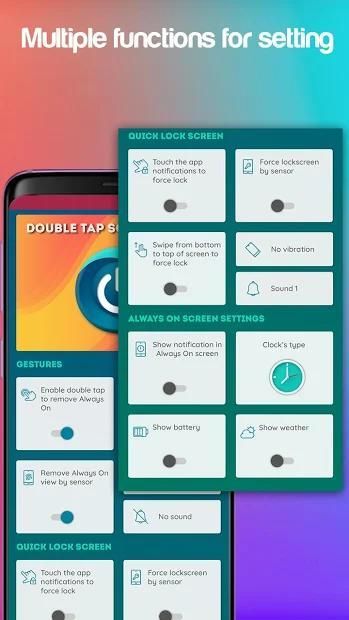
Main features Double tap lock screen and unlock screen:
Open & wake up screen and turn off screen
✔ Use the double tap to open the screen
✔ Use touch sensor to turn off the screen so less RAM, less wasted battery
✔ Show missed call information and unread messages on the lock screen
✔ Sound and vibrating alert when opening the screen
Screen lock & unlock
✔ Touch the notification of the app to lock the screen
✔ Cover proximity sensor to lock the screen
✔ Sound and vibration when locking the screen
✔ Action gesture support: Double Tap, Up
✔ Support multiple phone lines from low to high
With
Double Tap Screen On Off – Smart Screen Lock
, you can use features only available in high-end models. Protect the power button not be damaged with double tap the screen Double Tap Screen On Application.
Thank you for your trust and use
Double Tap Screen On Off – Smart Screen Lock
. If you have any questions, please feel free to contact us by email to the developer. Do not forget to rate this 5-star for
Double Tap Screen On Off – Smart Screen Lock
if it's useful! We will update more functions in the future to improve your experience.
डबल टैप स्क्रीन ऑफ - स्मार्ट स्क्रीन लॉक एक ऐप है जो आपको पावर बटन का उपयोग किए बिना अपनी स्क्रीन चालू / बंद करने में मदद करता है।
मॉनीटर सक्षम करने के लिए डबल-क्लिक लगभग एलजी इकाइयों के लिए लगभग विशेष रूप से है, लेकिन अब आप इस भयानक ऐप का उपयोग कर अपने मॉनिटर को चालू करने के लिए दो बार टैप कर सकते हैं!
डबल टैप स्क्रीन ऑफ - स्मार्ट स्क्रीन लॉक आपको पावर बटन की तीव्रता को कम करने में मदद करेगा और यह सुनिश्चित करेगा कि पावर बटन स्थिर है और लंबे समय तक आसानी से संचालित होता है। स्क्रीन पर दो बार टैप करने पर डबल टैप स्क्रीन (डबल टैप स्क्रीन ऑन) स्क्रीन पर फोन रिकॉर्डिंग कार्यों के सेंसर के आधार पर काम करती है, फोन स्क्रीन को तेजी से खोलने में मदद के लिए स्क्रीन पर डबल।
अब से आपको स्क्रीन चालू करने और स्क्रीन को डबल टैप करने के लिए पावर बटन का उपयोग नहीं करना पड़ेगा, आपको फ़ोन को उठाने के लिए बस स्क्रीन को टैप करने की आवश्यकता है।
डबल टैप स्क्रीन ऑफ - स्मार्ट स्क्रीन लॉक बहुत अधिक रैम लेने के बिना स्क्रीन को हल्के ढंग से खोलता है। हमारी उन्नत एप्लिकेशन तकनीक का उपयोग करने से सीएच प्ले पर उसी एप्लिकेशन की तुलना में अत्यधिक बैटरी नाली नहीं होगी।
आप डिस्प्ले को बंद करने के लिए एप्लिकेशन या फोन का उपयोग कर अपने फोन को बंद करने के लिए अक्षम क्षेत्र का उपयोग कर सकते हैं। फोन स्क्रीन को बंद करने के लिए सुरक्षा मोड 1-2 सेकंड के बाद सक्रिय होगा, आप पता भेजते हैं।
इसके अतिरिक्त, आप अधिसूचना बार में स्वाइप करके और एप्लिकेशन आइकन पर क्लिक करके ऑफ स्क्रीन का भी उपयोग कर सकते हैं।
डबल टैप स्क्रीन ऑफ ऑन - स्मार्ट स्क्रीन लॉक स्क्रीन को दो स्पर्शों से बंद करने के लिए वास्तव में एक अच्छा स्पर्श है, क्योंकि एक ऐप होने से एक दीर्घकालिक सहायता व्यक्ति होने की स्थिति को कम करने में मदद मिलेगी बटन fades और अपने फोन को नुकसान पहुंचाता है। स्क्रीन को लॉक या खोलने के लिए अब स्क्रीन को दो बार स्पर्श करें
मुख्य विशेषताएं डबल टैप लॉक स्क्रीन और अनलॉक स्क्रीन:
स्क्रीन खोलें और जागें और स्क्रीन बंद करें
स्क्रीन खोलने के लिए डबल टैप का उपयोग करें
स्क्रीन को बंद करने के लिए टच सेंसर का उपयोग करें ताकि कम रैम, कम बर्बाद बैटरी हो
✔ लॉक स्क्रीन पर मिस्ड कॉल जानकारी और अपठित संदेशों को दिखाएं
स्क्रीन खोलते समय ध्वनि और कंपन चेतावनी
स्क्रीन लॉक और अनलॉक
स्क्रीन लॉक करने के लिए ऐप की अधिसूचना को स्पर्श करें
स्क्रीन लॉक करने के लिए निकटता सेंसर कवर करें
स्क्रीन लॉक करते समय ध्वनि और कंपन
✔ एक्शन इशारा समर्थन: डबल टैप, ऊपर
✔ कम से अधिक तक कई फोन लाइनों का समर्थन करें
डबल टैप स्क्रीन ऑफ ऑफ - स्मार्ट स्क्रीन लॉक के साथ, आप केवल उच्च-अंत मॉडल में उपलब्ध सुविधाओं का उपयोग कर सकते हैं। स्क्रीन पर दो बार टैप स्क्रीन के साथ क्षतिग्रस्त न होने वाले पावर बटन को सुरक्षित रखें एप्लिकेशन पर डबल टैप स्क्रीन।
अपने ट्रस्ट के लिए धन्यवाद और
डबल टैप स्क्रीन ऑफ ऑफ - स्मार्ट स्क्रीन लॉक का उपयोग करें। यदि आपके कोई प्रश्न हैं, तो कृपया डेवलपर को ईमेल द्वारा हमसे संपर्क करने में संकोच न करें। <5> डबल टैप स्क्रीन ऑफ ऑफ - स्मार्ट स्क्रीन लॉक के लिए यह 5-सितारा रेट करने के लिए मत भूलना अगर यह उपयोगी है! हम आपके अनुभव को बेहतर बनाने के लिए भविष्य में और अधिक फ़ंक्शंस अपडेट करेंगे।
- Explain Device Admin privileges




9Apps 4.9













