
I'm glad to tell you that 20,000+ users downloaded Screen Connect TV latest version on 9Apps for free every week! And now, this app adds more functions. This hot app was released on 2019-08-07. You can see more apps release recently on 9Apps.
Screen Mirroring Connect to TV
Now Connect Your TV Screen by Just One Click and Have a Fun….
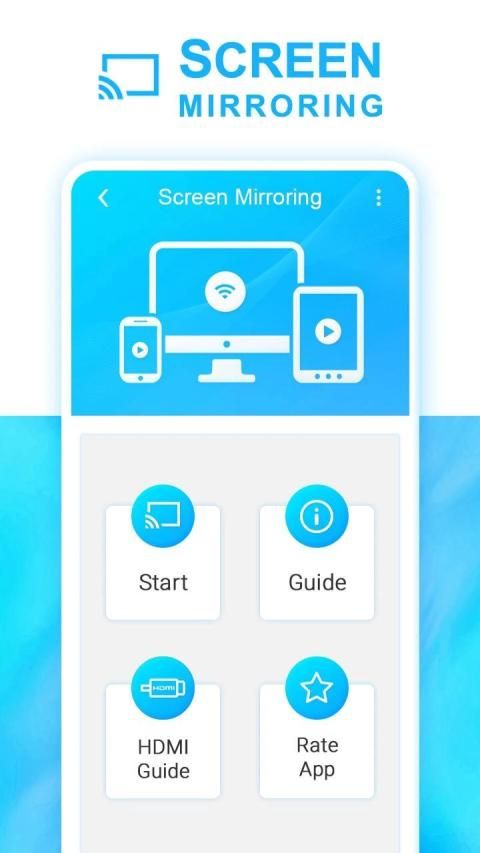
Screen Mirroring Connect to TV app for android is the best app for mirroring your phone to your tv! Screen mirroring for tv for android is a totally new and professional!
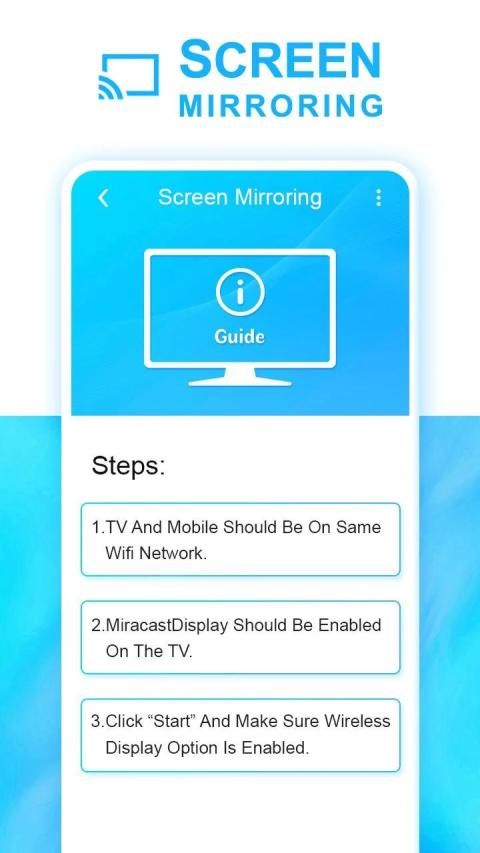
Please follow below steps to mirror your mobile screen to smart TV.
1) Your TV should support Wireless Display or any sort of Display Dongles.
2) The TV must be connected to wifi network same as your phone.
3) The Phone version must be android 4.2 and above.
4) Download and run Screen Mirroring App.
Check your TV weather it supports WIFI Display / Miracast.
2. Make sure TV is connected to the same WIFI network as your mobile device. You can't connect it with wired connection (LAN).
3. Make sure your Android device version is 4.2 or higher.
4. Make sure your device inbuilt hardware of Miracast.
5. Download and run Screen Mirroring App.
Screen Mirroring with TV sharing with web browsers screen Mirroring to play games. Screen drawing while mirroring. Mirroring, screen sharing with media players. to make powerful presentation for work, education, or gaming screen cast is used.
Screen Mirroring Connect to TV Video able to play videos, music, photos, etc in my Smartphone with any devices Smartphone, smart TV, laptop, tablet, etc at anywhere.
Screen Mirroring Connect to TV sharing with web browsers screen Mirroring to play games. Screen drawing while mirroring. All Screen Mirroring, screen sharing with media players. to make powerful presentation for work, education, or gaming screen cast is used.
Screen Mirroring Connect to TV screen does not need extra dongle or cable. Click the Start, the Mobile hotspot will be operating automatically. and After hotspot will be operating, connect to AP from other devices.
Thank You…….!!
स्क्रीन मिररिंग कनेक्ट टू टीवी
अब बस एक क्लिक करके अपने टीवी स्क्रीन को कनेक्ट करें और मज़े करें…।
स्क्रीन मिररिंग एंड्रॉइड के लिए टीवी ऐप से कनेक्ट करें अपने फोन को अपने टीवी पर मिरर करने के लिए सबसे अच्छा ऐप है! Android के लिए टीवी के लिए स्क्रीन मिररिंग एक पूरी तरह से नया और पेशेवर है!
कृपया अपने मोबाइल स्क्रीन को स्मार्ट टीवी पर दिखाने के लिए नीचे दिए गए चरणों का पालन करें।
1) आपके टीवी को वायरलेस डिस्प्ले या किसी भी प्रकार के डिस्प्ले डोंगल का समर्थन करना चाहिए।
2) टीवी को आपके फोन के समान ही वाईफाई नेटवर्क से जोड़ा जाना चाहिए।
3) फोन का संस्करण एंड्रॉइड 4.2 और उससे अधिक होना चाहिए।
4) स्क्रीन मिररिंग ऐप डाउनलोड करें और चलाएं।
अपने टीवी मौसम की जांच करें यह वाईफ़ाई डिस्प्ले / मिराकास्ट का समर्थन करता है।
2. सुनिश्चित करें कि टीवी आपके मोबाइल डिवाइस के समान ही वाईफ़ाई नेटवर्क से जुड़ा है। आप इसे वायर्ड कनेक्शन (LAN) से नहीं जोड़ सकते।
3. सुनिश्चित करें कि आपका एंड्रॉइड डिवाइस संस्करण 4.2 या उच्चतर है।
4. सुनिश्चित करें कि आपका डिवाइस Miracast के इनबिल्ट हार्डवेयर है।
5. स्क्रीन मिररिंग ऐप डाउनलोड करें और चलाएं।
वेब ब्राउजर के साथ टीवी शेयरिंग के साथ स्क्रीन मिररिंग स्क्रीन गेम खेलने के लिए मिररिंग। मिरर करते समय स्क्रीन ड्राइंग। मीडिया खिलाड़ियों के साथ मिररिंग, स्क्रीन शेयरिंग। काम, शिक्षा, या गेमिंग स्क्रीन कास्ट के लिए शक्तिशाली प्रस्तुति बनाने के लिए उपयोग किया जाता है।
स्क्रीन मिररिंग कनेक्ट टीवी वीडियो किसी भी डिवाइस के साथ मेरे स्मार्टफ़ोन में वीडियो, संगीत, फ़ोटो, आदि खेलने में सक्षम। स्मार्टफ़ोन, स्मार्ट टीवी, लैपटॉप, टैबलेट, आदि कहीं भी।
स्क्रीन मिररिंग वेब ब्राउज़र के साथ टीवी साझा करने के लिए कनेक्ट करें स्क्रीन पर गेम खेलने के लिए मिररिंग। मिरर करते समय स्क्रीन ड्राइंग। सभी स्क्रीन मिररिंग, मीडिया खिलाड़ियों के साथ स्क्रीन शेयरिंग। काम, शिक्षा, या गेमिंग स्क्रीन कास्ट के लिए शक्तिशाली प्रस्तुति बनाने के लिए उपयोग किया जाता है।
स्क्रीन मिररिंग कनेक्ट टू टीवी स्क्रीन को अतिरिक्त डोंगल या केबल की आवश्यकता नहीं है। स्टार्ट पर क्लिक करें, मोबाइल हॉटस्पॉट अपने आप चालू हो जाएगा। और हॉटस्पॉट चालू होने के बाद, अन्य उपकरणों से एपी से कनेक्ट करें।
धन्यवाद……।!!




9Apps 4.9














