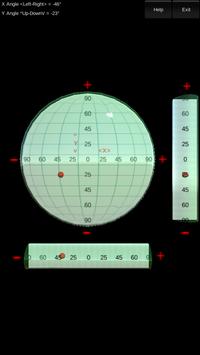
A Spirit level / Bubble Level App designed to measure the surface's angle.
Features :
- Determines if the surface is flat
- Measure the surface's angle
- Angle Level
- 3D Meter Board
How to use :
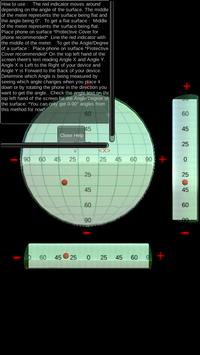
The red indicator moves around depending on the angle of the surface.
The middle of the meter represents the surface being flat and the angle being 0°.
To get a flat surface :
Middle of the meter represents the surface being flat.
Place phone on surface *Protective Cover for phone recommended*
Line the red indicator with the middle of the meter.
To get the Angle/Degree of a surface :
Place phone on surface *Protective Cover recommended*
On the top left hand of the screen there's text reading Angle X and Angle Y.
Angle X is Left to the Right of your device and Angle Y is Forward to the Back of your device.
Determine which Angle is being measured by seeing which angle changes when you place it down or by rotating the phone in the direction you want to get the angle.
Check the angle text on the top left hand of the screen for the Angle/Degree of the surface.
*You can only get 0-90° angles from this method for now*
****Disclaimer****
Putting your phone on a rough surface may scratch or damage your device.
A protective cover is recommended.
This app may not be 100% accurate, test wisely before using it in big scale.
********************
Added more levels and meters.
Cleaned up permissions.

9Apps 4.9