
9Apps provide best free android apps download. 20,000+ users downloaded CMX - Side Sektors latest version on 9Apps for free every week! The app can be the quickest one to play if you get used to it. This hot app was released on 2018-12-26. More apps was release recently, you can download them and share with your friends!
*****Please read everything carefully before downloading *****
*THIS THEME MIGHT NOT FIT LONG ASPECT RATIO SCREENS LIKE THE LGG6 AND S8*
----------------------------------
Please make sure to acquire KLWP PRO before downloading this theme.
Kustom (KLWP) PRO https://play.google.com/store/apps/details?id=org.kustom.wallpaper.pro
Nova Launcher is recommended but most Launcher should work
----------------------------------
Nova Settings:
Just 1 Screen (Page)
No Dock
Look and feel...
Show notification Bar:ON/OFF (personal choice)
Transparent Notification Bar: ON
Instructions:
Once Installed… Open Kustom → Load Preset → Installed → Tap on the Theme → Hit the save button → Ok to Set as Wallpaper/Set Wallpaper and go back to the Homescreen
All set!
For deeper personalization:
Color - Check the GLOBALS section in the root layer and you'll see that most of the Theme has been globalized. Just change it to whatever you want and save changes. Reload the theme to revert original color
Font - It has been globalized as well - Keep in mind that not all the fonts will fit since they are tailored differently. A narrow font is recommended.
Background - Go to Background in the root layer - Pick Image - And chose any from your gallery
If you want to change apps in the bottom Sektor, locate "Sektor 5 Info Apps", tap on it, scroll right to "ANIMATION", tap on "Animate", change "Ease" to "Normal. CHANGE IT BACK TO INVERTED ONCE YOU FINISH CHANGING APPS...Go back to "ITEMS", scroll down until you see the name of the app you want to change, tap on it, tap on "FontIcon", Tap on "Set" to choose the icon pack, tap on "Icon" to try to find the icon of the app you are trying to change to (keep in mind not all the icons are present, most of them are the most common/popular), if you find your icon, tap on it, go back one level, tap on "TOUCH", tap on "App" and choose the app you want, go back and do the same for any other you want, make sure to change the animation back, save and go back to the home screen.
The App drawer is connected to Nova, so If you are not using Nova - Scroll down until you see "App Drawer" - tap on it - Go to "TOUCH" - "Launch Shortcut" - and change it to your Launcher's App Drawer Shortcut
If you want to add Auto close times - Go to the Globals section - scroll down - put a check mark on either "Sektor1 - 5" - tap the top pencil icon (Edit) - Auto off - Change it to Manual and add seconds.
Note: Depending on your screen size you may need to scale the theme by opening KLWP - in the root layer go to "LAYER" - scale it using the - and +, do not use the double arrows. And also depending on the screen size and scaling things may look a bit different than the screenshots.
Theme Features/Hot Spots/App Launchers:
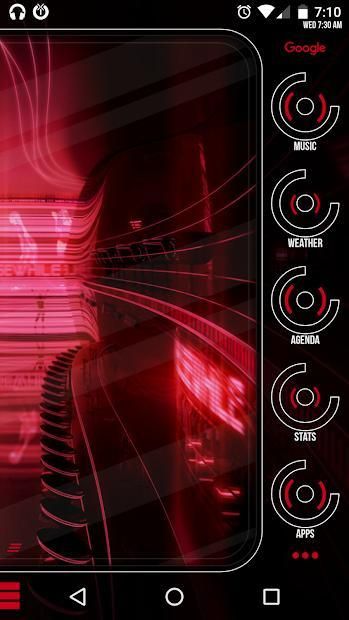
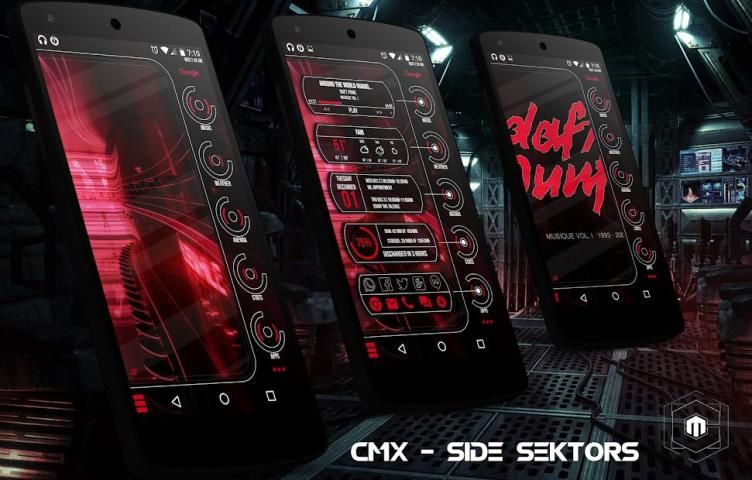
- Music Controls (First time use - Start music from your app, so KLWP can engage the controls) - Tap the CoverArt to open current player
- Media Volume Controls and Music Visualizer (EQ SIMULATOR)
- Next Alarm
- Date/Agenda
- Battery/Ram/Internal Storage
- Google App
- Chrome
- Camera
- Phone
- Email/Gmail
- Text/Hangouts
- Whatsapp
- Facebook
- Twitter
- G+
- Apps/Nova Open App Drawer
- 3 Day extended Weather
Please contact me with any questions/issues before leaving a negative rating, I should be able to get in contact through my email (below), Hangouts or G+
***** कृपया डाउनलोड करने से पहले सब कुछ ध्यान से पढ़ें *****
* इस थीम फिट नहीं सकता LGG6 और S8 की तरह लंबी पहलू अनुपात स्क्रीन *
----------------------------------
कृपया इस विषय डाउनलोड करने से पहले KLWP प्रो प्राप्त करने के लिए सुनिश्चित करें।
Kustom (KLWP) प्रो https://play.google.com/store/apps/details?id=org.kustom.wallpaper.pro
नोवा लांचर की सिफारिश की है लेकिन सबसे लांचर काम करना चाहिए
----------------------------------
नोवा सेटिंग्स:
बस 1 स्क्रीन (पृष्ठ)
कोई डॉक
देखो और महसूस...
अधिसूचना बार दिखाएं: / बंद (व्यक्तिगत पसंद)
पारदर्शी सूचना पट्टी: चालू
निर्देश:
एक बार स्थापित ... ओपन Kustom → लोड प्रीसेट → स्थापित → थीम पर नल → के रूप में वॉलपेपर / वॉलपेपर सेट सेट और होमस्क्रीन के लिए वापस जाना → ठीक सहेजें बटन दबाते
सब तैयार!
गहरी निजीकरण के लिए:
रंग - जड़ परत में वैश्विक अनुभाग की जाँच करें और आप देखेंगे कि थीम के सबसे वैश्वीकरण की गई है। बस आप जो कुछ भी इच्छानुसार और परिवर्तन सहेजें। विषय को पुनः लोड करें मूल रंग वापस लौटने के लिए
फ़ॉन्ट - यह रूप में अच्छी तरह वैश्वीकरण किया गया है - ध्यान रखें कि नहीं सभी फ़ॉन्ट बाद से वे अलग तरह से अनुरूप हैं फिट होगा। एक संकीर्ण फॉन्ट की सिफारिश की है।
पृष्ठभूमि - जड़ परत में पृष्ठभूमि में जाएं - छवि उठाओ - और अपने गैलरी से किसी भी चुना
आप नीचे Sektor में क्षुधा बदलना चाहते हैं, "Sektor 5 जानकारी ऐप्स" का पता लगाने, उस पर टैप करें, करने के लिए "एनिमेशन", "एनिमेट करें", परिवर्तन "आसानी" "सामान्य। आईटी उल्टे पर वापस जाने के एक बार पर टैप सही स्क्रॉल आप ऐसे ऐप्स बदलना पूर्ण ... वापस "आइटम" करने के लिए, इस पर जाएं नीचे स्क्रॉल करें जब तक आप आप बदलना चाहते हैं उस ऐप्लिकेशन के नाम को देखने के नल, "सेट" आइकन पैक का चयन करने पर टैप करें, "FontIcon" पर टैप करते हैं, एप्लिकेशन को आप को बदलने के लिए कोशिश कर रहे हैं के आइकन खोजने की कोशिश करने के लिए "चिह्न" पर टैप (ध्यान में रखना नहीं सभी चिह्न मौजूद हैं, उनमें से ज्यादातर सबसे आम / लोकप्रिय हैं), आप अपने आइकन नहीं मिल जाता है, पर नल यह, वापस एक स्तर नल "एप्लिकेशन" पर किसी भी अन्य आप चाहते हैं के लिए जाना है, "टच" पर टैप करें और अपना इच्छित ऐप चुनते हैं, तो वापस जाने के लिए और कर ही, एनीमेशन वापस बदलने के लिए, बचाने के लिए और वापस जाने के लिए सुनिश्चित करें होम स्क्रीन।
अनुप्रयोग दराज, नोवा से जुड़ा है, इसलिए यदि आप नोवा का उपयोग नहीं कर रहे हैं - तक नीचे स्क्रॉल "ऐप्लिकेशन की दराज" - उस पर नल - "टच" में जाएं - "शॉर्टकट लॉन्च" - और अपने लांचर के App दराज शॉर्टकट के लिए इसे बदल
आप ऑटो पास बार जोड़ना चाहते हैं - वैश्विक अनुभाग में जाएं - नीचे स्क्रॉल - पर या तो एक जाँच चिह्न डाल "Sektor1 - 5" - शीर्ष पेंसिल आइकन (संपादित) का दोहन - ऑटो बंद - मैनुअल के लिए इसे बदल और सेकंड जोड़ें।
नोट: आपके स्क्रीन आकार पर निर्भर करता है आप KLWP खोलने के द्वारा विषय पैमाने पर करने की आवश्यकता हो सकती - "परत" के लिए जाना जड़ परत में -, डबल ऐरो का उपयोग नहीं करते और + - का उपयोग कर इसे पैमाने। और यह भी स्क्रीन आकार पर निर्भर करता है और चीजों को स्केलिंग स्क्रीनशॉट से थोड़ा अलग दिख सकता है।
थीम सुविधाएँ / हॉट स्पॉट / अनुप्रयोग लांचर:
- संगीत नियंत्रण (पहली बार उपयोग - अपने ऐप्लिकेशन से शुरू संगीत, इसलिए KLWP नियंत्रण शामिल कर सकते हैं) - मौजूदा खिलाड़ी को खोलने के लिए CoverArt टैप करें
- मीडिया वॉल्यूम नियंत्रण और संगीत विजुअलाइज़र (EQ सिम्युलेटर)
- अगला अलार्म
- दिनांक / एजेंडा
- बैटरी / राम / मोबाइल मेमोरी
- गूगल एप
- क्रोम
- कैमरा
- फ़ोन
- ईमेल / जीमेल
- पाठ / Hangouts
- Whatsapp
- फेसबुक
- ट्विटर
- जी +
- एप्लिकेशन / नोवा ओपन अनुप्रयोग दराज
- 3 दिन बढ़ाया मौसम
एक नकारात्मक रेटिंग रवाना होने से पहले किसी भी प्रश्न / मुद्दों के साथ कृपया मुझे संपर्क करें, मैं अपने ईमेल (नीचे), Hangouts या जी के माध्यम से संपर्क में प्राप्त करने में सक्षम होना चाहिए +




9Apps 4.9














