
All high quality mobile apps are available for free download. 20,000+ users downloaded VPN Config Loader latest version on 9Apps for free every week! You get various free apps from the store. This hot app was released on 2019-03-22. You can also find some other similar apps here.
WHY USE VPN CONFIG LOADER?
• Changing config in any of the supported VPNs can be done in JUST 2 CLICKS!
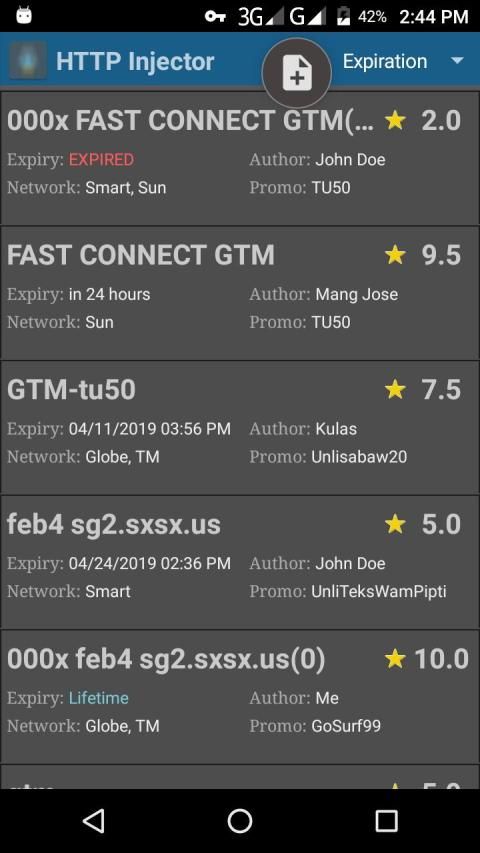
• With a rating system to remind yourself which configs are fast and reliable
• Keep track of expiration dates
• List can be sorted according to Rating, Expiration, Network, etc.
-------------------------------------
HOW TO CHANGE THE CONFIG OF A VPN
1. Select from the list.
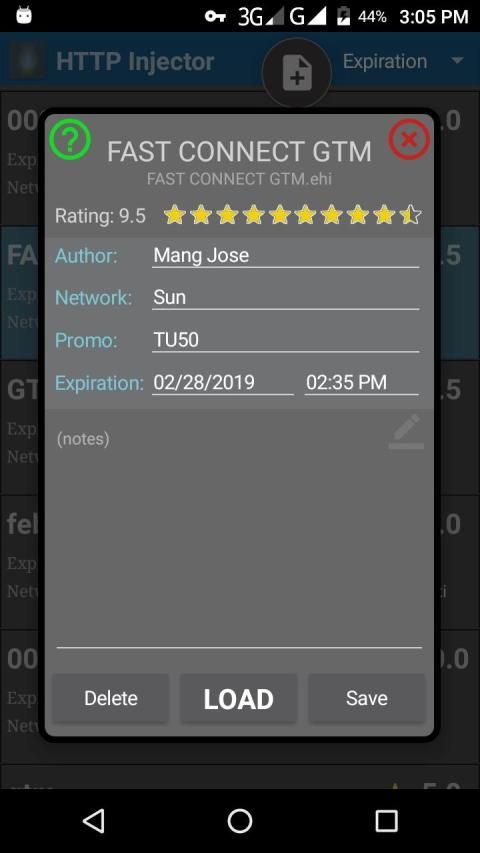
2. Click LOAD on the next screen. DONE!
------------------------------------
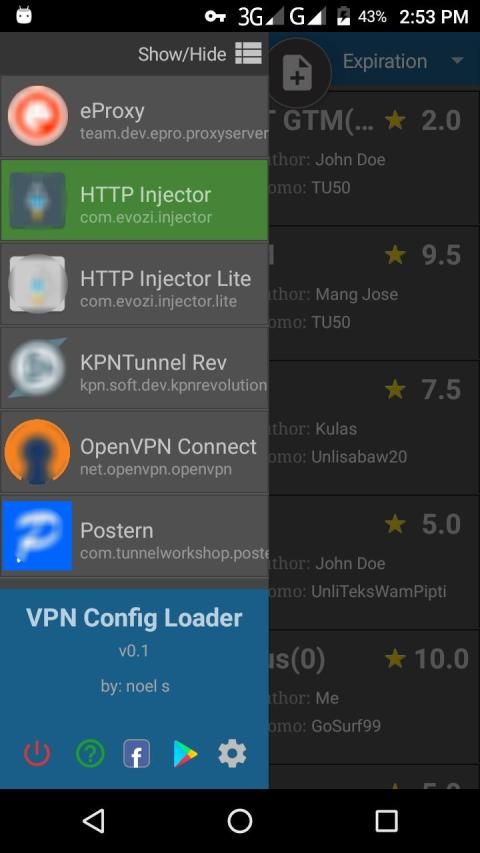
THIS APP WORKS ON:
• eProxy
• HTTP Injector
• HTTP Injector Lite
• KPNTunnel Rev
• OpenVPN Connect
• Postern
(For Android 5+ only)
=====================================
HOW TO ADD CONFIG FILES
• Move or copy your config files to the "vpn config loader" folder in the root of your phone's internal storage.
• Click the + sign at top of the main screen.
All files compatible for the supported VPNs will be added automatically.
After the configs are added, the original files will be moved to "added" folder.
You can now delete them if you want. Just make sure you don't do "Clear Data" or you will lose everything.
क्यों वीपीएन CONFIG लोडर का उपयोग करें?
• समर्थित वीपीएन में से किसी में भी कॉन्फिगर करना जस्ट 2 क्लिक्स में किया जा सकता है!
• अपने आप को याद दिलाने के लिए एक रेटिंग प्रणाली के साथ जो विन्यास तेज और विश्वसनीय हैं
• समाप्ति की तारीखों का ध्यान रखें
• सूची को रेटिंग, समाप्ति, नेटवर्क, आदि के अनुसार क्रमबद्ध किया जा सकता है।
-------------------------------------
कैसे एक वीपीएन की अवधारणा को बदलने के लिए
1. सूची से चयन करें।
2. अगली स्क्रीन पर LOAD पर क्लिक करें। किया हुआ!
------------------------------------
इस एप्लिकेशन पर काम करता है:
• eProxy
• HTTP इंजेक्टर
• HTTP इंजेक्टर लाइट
• KPNTunnel रेव
• OpenVPN कनेक्ट
• पोस्टर्न
(केवल एंड्रॉइड 5+ के लिए)
=====================================
कॉनफिड फिल्मों को कैसे जोड़ें
• अपने कॉन्फिगर फाइल को अपने फोन के इंटरनल स्टोरेज के रूट में "vpn config लोडर" फोल्डर में ले जाएं या कॉपी करें।
• मुख्य स्क्रीन के शीर्ष पर + चिह्न पर क्लिक करें।
समर्थित वीपीएन के लिए संगत सभी फाइलें अपने आप जुड़ जाएंगी।
कॉन्फ़िगरेशन जोड़े जाने के बाद, मूल फ़ाइलों को "जोड़ा" फ़ोल्डर में ले जाया जाएगा।
आप चाहें तो अब उन्हें हटा सकते हैं। बस सुनिश्चित करें कि आप "डेटा साफ़ न करें" या आप सब कुछ खो देंगे।
v0.9-M
* bug fixes
NOTE:
This version is for Android Lollipop an Marshmallow only.
The Alternate version: v0.9-A works also for Nougat, Oreo, and Pie.
https://drive.google.com/file/d/1xO9iiaBIKnijpa3j2DyWFXcHiXlG1FZS/view?usp=drivesdk





9Apps 4.9














