

It’s time to update your mobile application. 10,000+ users downloaded Unicon - Icon Themer latest version on 9Apps for free every week! This indicates many people like this application. This hot app was released on 2016-01-29. 9Apps allows you to download more apps and updated daily!
★ REQUIRES ROOT ★
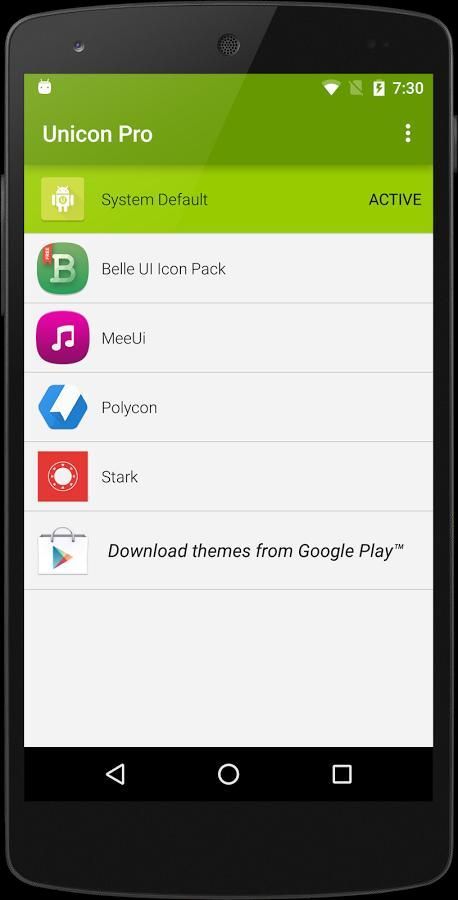
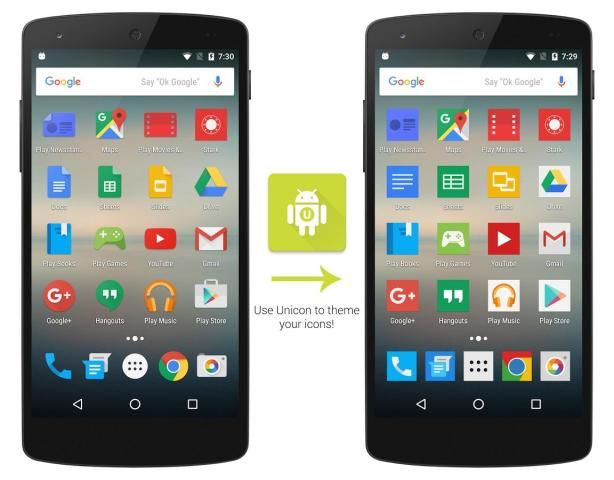
Unicon allows you to apply icon packs (Nova/Apex/ADW etc.) to your device to theme icons.
You can now use
any
launcher you prefer (especially Stock launchers!) and still have the power to customize how your application icons look like.
(Note: If your launcher is replacing the icons with their own theme, Unicon would appear to be not working)
Unicon is also more consistent because the icon theme is
applied throughout your device
and not just confined your launcher!
See the screenshots to believe!
Basic Features:
★ More than 100 icon packs available in Play Store ready to be applied to Unicon
★ Tested with ADW, Apex, Nova Themes/Icon Packs
★ Works with Legacy GO Themes (the ones which is not made with GO Theme Factory)
★ Works with Paid Icon Packs
★ Works with Odex/Deodexed ROMs
PRO Features:
★ Requires Pro Key: https://play.google.com/store/apps/details?id=sg.ruqqq.IconThemer
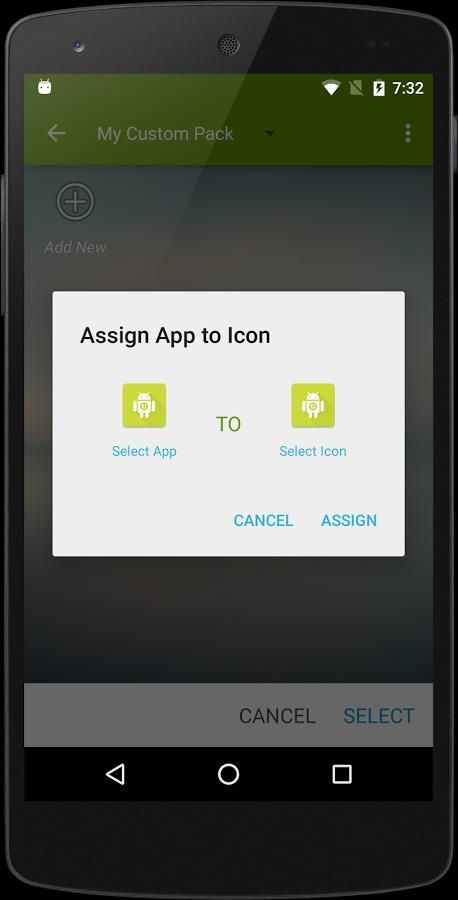
★ Custom Icon Assignment: Manually map apps to icons from different icon packs!
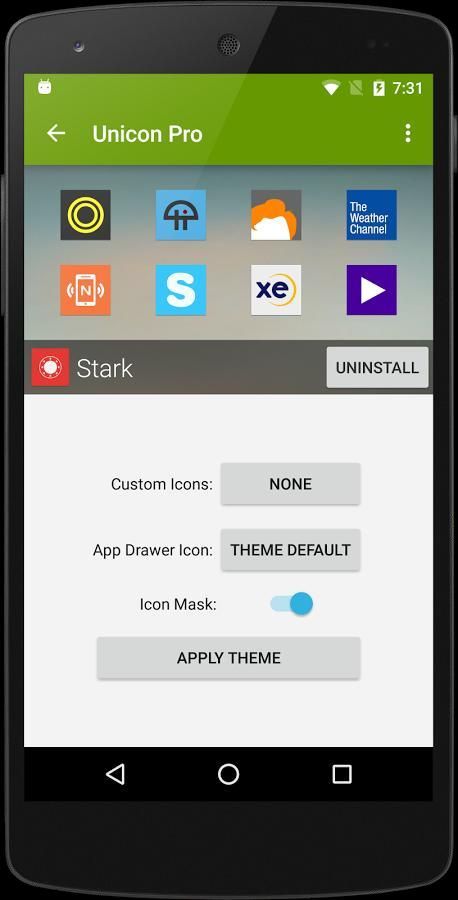
★ App Drawer Icon Theming: Using stock launcher? No problem! Now you can have pick app drawer icon from icon packs!
★ More to come!
Requirements:
★ ROOT REQUIRED
★ Android 4.0+ with JIT (most devices)
★ Android 5.0+/6.0+ with Xposed Framework Alpha (not all devices supported!):
http://forum.xda-developers.com/showthread.php?t=3034811
★ Xposed Framework (Unicon will prompt you to install if not found):
http://forum.xda-developers.com/showpost.php?p=24267823&postcount=2
★ Not Compatible with MIUI
★ SELinux Permissive
Install Instructions:
(You only need to follow this if the in-built guide fails)
1. Install Xposed Installer
2. Install Xposed Framework (from the Xposed Installer app)
3. Activate the module in Xposed Installer app
4. Download Icon Packs from Play Store and apply in Unicon
FAQ:
How do I apply theme without Icon Masks?
Long click on the Apply button.
I applied a theme but the changes does not show up on Folder Organizer?
Folder Organizer has an icon cache. You just need to go into Folder Organizer and click the Refresh button. All should be well.
★ जड़ ★ आवश्यकता
यूनिकॉन आप विषय चिह्न के लिए अपनी डिवाइस के लिए आइकन पैक (नोवा / एपेक्स / ADW आदि) को लागू करने की अनुमति देता है।
अब आप
आप अभी भी (विशेष रूप से स्टॉक लांचर!) पसंद करते हैं और किसी भी लॉन्चर अपने आवेदन माउस की तरह दिखते कैसे अनुकूलित करने की शक्ति है का उपयोग कर सकते हैं।
(नोट: अपने लांचर अपने स्वयं के विषय के साथ माउस की जगह ले जाता है, यूनिकॉन काम नहीं कर रहा हो प्रकट होता है)
प्रतीक थीम
अपनी डिवाइस भर में लागू और सिर्फ सीमित नहीं अपने लांचर है क्योंकि यूनिकॉन भी अधिक सुसंगत है!
स्क्रीनशॉट विश्वास करने के लिए मिलते हैं!
बुनियादी सुविधाओं:
★ प्ले स्टोर में उपलब्ध के लिए तैयार 100 से अधिक आइकन पैक यूनिकॉन करने के लिए लागू किया जाएगा
★ ADW, सर्वोच्च, नोवा विषय / चिह्न पैक के साथ परीक्षण किया
★ विरासत जाओ विषय-वस्तु (जाओ थीम फैक्टरी के साथ नहीं किया जाता है, जो लोगों) के साथ काम करता है
★ अदा चिह्न पैक के साथ काम करता है
★ Odex / Deodexed रोम के साथ काम करता है
प्रो सुविधाएँ:
★ प्रो कुंजी आवश्यक है: https://play.google.com/store/apps/details?id=sg.ruqqq.IconThemer
★ कस्टम चिह्न काम: अलग आइकन पैक से प्रतीक करने के लिए मैन्युअल नक्शा क्षुधा!
★ अनुप्रयोग दराज चिह्न थीम: शेयर लांचर का उपयोग? कोई बात नहीं! अब आप आइकन पैक से अनुप्रयोग दराज आइकन लेने हो सकता है!
★ अधिक आने के लिए!
आवश्यकताएँ:
★ जड़ आवश्यक
जीत के साथ ★ एंड्रॉयड 4.0 + (सबसे उपकरणों)
★ एंड्रॉयड 5.0 / + 6.0 + Xposed फ्रेमवर्क अल्फा (सभी उपकरणों का समर्थन नहीं है!) के साथ:
http://forum.xda-developers.com/showthread.php?t=3034811
★ Xposed फ्रेमवर्क (अगर नहीं मिला यूनिकॉन स्थापित करने का संकेत होगा):
http://forum.xda-developers.com/showpost.php?p=24267823&postcount=2
MIUI साथ ★ संगत नहीं
★ SELinux उदारचेता
निर्देश स्थापित:
(आप केवल में निर्मित गाइड असफल रहती है तो इस का पालन करने की जरूरत है)
1. स्थापित Xposed इंस्टालर
2. (Xposed इंस्टालर एप्लिकेशन से) Xposed फ्रेमवर्क स्थापित करें
3. Xposed इंस्टालर अनुप्रयोग में मॉड्यूल सक्रिय
प्ले स्टोर से 4. डाउनलोड आइकन पैक और यूनिकॉन में लागू
पूछे जाने वाले प्रश्न:
मैं आइकन मास्क बिना विषय को लागू करते?
लागू करें बटन पर लांग क्लिक करें।
मैं एक विषय लागू है, लेकिन परिवर्तन फ़ोल्डर आयोजक? पर नहीं दिखा है
फ़ोल्डर आयोजक एक आइकन कैश है। तुम बस फ़ोल्डर आयोजक में जाओ और ताज़ा करें बटन पर क्लिक करने की जरूरत है। सब कुछ ठीक हो जाना चाहिए।
Hello from Unicon 2.0. Now comes with custom icon theming and app drawer icon theming for Pro versions.

9Apps 4.9


![Tweaking Xolo A500S [Unicon/Icon Themer] screenshot 2](https://i.ytimg.com/vi/AdzvIvtDsOc/mqdefault.jpg)
![AndroidMod - Unicon Icon Themer & MoDaCo Toolkit [Xposed] screenshot 3](https://i.ytimg.com/vi/ZSiiql3JpqU/mqdefault.jpg)
















