

Enjoy the most popular apps here! 20,000+ users downloaded Touch to remove latest version on 9Apps for free every week! In addition, the latest version of the app has updated a lot of features. This hot app was released on 2019-03-25. 9Apps allows you to download more apps and updated daily!
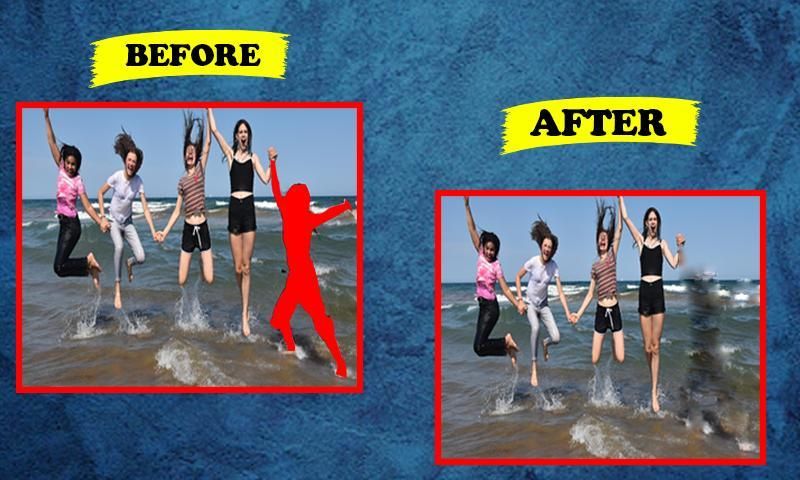
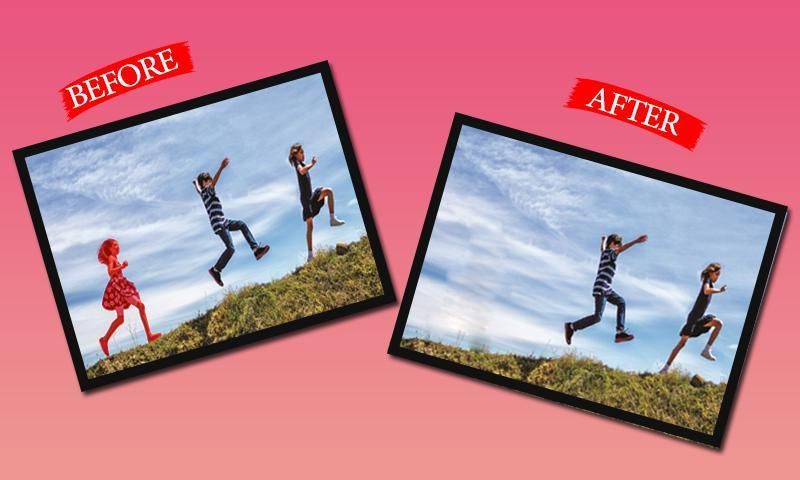
select your best Photo from gallery using Touch Retouch app: Remove Unwanted Photos app and retouch-Touch to remove content or lines from photo which you select.
Touch To Erase - Photo Retouch Blemish Remove .Remove people from best photo, Remove clothes editor is an object removal app , You have no need to precise It the app will find the line automatically. If you want to erase photo, erase only a part of line, Use Segment Remover. Set your line Thickness and thick for better performance: Remove Unwanted Photos is one of best app you ever use for remover.
Features Add.
1=Easy to use this application
2=User friendly user interface
3=Remove unwanted part of your image with Eraser
4=Remove pimples and skin blemishes easily
5=Remove text and colour from your image
6=Remove whatever you feel is spoiling your photos
7=Object eraser on photo, images to become beauty
8=Option to remove image part with lasso tools
9= Set eraser with scale ratio
10=Quick repair your image
टच रीटच ऐप का उपयोग करके गैलरी से अपना सर्वश्रेष्ठ फोटो चुनें: जिस फोटो को आप चुनते हैं उससे कंटेंट या लाइन्स हटाने के लिए अनवांटेड फोटोज़ ऐप और रीटच-टच को हटा दें।
टच टू इरेज - फोटो रीटच बिमलेश रिमूव करें। लोगों को बेस्ट फोटो से हटाएं, कपड़े एडिटर को हटाएं एक ऑब्जेक्ट रिमूवल ऐप है, आपको सटीक करने की कोई आवश्यकता नहीं है यह ऐप स्वचालित रूप से लाइन ढूंढ लेगा। यदि आप फ़ोटो को मिटाना चाहते हैं, तो लाइन का केवल एक भाग मिटाएँ, सेगमेंट रिमूवर का उपयोग करें। बेहतर प्रदर्शन के लिए अपनी लाइन को गाढ़ा और गाढ़ा करें: अनवांटेड फोटोज को हटा दें जो आपके द्वारा कभी रिमूवर के लिए उपयोग किए जाने वाले सबसे अच्छे ऐप में से एक है।
सुविधाएँ जोड़ें।
1 = इस एप्लिकेशन का उपयोग करना आसान है
2 = उपयोगकर्ता के अनुकूल उपयोगकर्ता इंटरफ़ेस
3 = इरेज़र के साथ अपनी छवि का अवांछित हिस्सा निकालें
4 = पिंपल्स और त्वचा के दाग धब्बों को आसानी से हटाएं
5 = अपनी छवि से पाठ और रंग निकालें
6 = जो भी आपको लगता है उसे हटा दें जिससे आपकी तस्वीरें खराब हो रही हैं
7 = फोटो पर ऑब्जेक्ट इरेज़र, सुंदरता बनने के लिए चित्र
8 = लासो टूल्स के साथ छवि भाग को हटाने का विकल्प
9 = स्केल अनुपात के साथ इरेज़र सेट करें
10 = अपनी छवि को शीघ्र सुधारें




9Apps 4.9













