



As we all know, 20,000+ users downloaded Shotnote latest version on 9Apps for free every week! More apps are free download here! This hot app was released on 2018-05-22. That’s it! You’re done?
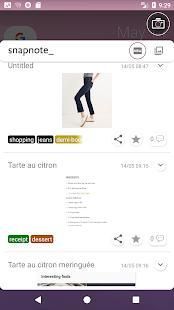
Using a floating Shutter, target the part of the screen that you want to capture. Release the Shutter then resize the cropper. Finally tap the Shutter to take a screenshot. Use Tags and filters to organize your Snapshots. Examine your collection with zoom and add notes and comments with details about the pictures. You can also archive and share them on social media.
Make a selection of your favorite things on the Internet. Recipes, shoes, quotes, posts, ... Anything you see in your screen, now you can save and organize it in collections and archives.
एक अस्थायी शटर का उपयोग करना, स्क्रीन कि आप कैप्चर करना चाहते का हिस्सा लक्षित करते हैं। रिलीज शटर तो काटने वाला आकार बदलें। अंत में शटर स्क्रीनशॉट लेने के लिए टैप करें। उपयोग टैग और फिल्टर अपने स्नैपशॉट्स व्यवस्थित करने के लिए। ज़ूम के साथ अपने संग्रह की जांच करना और चित्रों के बारे में विवरण के साथ नोट्स और टिप्पणी जोड़ें। तुम भी संग्रह कर सकते हैं और सामाजिक मीडिया पर उन्हें साझा करें।
इंटरनेट पर अपने पसंदीदा चीजों में से एक चयन करें। व्यंजनों, जूते, उद्धरण, पोस्ट, ... कुछ भी आप अपनी स्क्रीन में देखते हैं, अब आप को बचाने और संग्रह और अभिलेखागार में यह आयोजन कर सकते हैं।
Snapshot review UI rearranged

9Apps 4.9


![Ampad Shot Note- A Simple Solution for Storing and Sharing Handwritten Notes [REVIEW] screenshot 2](https://i.ytimg.com/vi/FLVIIhmr7XY/mqdefault.jpg)