
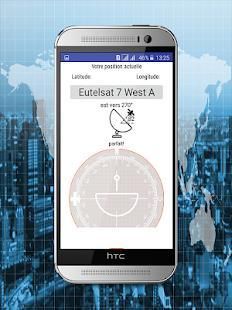
Are you looking for some free apps? 20,000+ users downloaded Satellite Finder pro latest version on 9Apps for free every week! This indicates many people like this application. This hot app was released on 2018-04-16. Read the following paragraph to see more information.
Finding a TV satellite or an antenna, in azimuth, can be pretty difficult. Before you can find it with a compass you have to do some calculations using GPS location, magnetic variation, compass azimuth and satellite azimuth.
Satellite Director replaces all of that. See tips to success below.
Português: Telefones sem bússola não pode baixar este aplicativo.
WARNING: YOUR PHONE or TABLET MUST HAVE A COMPASS !!!!
WITHOUT COMPASS YOU CANNOT DOWNLOAD THIS APP.
Check "Satellite Locator" which uses GPS locations to find a satellite.
Some phone/tablet compass are really bad so compare your phone/tablet compass with a real compass !!
Unfortunatly you have to calibrate the compass before using it.
Metal covers/cases or covers/cases with metal/magnetic closure will influence/disrupt the compass of your phone or tablet. Do not use these covers !! The compass of your phone can also get inaccurate because it is affected by other electro - magnetic fields or because it is weakened by age. Calibrating the compass may not help anymore.
PRECISION DEPENDS ON THE QUALITY OF YOUR PHONES HARDWARE.
Warning: If you use Cyanogenmod / Cymod then you may run into Android compatibility issues and the app may not work. You should then complain to Cyanogenmod / Cymod and not to me.
This app is add-free !
Help me to continue the work on this app and watch some of my videos on Youtube. The advertising in the videos provides some required money (houres of work, phones to test on, satellite equipment, etc.).
How does it work ?
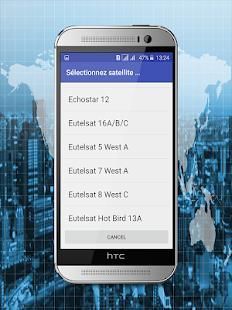
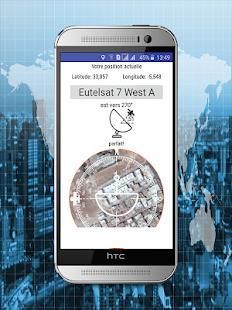
Just enable the GPS in your phone or enter your GPS location, select the desired TV satellite or antenna location and point your phone to the sky to target (find) the TV satellite. You have found the satellite when the white ball is in the white circle and the cyan ball is in the cyan circle. Align, in azimuth, the offset arm of the satellite dish to the cyan arrow on the phones display and the satellite dish is aligned in azimuth with the satellite.
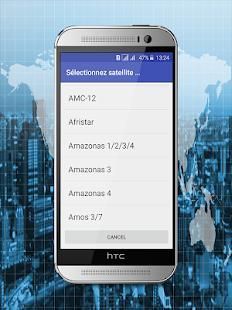
Selectable audio tone, camera preview, continuous mode (no pause), color pickers or a user defined satellite position may make it easier for you to find the desired TV satellite. The satellite list contains 280 satellites.
Optional you can take a photo (resized)/screenshot by touching on the director tab. The photo/screenshot is ONLY stored on the phones memory card.
Optional: you can get an indication when you are to close to iron (dish/pole) in the form of an green/yellow/red bar.
satellite alignment - Satellite positions are derived from Agi's database. Some positions may seem not accurate (example: Hispasat 30°w is at 29.96°w in the satellite list) but they are very accurate.
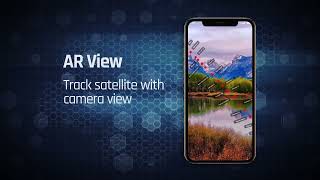
SatFinder (Satellite Finder) satellite finder app is a tool which will help you to set up satellite dish. It will give you azimuth, elevation and LNB tilt for your location (based on GPS) and chosen satellite from list. The result is shown both as numeric data and graphical on google maps. It has also built in compass which will help you to find proper satellite azimuth. It also can use augmented reality to show where is satellite on camera view.
Compass works only on devices with compass sensor (magnetometer).
How to use this app Satellite Tracker :
1. First of all, you should enable GPS and Internet on your phone. Remember – in most cases it is impossible to receive GPS signal inside buildings. So if you want to get very accurate location – please go near windows or go even outside.
In current app version location should be found quite immediately. So if you stuck with ‘no location’ message please make ensure that you got enabled all required features/permissions.
2. If app found your location, you must select desired satellite. To do this you must find icon with magnification glass and tap it. On the list you will find all satellites with elevation angle above zero degrees. Remember: satellite name doesn’t affect the calculation of angles. Important thing is satellite position.
दिगंश में एक टीवी उपग्रह या एक एंटीना, ढूँढना, सुंदर मुश्किल हो सकता है। इससे पहले कि आप एक कम्पास के साथ इसे पा सकते हैं आप कुछ जीपीएस स्थान, चुंबकीय परिवर्तन, कम्पास दिगंश और उपग्रह दिगंश का उपयोग कर गणना करने के लिए है।
उपग्रह निदेशक यह सब बदल देता है। नीचे सफलता के लिए टिप्स देखें।
Português: Telefones sem bússola não pode Baixar इस aplicativo।
चेतावनी: अपने फोन या टेबलेट चाहिए दिशा-सूचक !!!!
कम्पास के बिना आप इस एप्लिकेशन को डाउनलोड नहीं कर सकते।
"सैटेलाइट लोकेटर" जो एक उपग्रह को खोजने के लिए जीपीएस स्थानों का उपयोग करता जाँच करें।
कुछ फ़ोन / टेबलेट कम्पास वास्तव में तो एक असली कम्पास के साथ अपने फोन / टैबलेट कम्पास तुलना बुरा कर रहे हैं !!
दुर्भाग्य से आप इसे उपयोग करने से पहले कम्पास की जांच करने के लिए है।
धातु कवर / मामलों या कवर / धातु / चुंबकीय बंद होने के साथ मामलों को प्रभावित करती है / अपने फ़ोन या टेबलेट के कम्पास को बाधित। इन कवर का प्रयोग न करें !! अपने फोन की कम्पास भी गलत हो सकता है क्योंकि यह अन्य विद्युत से प्रभावित होता है - चुंबकीय क्षेत्र या क्योंकि यह उम्र से कमजोर है। कम्पास कैलिब्रेट की अब और मदद नहीं कर सकते हैं।
PRECISION अपने फोन हार्डवेयर की गुणवत्ता पर निर्भर।
चेतावनी: अगर आप CyanogenMod का उपयोग करते हैं / Cymod तो आप एंड्रॉयड संगतता समस्याओं में पड़ सकते हैं और एप्लिकेशन को काम न करें। इसके बाद आप CyanogenMod / Cymod को शिकायत करनी चाहिए और मेरे पास नहीं।
इस एप्लिकेशन को एड-नि: शुल्क है!
मुझे इस एप्लिकेशन पर काम जारी रखने और यूट्यूब पर मेरे वीडियो में से कुछ देखने के लिए मदद करें। वीडियो में विज्ञापन कुछ आवश्यक पैसा (उपग्रह उपकरण काम के houres, फोन, पर परीक्षण करने के लिए, आदि) प्रदान करता है।
यह कैसे काम करता है ?
बस अपने फोन में जीपीएस सक्षम करने या अपने जीपीएस स्थान डालें वांछित टीवी उपग्रह या एंटीना स्थान का चयन करें और आकाश के लिए अपने फोन को इंगित को लक्षित (लगता है) टीवी उपग्रह है। जब सफेद गेंद सफेद सर्कल में है और सियान गेंद सियान मंडली में शामिल है आप उपग्रह मिल गया है। संरेखित, दिगंश में, फोन प्रदर्शन और उपग्रह डिश पर सियान तीर करने के लिए उपग्रह डिश की भरपाई हाथ उपग्रह के साथ दिगंश में गठबंधन है।
चयन ऑडियो टोन, कैमरा पूर्वावलोकन, सतत मोड (कोई विराम), रंग पिकर या एक उपयोगकर्ता परिभाषित उपग्रह स्थिति यह आसान आप इच्छित टीवी उपग्रह को खोजने के लिए कर सकते हैं। उपग्रह सूची 280 उपग्रहों में शामिल है।
वैकल्पिक आप एक तस्वीर (आकृति परिवर्तन) निदेशक टैब पर स्पर्श करके / स्क्रीनशॉट ले सकते हैं। तस्वीर / स्क्रीनशॉट केवल फोन के मेमोरी कार्ड पर संग्रहीत किया जाता है।
वैकल्पिक: यदि आप एक संकेत प्राप्त कर सकते हैं जब आप एक हरी / पीला / लाल पट्टी के रूप में लोहे (पकवान / ध्रुव) को बंद करने के लिए कर रहे हैं।
उपग्रह संरेखण - सैटेलाइट पदों Agi के डेटाबेस से प्राप्त कर रहे हैं। कुछ पदों पर लग सकता है सही नहीं है (उदाहरण: Hispasat 30 डिग्री डब्ल्यू उपग्रह सूची में डब्ल्यू 29.96 डिग्री पर है), लेकिन वे बहुत ही सटीक हैं।
SatFinder (सैटेलाइट खोजक) उपग्रह खोजक एप्लिकेशन है जो आप उपग्रह डिश स्थापित करने के लिए मदद मिलेगी एक उपकरण है। यह आप दिगंश, सूची से अपने स्थान के लिए ऊंचाई और LNB झुकाव (जीपीएस के आधार पर) और चुने हुए उपग्रह दे देंगे। परिणाम दोनों गूगल मैप्स पर संख्यात्मक डेटा और ग्राफिकल रूप में दिखाया गया है। यह भी कम्पास जो आप उचित उपग्रह दिगंश को खोजने के लिए मदद मिलेगी में निर्माण किया है। यह भी संवर्धित वास्तविकता का उपयोग दिखाने के लिए जहां कैमरा दृश्य पर उपग्रह है सकते हैं।
कम्पास केवल कम्पास सेंसर (मैग्नेटोमीटर) के साथ उपकरणों पर काम करता है।
इस एप्लिकेशन को सैटेलाइट ट्रैकर का उपयोग कैसे करें:
1. सबसे पहले, आप जीपीएस और इंटरनेट अपने फोन पर सक्षम होना चाहिए। याद रखें - ज्यादातर मामलों में यह इमारतों के अंदर जीपीएस संकेत प्राप्त करने के लिए असंभव है। तो तुम बहुत ही सटीक स्थान प्राप्त करने के लिए चाहते हैं - पास विंडो जाना या यहाँ तक कि बाहर जाएं।
वर्तमान एप्लिकेशन संस्करण स्थान में काफी तुरंत पाया जाना चाहिए। तो अगर आप 'कोई स्थान' संदेश के साथ फंस कृपया सुनिश्चित करें कि आप सक्षम हो गया सभी आवश्यक सुविधाओं / अनुमतियाँ हैं।
2. यदि एप्लिकेशन आपके स्थान पाया, आपके द्वारा इच्छित उपग्रह चयन करना होगा। ऐसा करने के लिए आप आवर्धन गिलास के साथ आइकन नहीं मिल जाता और उसे टैप करना होगा। सूची पर आप शून्य डिग्री से ऊपर ऊंचाई कोण के साथ सभी उपग्रहों मिल जाएगा। याद रखें: उपग्रह नाम कोण की गणना को प्रभावित नहीं करता। महत्वपूर्ण बात यह है उपग्रह की स्थिति है।



9Apps 4.9














