



Download and enjoy our service, 30,000+ users downloaded SaAsh File Manager latest version on 9Apps for free every week! The app has do enough to distinguish itself from its predecessor. This hot app was released on 2018-04-23. You can enjoy the most completed function of this app.
SaAsh File Manager is easy and powerful file manager for Android devices. It’s free, fast and full-featured. Because of its simple UI, it’s extremely easy to use.
With SaAsh File Manager, you can easily manage your files and folders in your device and Network-attached storage
It supports every file explorer actions like open, search, navigate directory, copy and paste, cut, delete, rename, compress, decompress, transfer, download, bookmark,
organize. SaAsh File Manager supports media files and major file formats including apk.
Functions of SaAsh File Manager are as following:
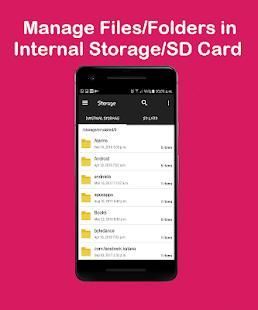
• Main Storage: You can manage all files and folders in your local device storage.
• SD Card: You can manage all files and folders in your SD Card.
• Storage: You can manage all files and folders in your OTG.
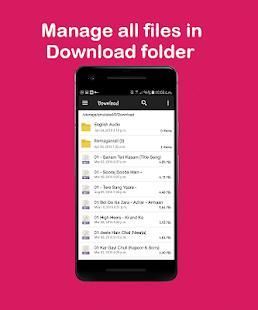
• Download: You manage all files (including apk and zip files) in download folder.
• Images: You can manage image and picture files in your storages. Image preview is available. (Supported file formats: bmp, gif, jpg, png and etc)
• Music: You can manage all music and sound related files. (Supported file formats: mp3, ogg, flac, m4p, wav, wma and etc)
• Videos: You can manage all video files in your device. (Supported file formats: asf, avi, flv, mp4, mpeg, wmv and etc)
• Doc: You can manage all document files in your device. (Supported file formats: doc, ppt, pdf, and etc)
• Apps: You can see all applications installed in your local device. You can stop or delete apps. You can delete data or cash of apps. You can backup your app as apk file also.
• New Files: You can manage new files moved and downloaded to your local device.
• Favorites: You can long press the files and add as favorites
SaAsh फ़ाइल प्रबंधक Android उपकरणों के लिए आसान और शक्तिशाली फ़ाइल प्रबंधक है। यह नि: शुल्क तेजी से और पूर्ण विशेषताओं है। अपने सरल यूआई के कारण, यह उपयोग करने के लिए बेहद आसान है।
SaAsh फ़ाइल प्रबंधक के साथ, आप आसानी से अपने डिवाइस और नेटवर्क संलग्न संग्रहण में अपनी फ़ाइलों और फ़ोल्डरों का प्रबंधन कर सकते
यह खुले, खोज की तरह हर फ़ाइल एक्स्प्लोरर कार्यों का समर्थन करता है, निर्देशिका नेविगेट, कॉपी और पेस्ट, कट, हटाएँ, नाम बदलने, सेक, संपीड़न हटाने, स्थानांतरण, डाउनलोड, बुकमार्क,
आयोजन करते हैं। SaAsh फ़ाइल प्रबंधक मीडिया फ़ाइलों और apk सहित प्रमुख फ़ाइल स्वरूपों का समर्थन।
SaAsh फ़ाइल प्रबंधक के कार्य निम्नलिखित हैं:
• मुख्य भंडारण: आप अपने स्थानीय डिवाइस संग्रहण में सभी फ़ाइलों और फ़ोल्डरों का प्रबंधन कर सकते हैं।
• एसडी कार्ड: आप अपने एसडी कार्ड में सभी फ़ाइलों और फ़ोल्डरों का प्रबंधन कर सकते हैं।
• भंडारण: आप अपने OTG में सभी फ़ाइलों और फ़ोल्डरों का प्रबंधन कर सकते हैं।
• डाउनलोड: आप डाउनलोड फ़ोल्डर में (apk और ज़िप फ़ाइलों सहित) सभी फाइलों का प्रबंधन।
• छवियाँ: आप अपने भंडार में छवि और तस्वीर फाइलों का प्रबंधन कर सकते हैं। छवि पूर्वावलोकन उपलब्ध है। (समर्थित फ़ाइल प्रारूप: BMP, GIF, JPG, PNG और आदि)
• संगीत: आप सभी संगीत का प्रबंधन और संबंधित फ़ाइलें ध्वनि कर सकते हैं। (समर्थित फ़ाइल प्रारूप: एमपी 3, ogg, FLAC, m4p, wav, अर्थोपाय अग्रिम और आदि)
• वीडियो: आप अपने डिवाइस में सभी वीडियो फ़ाइलों का प्रबंधन कर सकते हैं। (समर्थित फ़ाइल प्रारूप: asf, AVI, FLV, MP4, एमपीईजी, WMV और आदि)
• डॉक्टर: आप अपने डिवाइस में सभी दस्तावेज़ फ़ाइलों का प्रबंधन कर सकते हैं। (समर्थित फ़ाइल प्रारूप: डॉक, पीपीटी, पीडीएफ, और आदि)
• ऐप्स: आप सभी आवेदनों को अपने स्थानीय उपकरण में स्थापित देख सकते हैं। आप बंद कर दें या क्षुधा हटा सकते हैं। आप ऐसे ऐप्स का डेटा या नकद हटा सकते हैं। तुम भी apk फ़ाइल रूप में अपने अनुप्रयोग का बैकअप ले सकते।
• नई फ़ाइलें: आप नई फ़ाइलें चले गए और अपने स्थानीय डिवाइस पर डाउनलोड का प्रबंधन कर सकते हैं।
• पसंदीदा: आप लंबे समय तक फाइलों दबाएँ और पसंदीदा के रूप में जोड़ सकते हैं
SaAsh File Manager is easy and powerful file manager for Android devices. It’s free, fast and full-featured. Because of its simple UI, it’s extremely easy to use.
Functions of SaAsh File Manager are as following:
• Main Storage
• SD Card
• Storage
• Download
• Images
• Music
• Videos
• Doc
• Apps:
• New Files
• Favorites



9Apps 4.9














