
Are you finding some interesting apps? 20,000+ users downloaded Open Tablet in WhatsApp latest version on 9Apps for free every week! You can enjoy it by use in your own phone. This hot app was released on 2018-08-26. To know more information, read the paragraph below.
Disclaimer: This app is not affiliated with nor endorsed by WhatsApp Inc.
---------------------------------------------------
With this Application “Open Tablet in WhatsApp (one click to chat)” you can
open a chat WhatsApp on tablet to any phone number in WhatsApp
messenger, provided that this number is registered in the Tablet for WhatsApp
messenger.
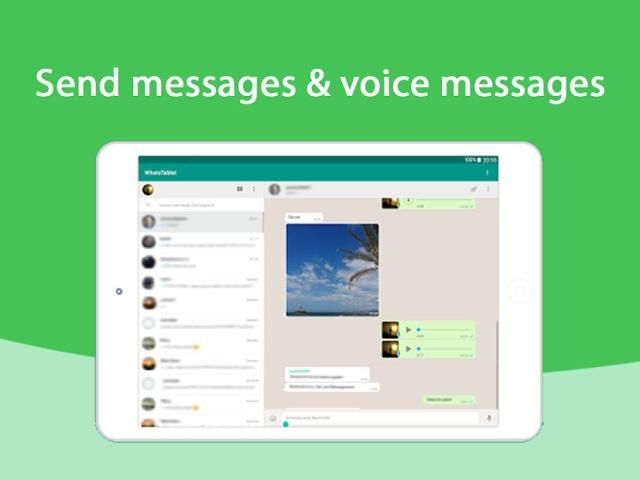
Do you want to use WhatsApp on your mobile phone a tablet simultaneously?
That's possible with Whats Tablet now.
This app will give open in WhatsApp messenger on your tablet. Officially, WhatsApp is not supported by the tablet, but there are a couple of tricks to bypass this restriction, so this app can be called a guide to installing the messenger WhatsApp on your tablet. This does not have anything difficult you just need to follow the instructions, and after a while WhatsApp messenger is installed on your tablet. Guide how to install WhatsApp messenger to the tablet supported on all Android tablets including such popular as: Samsung galaxy tab, Lenovo Yoga Tablet, Lenovo IdeaTab, Google nexus 7,8,9,10, NVIDIA, ASUS MeMO Pad, Digma tablets and all other devices on Android are not included in this list. WhatsApp messenger is an amazing app that will help you stay connected, regardless of device type. Set yourself on the tablet WhatsApp messenger and enjoy! Thank you for your interest in the management how to install WhatsApp messenger on your tablet!
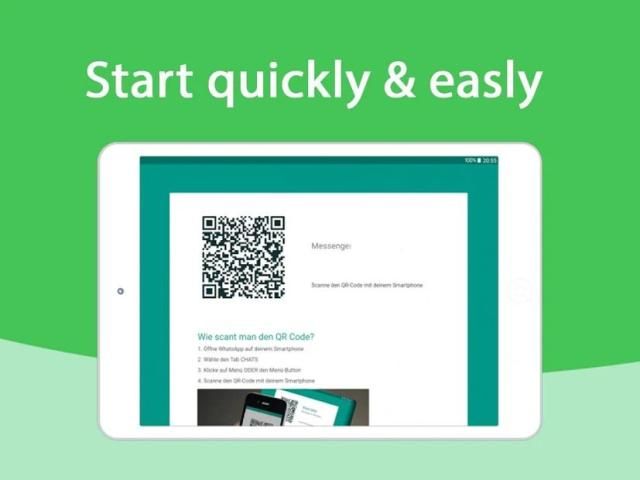
Install Whats Tablet on your tablet and connect your mobile phone with your tablet via a QR code, that's all.
From now on tablet a mobile are synct.
Features in this app:
♥No more change needed between tablet a mobile phone
♥Use big tablet keypad a display
♥Contactable on both devices
♥Your contacts on both devices
♥Your pictures on both devices
N.B. : This app is not an official WhatsApp applications and not associated
with WhatsApp Inc.
अस्वीकरण: यह ऐप व्हाट्सएप इंक द्वारा संबद्ध नहीं है और न ही अनुमोदित है।
-------------------------------------------------- -
इस एप्लिकेशन के साथ "व्हाट्सएप में ओपन टैबलेट (चैट करने के लिए एक क्लिक)" आप कर सकते हैं
व्हाट्सएप में किसी भी फोन नंबर पर टैबलेट पर चैट व्हाट्सएप खोलें
मैसेंजर, बशर्ते कि यह नंबर व्हाट्सएप के लिए टैबलेट में पंजीकृत है
दूत।
क्या आप अपने मोबाइल फोन पर व्हाट्सएप का एक साथ टैबलेट का उपयोग करना चाहते हैं?
व्हाट्स टैबलेट के साथ अब यह संभव है।
यह ऐप आपके टैबलेट पर व्हाट्सएप मैसेंजर में खुल जाएगा। आधिकारिक तौर पर, व्हाट्सएप टैबलेट द्वारा समर्थित नहीं है, लेकिन इस प्रतिबंध को बाईपास करने के लिए कुछ युक्तियां हैं, इसलिए इस ऐप को आपके टैबलेट पर मैसेंजर व्हाट्सएप इंस्टॉल करने के लिए एक गाइड कहा जा सकता है। इसमें कुछ भी मुश्किल नहीं है, आपको निर्देशों का पालन करने की आवश्यकता है, और कुछ समय बाद व्हाट्सएप मैसेंजर आपके टैबलेट पर स्थापित है। सैमसंग गैलेक्सी टैब, लेनोवो योग टैबलेट, लेनोवो आइडियाटैब, Google नेक्सस 7,8,9,10, एनवीआईडीआईए, एएसयूएस एमएमओ पैड, दिग्मा टैबलेट्स और सभी के रूप में लोकप्रिय सभी टैबलेट पर समर्थित टैबलेट पर व्हाट्सएप मैसेंजर को कैसे इंस्टॉल करें गाइड करें एंड्रॉइड पर अन्य डिवाइस इस सूची में शामिल नहीं हैं। व्हाट्सएप मैसेंजर एक अद्भुत ऐप है जो डिवाइस प्रकार के बावजूद आप जुड़े रहने में मदद करेगा। अपने आप को व्हाट्सएप मैसेंजर टैबलेट पर सेट करें और आनंद लें! प्रबंधन में आपकी रूचि के लिए धन्यवाद, अपने टैबलेट पर व्हाट्सएप मैसेंजर को कैसे इंस्टॉल करें!
अपने टैबलेट पर व्हाट टैबलेट इंस्टॉल करें और अपने मोबाइल फोन को अपने टैबलेट से क्यूआर कोड के माध्यम से कनेक्ट करें, बस इतना ही।
अब टैबलेट पर एक मोबाइल synct हैं।
इस ऐप में विशेषताएं:
♥ टैबलेट के बीच एक मोबाइल फोन की आवश्यकता नहीं है
♥ एक बड़ा टैबलेट कीपैड एक डिस्प्ले का उपयोग करें
♥ दोनों उपकरणों पर संपर्क करने योग्य
♥ दोनों उपकरणों पर आपके संपर्क
♥ दोनों उपकरणों पर आपकी तस्वीरें
N.B. : यह ऐप आधिकारिक व्हाट्सएप एप्लिकेशन नहीं है और संबद्ध नहीं है
व्हाट्सएप इंक।
V 0.1.0 Last updated at August 24, 2018
♦ Added recents message button. Remember you can delete it by long tapping the 'recents' button!
♦ Improved the dual open/share screens
(Thanks to Largotars for the suggestions!)
♦ Updated English translation




9Apps 4.9













