
Are you looking for some free apps? 30,000+ users downloaded MS Office latest version on 9Apps for free every week! More apps are free download here! This hot app was released on 2018-04-14. 9Apps has thousands of apps and updated daily!
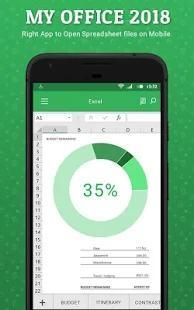
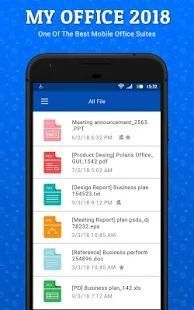
Office 2018 app manage PDF, Text, Soft Word, Soft Excel and Soft PowerPoint documents at one place. This is very simple and user-friendly app. Get list of all documents available in your smart phone at single place.
My Office Star 2018 lets you easily view and access Word, Excel, and PowerPoint documents, and perform advanced PDF operations. Complete with our integrated file manager, this is the most feature-rich mobile office solution available on Android. My Office Star 2018 is help you find a document for a special category like office document, pdf, images, apk and video.
Features:
- List PDF, XLS, PPT, DOC, TXT Files
- Open files direct
- Filter by File Type
- Short files by Name, Date, and Size
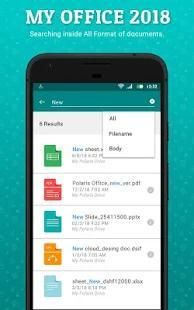
- Search file, rename and delete
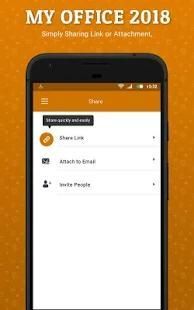
- Share Files
COMMON FEATURES ACROSS ALL FORMATS
• View, Edit, Create, Share, Save MS Office documents swiftly and securely.
• Editing: copy, cut, paste, undo and redo.
• Character formatting: bold, italics, underline; font style, size, color & highlight.
• Documents may be saved in original file format or converted to PDFs.
• Screen display adapts to fit smartphone or tablet screen and supports multi-touch gestures.
• All file formats include templates to aid new document creation.
• Password Protection support (Office files) – Open, view, edit and re-save encrypted Office documents on your device.
• Cloud support – Open and save documents to the cloud with effortless synchronization with Box, Dropbox and Google Drive.
WORD
• Paragraph formatting: indent, alignment, bullets, numbering
• Insert images, shapes, and graphics
• Support for tables, shapes, charts (display)
• Reflow mode for easier reading on small device
POWERPOINT
• Comprehensive text, paragraph, content formatting
• Shapes, images, textbox editing
• Insert images, shapes, and graphics
• Slide management and reordering
• Slide transition support
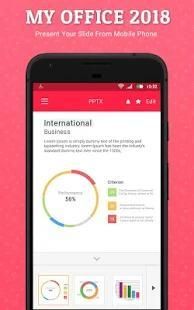
• Slideshow: present directly from mobile device or through a projector
SPREADSHEETS
• Cell formatting options: cell size and alignments, cell/column/row inserts and removal
• Multiple cell types: numeric, date, time, currency, fraction, percentage, scientific & more
• Multiple worksheet support; add/delete sheets
• Chart display and wide range of formulae
PDF, IMAGE FILES & PRINTING
• View, annotate, highlight and share PDF documents
• Convert, export, save Office documents to PDF format
• View and insert major image types (JPG, PNG, GIF)
• Wireless printing supports thousands of printers
FILE FORMATS
• Soft Office: all versions since 1997: Word, PowerPoint and Excel 97, 2000, XP, 2003, 2007, 2010, 2013, 2016 - doc, docx, xls, xlsx, ppt, pptx (view & edit)
• PDF Viewer, PDF Reader, Save as PDF
• JPEG, PNG, GIF,TIFF, BMP images (view); HWP (view)
• Vector WMF and EMF diagrams (view)
Txt manager
Text files manager
pdf files manager
xls files manager
pdf viewer
ppt files manager
ppt viewer
Word files manager
viewer for excel files
viewer for pdf files
pdf file
file manager for word files
pdf reader
Office manager
Office files manager
pdf manager
file manager download
List excel files
docs manager 2017
Document files manager
Document Management
List pdf files
scanned document can manage in this app.
manage scan document
this is very easy document manager
text files manager
My Office Star 2018 is collection of all documents file and managable all files.
कार्यालय 2018 एप्लिकेशन को एक स्थान पर पीडीएफ, पाठ, शीतल वर्ड, एक्सेल और शीतल शीतल PowerPoint दस्तावेज़ों का प्रबंधन। यह बहुत ही सरल और उपयोगकर्ता के अनुकूल एप्लिकेशन है। सभी दस्तावेजों ही स्थान पर अपने स्मार्ट फोन में उपलब्ध की सूची प्राप्त करें।
मेरे कार्यालय स्टार 2018 आसानी से देख और पहुँच वर्ड, एक्सेल, और PowerPoint दस्तावेज़ों, और उन्नत पीडीएफ कार्रवाई करने की सुविधा देता है। हमारे एकीकृत फ़ाइल प्रबंधक के साथ पूर्ण करें, यह सबसे सुविधा संपन्न मोबाइल कार्यालय Android पर उपलब्ध समाधान है। मेरे कार्यालय स्टार 2018 आप कार्यालय दस्तावेज़, पीडीएफ, छवियों, apk और वीडियो की तरह एक विशेष वर्ग के लिए एक दस्तावेज पाने में आपकी मदद करता है।
विशेषताएं:
- सूची पीडीएफ, XLS, पीपीटी, डॉक्टर, TXT फ़ाइलें
- ओपन फ़ाइलें प्रत्यक्ष
- फ़िल्टर फ़ाइल प्रकार
- द्वारा नाम, दिनांक, और आकार कम फ़ाइलें
- खोज फ़ाइल, नाम बदलने और हटाने के
- फ़ाइलें बाटें
सभी प्रारूपों में आम सुविधाओं
• देखें, संपादित करें, बनाएँ, शेयर, सहेजें एमएस ऑफ़िस दस्तावेज़ों तेजी से और सुरक्षित रूप से।
• संपादन: कॉपी, कट, पेस्ट, पूर्ववत और फिर से करना।
• चरित्र स्वरूपण: बोल्ड, इटैलिक्स, रेखांकन, फ़ॉन्ट शैली, आकार, रंग और प्रकाश डाला।
• दस्तावेज़ मूल फ़ाइल स्वरूप में सहेजी गई या PDF करने के लिए परिवर्तित किया जा सकता है।
• स्क्रीन प्रदर्शन स्मार्टफोन या टैबलेट की स्क्रीन के अनुरूप लाने के लिए अनुकूलित और बहु स्पर्श इशारों का समर्थन करता है।
• सभी फ़ाइल स्वरूपों नए दस्तावेज़ निर्माण सहायता करने के लिए टेम्पलेट्स शामिल हैं।
• पासवर्ड सुरक्षा का समर्थन (Office फ़ाइलों) - ओपन, देखें, संपादित और फिर से बचाने के लिए अपने डिवाइस पर एन्क्रिप्टेड Office दस्तावेज़ों।
• बादल समर्थन - ओपन और बॉक्स, ड्रॉपबॉक्स और गूगल ड्राइव के साथ सरल तुल्यकालन के साथ बादल करने के लिए दस्तावेजों को बचाने के।
शब्द
• पैराग्राफ़ प्रारूपण: मांगपत्र, संरेखण, गोलियां, नंबरिंग
• छवियों डालें, आकार, और ग्राफिक्स
• टेबल, आकार के लिए समर्थन, चार्ट (प्रदर्शन)
• छोटा सा उपकरण पर आसानी से पढ़ने के लिए रीफ़्लो मोड
पावर प्वाइंट
• व्यापक पाठ, पैरा, सामग्री स्वरूपण
• आकृतियाँ, चित्र, पाठ बॉक्स संपादन
• छवियों डालें, आकार, और ग्राफिक्स
• स्लाइड प्रबंधन और पुनर्व्यवस्था
• स्लाइड संक्रमण समर्थन
• स्लाइड शो: मोबाइल डिवाइस से या एक प्रोजेक्टर के माध्यम से सीधे पेश
स्प्रेडशीट
• सेल फ़ॉर्मेटिंग विकल्प: सेल आकार और संरेखण, सेल / स्तंभ / पंक्ति आवेषण और हटाने
• एकाधिक प्रकार की कोशिकाओं: सांख्यिक, दिनांक, समय, मुद्रा, अंश, प्रतिशत, वैज्ञानिक और अधिक
• एकाधिक कार्यपत्रक समर्थन; जोड़ें / शीट हटाना
• चार्ट प्रदर्शन और सूत्रों की व्यापक रेंज
पीडीएफ, छवि फ़ाइलों और मुद्रण
• देखें, टिप्पणी, प्रकाश डाला और पीडीएफ दस्तावेजों का हिस्सा
• Convert, निर्यात, पीडीएफ प्रारूप करने के लिए Office दस्तावेज़ों को बचाने
• देखें और सम्मिलित प्रमुख छवि प्रकार (जेपीजी, PNG, GIF)
• वायरलेस मुद्रण प्रिंटर के हजारों का समर्थन करता है
फ़ाइल स्वरूपों
• शीतल कार्यालय: सभी संस्करणों के बाद से 1997: वर्ड, PowerPoint और Excel 97, 2000, एक्सपी, 2003, 2007, 2010, 2013, 2016 - दस्तावेज़, docx, xls, xlsx, ppt, pptx (देखें और संपादित करें)
• PDF व्यूअर, पीडीएफ रीडर, सहेजें पीडीएफ के रूप में
• जेपीईजी, PNG, GIF, TIFF, BMP छवियों (देखें); HWP (देखें)
• वेक्टर WMF और EMF चित्र (देखें)
txt प्रबंधक
पाठ फ़ाइलें प्रबंधक
पीडीएफ फाइलों प्रबंधक
xls फ़ाइलों प्रबंधक
पीडीएफ दर्शक
पीपीटी फ़ाइलें प्रबंधक
पीपीटी दर्शक
वर्ड फ़ाइलों प्रबंधक
एक्सेल फ़ाइलों के लिए दर्शक
पीडीएफ फाइलों के लिए दर्शक
पीडीएफ फाइल
शब्द फ़ाइलों के लिए फ़ाइल प्रबंधक
पीडीएफ़ रीडर
कार्यालय प्रबंधक
Office फ़ाइलों प्रबंधक
पीडीएफ प्रबंधक
फ़ाइल प्रबंधक डाउनलोड
सूची एक्सेल फ़ाइलें
डॉक्स प्रबंधक 2017
दस्तावेज़ फ़ाइलों प्रबंधक
दस्तावेज़ प्रबंधन
सूची पीडीएफ फाइलों
स्कैन किया दस्तावेज़ इस ऐप्लिकेशन में प्रबंधन कर सकते हैं।
स्कैन दस्तावेज़ प्रबंधन
यह बहुत आसान दस्तावेज़ प्रबंधक है
पाठ फ़ाइलें प्रबंधक
मेरे कार्यालय स्टार 2018 सभी दस्तावेजों फ़ाइल और प्रबंधनीय सभी फ़ाइलों का संग्रह है।
Bug Fixed



9Apps 4.9














