

The No.1 store for free apps, games & videos. 20,000+ users downloaded Musjid A-Silent latest version on 9Apps for free every week! With unexpected, recently it has become very popular in India. This hot app was released on 2018-05-22. Get the latest version now!
The App is meant for the Whole Muslim Ummah to pray to their Allah swt without the noise of phones.The app is based on location so for its smooth working you need to put the location option of your phone ON. Use it and share it with your friends.
How It Works
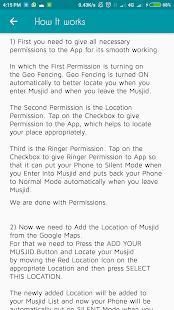
First you need to give all necessary permissions to the App for its smooth working. In which the First Permission is turning on the Geo Fencing. Geo Fencing is turned ON automatically to better locate you when you enter Musjid and when you leave the Musjid.
The Second Permission is the Location Permission. Tap on the Checkbox to give Permission to the App, which helps to locate your place appropriately.
Third is the Ringer Permission. Tap on the Checkbox to give Ringer Permission to App so that it can put your Phone to Silent Mode when you Enter Into Musjid and puts back your Phone to Normal Mode automatically when you leave Musjid
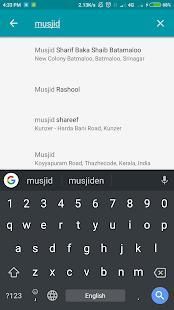
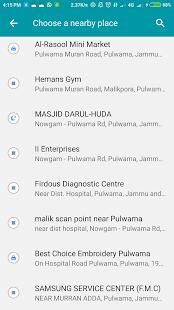
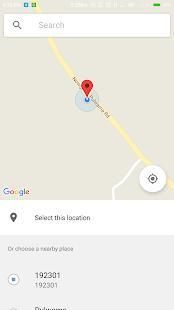
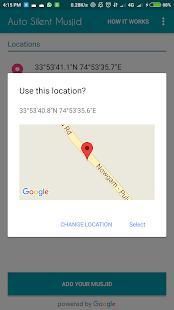
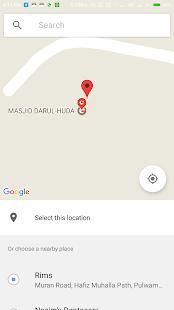
Now we need to Add the Location of Musjid from the Google Maps. For that we need to Press the ADD YOUR MUSJID Button and Locate your Musjid by moving the Red Location Icon on the appropriate Location and then press SELECT THIS LOCATION.
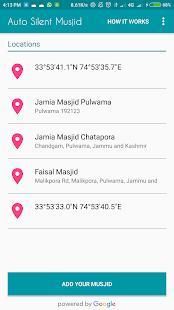
The newly added Location will be added to your Musjid List and now your Phone will be automatically put on SILENT Mode when you Enter into Musjid and Put back on NORMAL Mode when You leave Musjid. You can add as many Musjids as you want.
To better use this app you should enter the location of Musjid when you are in Musjid for the First time so that there will be 100 percent Positive Results
अनुप्रयोग phones.The अनुप्रयोग के शोर के बिना उनके अल्लाह SWT के लिए प्रार्थना करने के लिए पूरे मुस्लिम उम्माह के लिए है स्थान पर आधारित है के लिए अपने चिकनी काम कर आप अपने फोन पर के स्थान विक्रय विकल्प की जरूरत है। यह प्रयोग करें और अपने मित्रों के साथ साझा करें।
यह काम किस प्रकार करता है
सबसे पहले आप अपनी चिकनी काम करने के लिए अनुप्रयोग के लिए सभी आवश्यक अनुमतियों देने के लिए की जरूरत है। जिसमें सबसे पहले अनुमति भू बाड़ लगाना पर घूम रहा है। भू बाड़ लगाना अपने आप चालू हो जाता है बेहतर आप पता लगाने के लिए जब आप Musjid दर्ज करें और आप Musjid छोड़ जब।
दूसरा अनुमति स्थान की अनुमति है। अनुप्रयोग है, जो उचित रूप से अपनी जगह का पता लगाने में मदद करता है करने की अनुमति देने के लिए चेकबॉक्स पर टैप करें।
तीसरा रिंगर अनुमति है। इतना है कि यह मौन मोड करने के लिए अपने फोन रख सकते हैं जब आप Musjid में दर्ज रिंगर अनुमति एप्लिकेशन को देने के लिए चेकबॉक्स पर टैप करें और स्वचालित रूप से सामान्य मोड करने के लिए अपने फोन वापस डालता है जब आप Musjid छोड़
अब हम गूगल मैप्स से Musjid के स्थान जोड़ें की जरूरत है। ऐसी स्थिति में हमने तो अपने MUSJID जोड़ें बटन को दबाएं और उचित स्थान पर रेड स्थान चिह्न ले जाकर अपने Musjid का पता करने की जरूरत है और इस स्थान को चुन दबाएँ।
नए जोड़े गए स्थान आपके Musjid सूची में जोड़ दिया जाएगा और अब अपने फ़ोन स्वचालित रूप से साइलेंट मोड पर डाल दिया जाएगा जब आप Musjid में दर्ज करें और जब आप Musjid छोड़ सामान्य मोड पर वापस रखो। के रूप में आप जितने चाहें, उतने Musjids जोड़ सकते हैं।
बेहतर आप Musjid के स्थान में प्रवेश करना चाहिए इस एप्लिकेशन का उपयोग करने के लिए जब आप पहली बार के लिए Musjid में हैं ताकि वहाँ 100 प्रतिशत सकारात्मक परिणाम हो जाएगा
Auto Silent Your Phone On Entering Musjid and Back to Normal Mode On Leaving Musjid


9Apps 4.9