

Are you looking for some free apps? 20,000+ users downloaded Calculator latest version on 9Apps for free every week! You can find this multifunction app on 9Apps easily. This hot app was released on 2018-05-19. It is one of the popular Android apps in 2015.
Fingerprint Lock Vault is a godsend for anyone who wants to lock Apps and Hide Private Photos and Videos from third party apps, intruders, children, friends, family members and other Prying eyes!"
Fingerprint Lock Vault App is a completely free private file locker with Smart App Locker, Private Photo, Video Locker with Pattern, PIN and Fingerprint Lock Systems.
Really want secret locker for your personal files?
“Download Fingerprint Lock Vault from Ship Me This Today!”
【Top Features of Fingerprint Lock Vault】
☞
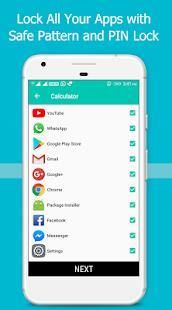
Smart Apps Lock Features
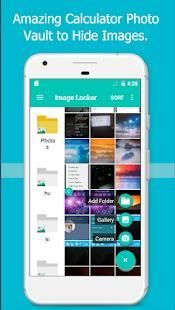
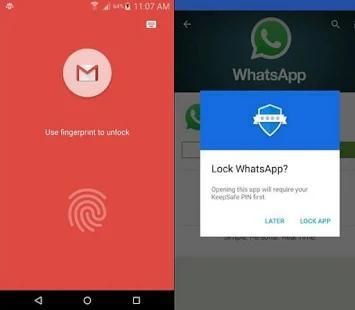
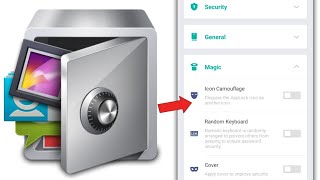
Lock any apps with PIN > Pattern > Fingerprint, App lock icon looks like Calculator, Hide Fingerprint Lock Vault App Icon and more.
☞
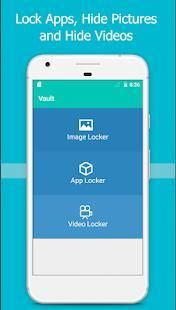
Private Photo Vault
Hide private photos of family, copies of driving licences, ID cards, Credit Cards, ATM cards in Photo Locker. Directly import pictures from Camera, Full screen Slideshow, Pro Backup, Auto Storage in Memory Card, Photo Swipe and more.
☞
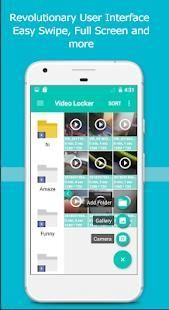
Private Video Vault
Hide multiple Videos in Video locker, In-built media player, Full screen Play, Video swipe, Screen rotation, Sort and Arrange files, record videos from camera, Unhide option to restore files to gallery and much more.
【New Features of Fingerprint Lock Vault】
►
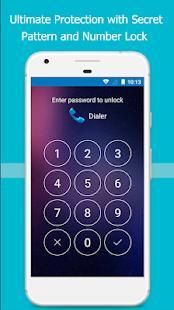
Stunning Lock System
Protect your apps, private images, videos with secret
PIN, Pattern, Fingerprint lock systems.
►
Revolutionary User Interface
Modern interface with multiple folder access, help boxes and user guides.
►
Universal Navigation bar
Easy access to home page, app locker, image locker, video locker, themes and settings.
►
Share it
Share Fingerprint Lock Vault app easily to friends or to social networks.
【Most useful features of Fingerprint Lock Vault】
★ Inbuilt Photo Viewer and Video Player
★ SD card as a storage area
★ Direct Share - Share via third party social app, Hidden pictures not visible in photo gallery and more.
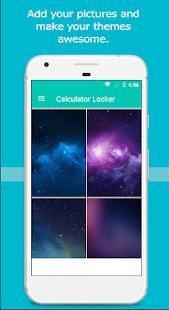
★ Custom Theme use your favorite Image as your theme.
★ Data Loss Protection - Your private images and videos are protected and will not get deleted even if you uninstall the app. Reinstall the app and you can access them again.
★ Do not show in Recent apps list
★ Automatically locks all apps in your phone making it safer than ever.
【How to Use Fingerprint Lock Vault】
Step 1: Enter four digit numbers and press confirm
Step 2: Choose a security question and enter an answer.
Step 3: Select App Locker, Draw a pattern and redraw the same pattern. Fingerprint can be activated by going to settings.
Step 4: Give needed Permissions to Fingerprint Lock Vault to lock apps. Once permission is granted, all apps will be automatically locked. Use the pattern, pin or fingerprint to unlock apps.
Step 5: Choose an image from theme section or ad from gallery to update pattern theme.
Step 6: Go to image locker or video locker and add images and videos from gallery to hide them.
【Quick Tips】
✔ App Icon Hide – Dial #0123 to make the app icon appear again.
✔ Forgot Password of Fingerprint Lock Vault – Go to Settings and select Change Password.
--------FAQ--------
Q
: If I uninstall the app, can I get my pictures back if I reinstall the app?
A
: Yes. Uninstalling the app will not result in deleting your files. Re-install the Fingerprint Lock Vault and you can access them again.
Q
: What happens to files if phone is lost, formatted or had a factory reset?
A
: Your files are stored only on your device. You will lose your files in these cases.
【How to Use Fingerprint Lock Vault: Instructions】
Tutorial Video
FAQ and User Manual
Disclaimer
- We have no access to any of your hidden apps, pictures and videos. The app is completely compliant with Google Policies.
☞Need Help?
Feel free to mail us at: akhilshipmethis[at]gmail[dot]com.
फिंगरप्रिंट लॉक वॉल्ट जो कोई Apps का ताला और तीसरे पक्ष के क्षुधा, घुसपैठियों, बच्चों, दोस्तों, परिवार के सदस्यों और अन्य prying आँखों से निजी तस्वीरें और वीडियो छिपाने के लिए चाहता है के लिए एक आकस्मिक धन है! "
फिंगरप्रिंट लॉक वॉल्ट एप्लिकेशन स्मार्ट अनुप्रयोग लॉकर, निजी फोटो, प्रतिमान, पिन और फिंगरप्रिंट लॉक सिस्टम के साथ वीडियो लॉकर के साथ एक पूरी तरह से नि: शुल्क निजी फ़ाइल लॉकर है।
वास्तव में आपकी व्यक्तिगत फ़ाइलों के लिए गुप्त लॉकर करना चाहते हैं?
"डाउनलोड फिंगरप्रिंट लॉक वॉल्ट शिप मेरे से यह आज!"
【फिंगरप्रिंट लॉक वॉल्ट का शीर्ष सुविधाएँ】
☞
स्मार्ट Apps का ताला विशेषताएं
पिन> पैटर्न> फ़िंगरप्रिंट, अनुप्रयोग ताला आइकन कैलक्यूलेटर तरह लग रहा है के साथ किसी भी क्षुधा ताला, फिंगरप्रिंट लॉक वॉल्ट ऐप्लिकेशन आइकन और अधिक छुपाएं।
☞
निजी फोटो वॉल्ट
, ड्राइविंग लाइसेंस, आईडी कार्ड, क्रेडिट कार्ड, एटीएम कार्ड फोटो लॉकर में की प्रतियां परिवार के निजी फ़ोटो को छिपाएं। सीधे मेमोरी कार्ड, फोटो स्वाइप और अधिक में कैमरा, पूर्ण स्क्रीन स्लाइड शो, प्रो बैकअप, ऑटो संग्रहण से चित्रों को आयात करते हैं।
☞
निजी वीडियो वॉल्ट
वीडियो लॉकर में एक से अधिक वीडियो छुपाएं, में निर्मित मीडिया प्लेयर, पूर्ण स्क्रीन प्ले, वीडियो कड़ी चोट, स्क्रीन रोटेशन, क्रमबद्ध और व्यवस्थित करें फ़ाइलें, कैमरे से रिकॉर्ड वीडियो, सामने लाएँ विकल्प गैलरी के लिए फ़ाइलों और भी बहुत कुछ बहाल करने के लिए।
【फिंगरप्रिंट लॉक वॉल्ट की नई सुविधाएँ】
►
बहतरीन लॉक सिस्टम
गुप्त
पिन, पैटर्न, फिंगरप्रिंट लॉक सिस्टम के साथ आपके एप्लिकेशन, निजी चित्र, वीडियो को सुरक्षित रखें।
►
क्रांतिकारी उपयोगकर्ता इंटरफ़ेस
एकाधिक फ़ोल्डर का उपयोग, मदद बक्से और उपयोगकर्ता गाइड के साथ आधुनिक इंटरफ़ेस।
►
यूनिवर्सल नेविगेशन बार
मुख पृष्ठ, एप्लिकेशन लॉकर, छवि लॉकर, वीडियो लॉकर, विषयों और सेटिंग्स लिए आसान पहुँच।
►
यह साझा करें
दोस्तों के लिए या सामाजिक नेटवर्क के लिए आसानी से फिंगरप्रिंट लॉक वॉल्ट एप्लिकेशन साझा करें।
【फिंगरप्रिंट लॉक वॉल्ट के अधिकांश उपयोगी सुविधाओं】
★ अंतर्निर्मित फ़ोटो दर्शक और वीडियो प्लेयर
★ एसडी एक भंडारण क्षेत्र के रूप में कार्ड
★ डायरेक्ट शेयर - तृतीय पक्ष सामाजिक एप्लिकेशन के माध्यम से साझा करें, छिपे हुए चित्र फोटो गैलरी और अधिक में दिखाई नहीं दे।
★ कस्टम थीम अपने विषय के रूप में अपने पसंदीदा छवि का उपयोग करें।
★ डाटा घटाने संरक्षण - आपकी निजी चित्र और वीडियो सुरक्षित हैं और नहीं हटेंगे भले ही आप एप्लिकेशन स्थापना रद्द करें। एप्लिकेशन को पुनर्स्थापित और आप उन्हें फिर से उपयोग कर सकते हैं।
★ हाल ही के एप्लिकेशन सूची में न दिखाएं
★ स्वचालित रूप से यह पहले से कहीं अधिक सुरक्षित बनाने अपने फोन में मौजूद सभी ऐप्लिकेशन अवरोधित करता है।
【कैसे फिंगरप्रिंट लॉक Vault का उपयोग करने के लिए】
चरण 1: चार अंकों की संख्या और पुष्टि करें दबाएं दर्ज
चरण 2: एक सुरक्षा प्रश्न चुनें और एक जवाब दर्ज करें।
चरण 3:, अनुप्रयोग लॉकर का चयन एक प्रतिमान आरेखित और एक ही पैटर्न पुनः बनाने। फिंगरप्रिंट सेटिंग में जाकर सक्रिय किया जा सकता।
चरण 4: फिंगरप्रिंट लॉक वॉल्ट करने के लिए आवश्यक अनुमतियां क्षुधा लॉक करने के लिए दे। एक बार अनुमति दी जाती है, लेकिन सभी ऐप्स स्वचालित रूप से लॉक किया जाएगा। क्षुधा अनलॉक करने के लिए पैटर्न, पिन या अंगुली की छाप का प्रयोग करें।
चरण 5: पैटर्न विषय अद्यतन करने के लिए विषय अनुभाग या गैलरी से विज्ञापन से कोई चित्र चुनें।
चरण 6: छवि लॉकर या वीडियो लॉकर में जाओ और उन्हें छिपाने के लिए गैलरी से चित्र और वीडियो जोड़ें।
【त्वरित सुझाव】
✔ एप्लिकेशन आइकन छिपाएं - एप्लिकेशन आइकन फिर से प्रदर्शित करने के लिए डायल # 0123।
सेटिंग पर जाएं और पासवर्ड बदलें का चयन करें - ✔ फिंगरप्रिंट लॉक वॉल्ट का पासवर्ड भूल गए।
-------- पूछे जाने वाले प्रश्न --------
क्यू : मैं इस ऐप्लिकेशन को अनइंस्टॉल करते हैं, तो मैं वापस आ गया है, तो मैं एप्लिकेशन को पुनर्स्थापित मेरी तस्वीरें मिल सकता है?
एक : हाँ। एप्लिकेशन स्थापना रद्द करना आपके फ़ाइलों को हटाने का कारण नहीं बनेगा। फिंगरप्रिंट लॉक वॉल्ट पुन: स्थापित करने और आप उन्हें फिर से उपयोग कर सकते हैं।
क्यू : फ़ाइलों के लिए क्या होता है फोन, खो दिया है स्वरूपित या एक कारखाने रीसेट था तो क्या होगा?
एक : अपने फ़ाइलों को केवल अपने डिवाइस पर जमा हो जाती है। आप इन मामलों में आपकी फ़ाइलों को खो देंगे।
【इस्तेमाल कैसे करें फिंगरप्रिंट लॉक वॉल्ट: निर्देश】
ट्यूटोरियल वीडियो
पूछे जाने वाले प्रश्न और प्रयोक्ता मैनुअल
अस्वीकरण - हम अपने छिपे क्षुधा, तस्वीरें और वीडियो में से किसी को कोई पहुंच है। एप्लिकेशन Google की नीतियों का पूरी तरह से अनुरूप है।
☞Need मदद?
पर हमें मेल के लिए स्वतंत्र महसूस: akhilshipmethis [पर] gmail [dot] com।
The latest Fingerprint Lock Vault - Photo, Video Hide, App locker is here. Do give us 5 star reviews if you like this fingerprint lock system app where you can hide private photos and videos and lock all apps.




9Apps 4.9














