
I would like to recommend you an application with large number of downloaders. 20,000+ users downloaded Call to Bluetooth latest version on 9Apps for free every week! It has been a popular app for a long time. This hot app was released on 2018-04-16. I believe that if you are an android apps lover, you would not miss it.
This simple app will enable bluetooth on your phone when you receive or make a call so you can answer it on your bluetooth headset or bluetooth hands-free device.
This way you will preserve the battery life of your phone.
Note that it will not answer your calls automatically (this can be accomplished by enabling the auto-answer setting under the call settings of your phone).
REQUIREMENTS:
You should have your phone and your bluetooth device already paired.
Your bluetooth headset or hands-free device must support bluetooth headset profile (is most probably it will)
SIMPLE INSTRUCTIONS:
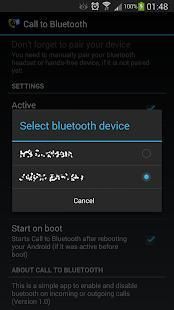
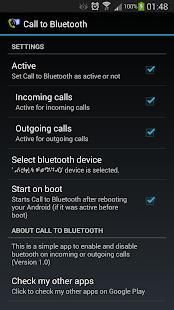
1. Open application.
2. Select default bluetooth device from the device selection list.
3. Select Active to activate it
जब आप प्राप्त करते हैं या तो आप अपने ब्लूटूथ हेडसेट या ब्लूटूथ हाथों से मुक्त डिवाइस पर जवाब कर सकते हैं एक फोन करना यह सरल ऐप्स आपके फ़ोन पर ब्लूटूथ सक्षम हो जाएगा।
इस तरह से आप अपने फोन की बैटरी जीवन की रक्षा करेगा।
ध्यान दें कि आपका कॉल अपने आप का जवाब नहीं होगा (यह स्वत: जवाब अपने फोन की कॉल सेटिंग के अंतर्गत स्थापित करने को सक्षम करने के द्वारा पूरा किया जा सकता है)।
आवश्यकताएँ:
आप अपने फोन और अपने ब्लूटूथ डिवाइस पहले से ही बनती होना चाहिए।
आपका ब्लूटूथ हेडसेट या हाथों से मुक्त डिवाइस ब्लूटूथ हेडसेट प्रोफ़ाइल का समर्थन करना चाहिए (संभवत: यह होगा है)
सरल निर्देशों:
1. आवेदन।
उपकरण चयन सूची से 2. चयन डिफ़ॉल्ट ब्लूटूथ डिवाइस।
3. का चयन करें इसे सक्रिय करने के लिए सक्रिय
Application size reduced and minor bugs fixed.






9Apps 4.9















