

Thousands of top best android apps on 9Apps! 20,000+ users downloaded OneBrowser latest version on 9Apps for free every week! It is the app that defined the best for a generation. This hot app was released on 2018-11-22. If you wanna more apps besides this, turn to 9Apps.
Basically one Browser is a simple web browser like any other, but there are some different things you need to know:
Custom home:
On the applications first start, home page shows as about:blank.
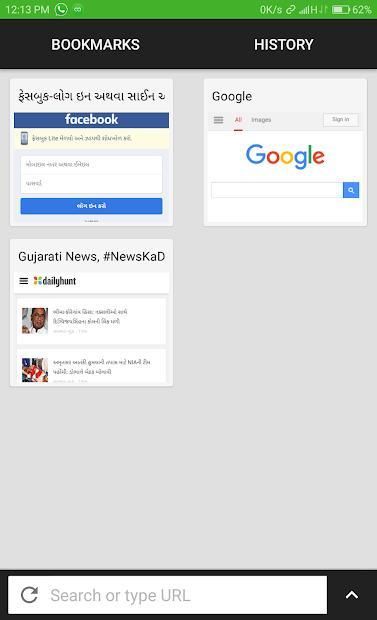
Use the overflow menu's Add to home to pin webpages to Homepage.
Use the overflow menu's Relayout to customize your homepage layout.
Long press on a card on the homepage, and you can edit the title.
Switch tabs:
You can set tab switcher position to be at the screen top or screen bottom at Settings/Browser/Omnibox Position.
Press the address bar and drag it down or up, then the fashion tab switcher will display.
Swipe up/down to dimiss a page.
Or just swipe the omnibox left/right to swicth tabs :)
The Settings is located in the top or bottom left of tab switcher, the gear icon.
Remember that if the soft keyboard is shown the tab switcher would not display, it's our design :)
Load in background when you click links in other App:
Set one Browser as your default browser when the link is clicked.
Single tap will open the links in the background, and show a clickable notification in the statusbar.
Double tap will show a dialog that allows you to open links in foreground, etc.
Volume control:
In Settings/Browser/Volume control you can set the volume keys behavior to:
Switch tabs.
Scroll webpages.
System default.
AdBlock whitelist:
Since AdBlock maybe cause some websites display error, you can add those websites to the whitelist Settings/AdBlock/Whitelist.
Readability:
one Browser supports read mode but it needs Readability API Token.
To get the token you should go to Readability Developer APIs and set it in Settings/Readability/Token.
Screenshot:
one Browser can capture entire webpages!
But that does not mean you could screenshot a very long webpage which may cause the browser to go Out of Memory
असल में एक ब्राउज़र किसी अन्य की तरह एक साधारण वेब ब्राउज़र है, लेकिन कुछ अलग-अलग चीजें हैं जिन्हें आपको जानने की आवश्यकता है:
कस्टम घर:
एप्लिकेशन पर पहली बार शुरू होने पर, होम पेज इस बारे में दिखाता है: रिक्त।
मुखपृष्ठ पर वेबपृष्ठों को पिन करने के लिए ओवरफ्लो मेनू का घर पर जोड़ें।
अपने होमपेज लेआउट को कस्टमाइज़ करने के लिए ओवरफ्लो मेनू के रिलेआउट का उपयोग करें।
मुखपृष्ठ पर कार्ड पर लंबे समय तक दबाएं, और आप शीर्षक संपादित कर सकते हैं।
टैब स्विच करें:
आप सेटिंग्स / ब्राउज़र / ऑम्निबॉक्स स्थिति पर स्क्रीन टॉप या स्क्रीन तल पर होने के लिए टैब स्विचर स्थिति सेट कर सकते हैं।
पता बार दबाएं और इसे नीचे या ऊपर खींचें, फिर फ़ैशन टैब स्विचर प्रदर्शित होगा।
किसी पृष्ठ को मंद करने के लिए ऊपर / नीचे स्वाइप करें।
या केवल swicth टैब के लिए ऑम्निबॉक्स बाएं / दाएं स्वाइप करें :)
सेटिंग्स टैब स्विचर के शीर्ष या निचले बाएं, गियर आइकन में स्थित है।
याद रखें कि यदि सॉफ्ट कीबोर्ड दिखाया गया है तो टैब स्विचर प्रदर्शित नहीं होगा, यह हमारा डिज़ाइन है :)
जब आप अन्य ऐप में लिंक पर क्लिक करते हैं तो पृष्ठभूमि में लोड करें:
लिंक क्लिक होने पर एक ब्राउज़र को अपने डिफ़ॉल्ट ब्राउज़र के रूप में सेट करें।
एकल टैप पृष्ठभूमि में लिंक खोल देगा, और स्टेटसबार में एक क्लिक करने योग्य अधिसूचना दिखाएगा।
डबल टैप एक संवाद दिखाएगा जो आपको अग्रभूमि, आदि में लिंक खोलने की अनुमति देता है।
ध्वनि नियंत्रण:
सेटिंग्स / ब्राउज़र / वॉल्यूम नियंत्रण में आप वॉल्यूम कुंजियों के व्यवहार को इस पर सेट कर सकते हैं:
टैब स्विच करें।
स्क्रॉल वेबपेज।
सिस्टम डिफ़ॉल्ट।
एडब्लॉक श्वेतसूची:
चूंकि एडब्लॉक कुछ वेबसाइटों को त्रुटि प्रदर्शित कर सकता है, इसलिए आप उन वेबसाइटों को श्वेतसूची सेटिंग्स / एडब्लॉक / व्हाइटलिस्ट में जोड़ सकते हैं।
पठनीयता:
एक ब्राउज़र रीड मोड का समर्थन करता है लेकिन इसे रीडबिलिटी एपीआई टोकन की आवश्यकता होती है।
टोकन प्राप्त करने के लिए आपको पठनीयता डेवलपर एपीआई पर जाना चाहिए और इसे सेटिंग्स / पठनीयता / टोकन में सेट करना चाहिए।
स्क्रीनशॉट:
एक ब्राउज़र पूरे वेबपृष्ठों को पकड़ सकता है!
लेकिन इसका मतलब यह नहीं है कि आप एक बहुत लंबा वेबपेज स्क्रीनशॉट कर सकते हैं जो ब्राउज़र को मेमोरी से बाहर जाने का कारण बन सकता है






9Apps 4.9













