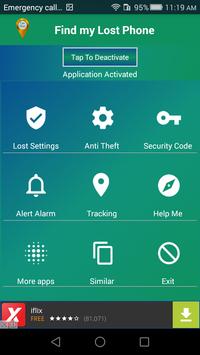
Anti lost my phone or Find my Phone-Location is an easy to use anti lost / anti theft mobile phone security application
This app is an anti theft and anti lost Smart Phone . It locates your mobile phone in few seconds through SMS.
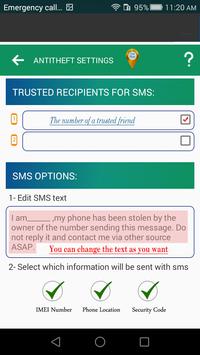
First you should set security code and two trusted friends/family member phone numbers to get SMS notification whenever phone is lost or stolen.
In case of theft you will get thief phone number along with Phone-Location coordinates, IMEI number and phone will be locked with security code.
Features
Your Phone is on silent mode and lost , you can buzz it with maximum sound by sending a SMS from your friend phone.
Very low battery usage
Get Phone-Location of the Lost-Phone remotely by sending SMS from any of your friends phone..
Find My Lost Phone is Works without internet.
You can lock your phone remotely with a single SMS.
--------------------------
How Find-My-Lost-Phone app works?
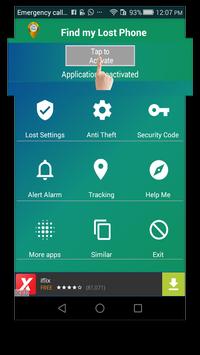
After activate the app by pressing “Tap to Activate” at main page.
When Phone is misplaced ! Send following messages from your friend cell phone to your Lost-Phone:
1 Buzz your silent phone with maximum sound : Alert #xxxx
2 Lock your phone : Lock #xxxx
3 Find Phone-Location :
Locate #xxxx
(xxxx = security code set in settings)
--------------------------
When phone is stolen and SIM is changed:
1 This app detects SIM change in your Phone and lock the Phone automatically with the lock code set by you in the app.
2 It sends message to your trusted friends Phone Number, you saved in the Anti-lost settings with the following options:
a. Your Lost-Phone IMEI number.
b.
Current Phone-Location (using GPS ).
c. Phone code.
--------------------------
Need uninstall "Find-My-Lost-Phone app" ???
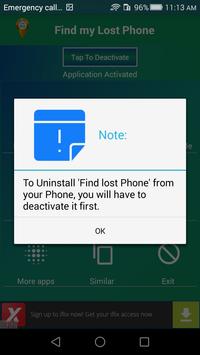
To uninstall the App, you must deactivate the app security first then uninstall from your cell phone. App can be deactivated by
A- Click "Tap to Deactivate" at home page of "Find-Lost-Phone"
OR
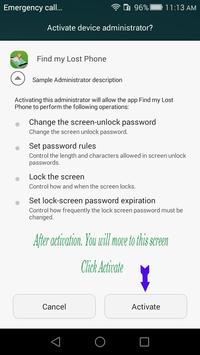
B- Phone>Settings > Security > Device Administrators, uncheck Find my Lost Phone
Note:
If app doesn't start, after installation and before opening application, turn on application permissions for Find-my-Lost-Phone in device applications root settings.
This application is under rankings :
GPS-Tracker-Phone
Phone-Tracker-Lost
Anti-Theft-Phone
Anti-Lost-Phone
Phone-Location
Repair some of the mistakes

9Apps 4.9