

Are you looking for some free apps? 20,000+ users downloaded My Computer File Explorer latest version on 9Apps for free every week! This app has been greatly welcomed in India. This hot app was released on 2018-04-12. Why not download and have a try?
My Computer Mobile File Explorer App has amazing feature like browse, cut, copy, paste, delete, send files.
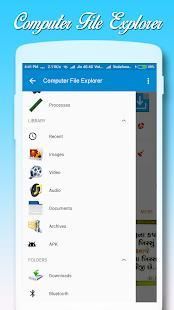
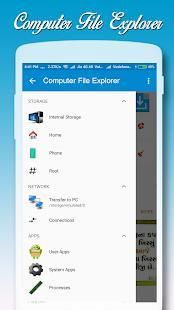
The File manger while browsing feels like your computer file explorer. You have an option for application manager and you can launch from this explorer, App search feature is there and also one touch to take all apps backup to the mobile.
Computer is a free, full-featured file explorer.
It provides access to pictures, music, video, documents, and other files on both your Android devices and your computers.
Features:
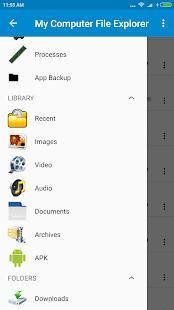
-> Quick to open Music, Picture, Videos, Documents, Download files by folder wise.
-> Application Launcher with search fields.
-> Net Work information from this app.
-> Set different type of themes for "My Computer Mobile Explorer" with different type of text colors.
-> Create New Folder/Directory, Search file option for your files.
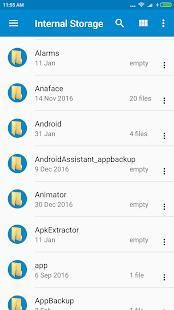
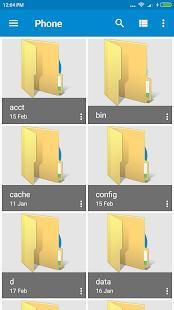
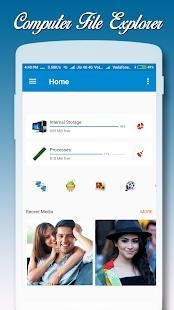
-> Display Memory Space, available Space and also Shows number of files & folders including date of created folder.
-> Different type of explorer view like Tiles, Thumbs, List like desktop folder view.
-> Cut, Copy, Paste, and Delete files.
-> Access to show hidden file explorer for this need to enable "Show Hidden Files/Folder". Find this on menu and settings button.
->Different types of sorting for files browse. Find this on menu and settings button.
-> File explorer: manage your documents like you do on your desktop or laptop.
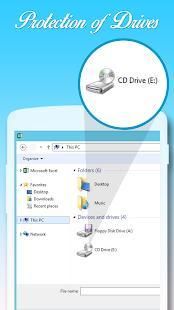
-> Access your home PC shared documents on network.
-> Functions as your FTP or SFTP client for internet connections.
-> Application manager: switching to other programs, uninstall or view any app's system management page. Launched applications are also in the taskbar.
-> Built-in media viewer and player for various media format, including photos, music, and videos.
-> Thumbnails for APKs and images.
-> Built-in ZIP support allows you to decompress or extract ZIP files.
-> Kill running tasks, increase memory and speed up your device.
-> Supports tabs and side-by-side windows, so you can open multiple folders at the same time.
-> Easy to access OTG devices through this OTG File Explorer application.
-> Computer File Explorer for android allows you to open and copy files from any USB mass storage device with a FAT32 or NTFS file system using the USB OTG port of your device, tablet or phone.
With a FAT32 file system, you can copy files to any USB mass storage device and manage your files on it (edit filenames, add directories, delete files)
So many feature are please find while using this mobile explorer.
Please write us your suggestions and feedback to make this app wonderful. We appreciate your suggestions & feedback. We will consider them for future update.
Thank you using this application.
Thank you.
My Computer Ponsel File Explorer App memiliki fitur yang menakjubkan seperti browsing, cut, copy, paste, menghapus, mengirim file.
File palungan saat browsing terasa seperti berkas komputer explorer. Anda memiliki pilihan untuk manajer aplikasi dan Anda dapat memulai dari explorer ini, fitur pencarian App ada dan juga satu sentuhan untuk mengambil semua aplikasi backup ke ponsel.
Komputer adalah gratis, fitur lengkap file explorer.
Ini menyediakan akses ke gambar, musik, video, dokumen, dan file lainnya pada kedua perangkat Android Anda dan komputer Anda.
Fitur:
-> Cepat untuk membuka Music, Picture, Video, Dokumen, Download file dengan folder yang bijaksana.
-> Application Launcher dengan bidang pencarian.
-> Informasi Kerja Bersih dari aplikasi ini.
-> Set berbagai jenis tema untuk "My Computer Ponsel Explorer" dengan berbagai jenis warna teks.
-> Create New Folder / Directory, Cari pilihan file untuk file Anda.
-> Ruang Tampilan Memory, tersedia ruang dan juga Menunjukkan jumlah file & folder termasuk tanggal folder dibuat.
-> Berbagai jenis explorer tampilan seperti ubin, Thumbs, Daftar seperti tampilan folder desktop yang.
-> Cut, Copy, Paste, dan Hapus file.
-> Akses untuk menunjukkan tersembunyi file explorer untuk kebutuhan ini untuk mengaktifkan "Show Hidden Files / Folder". Menemukan ini di menu dan tombol pengaturan.
-> Berbagai jenis menyortir untuk file isi. Menemukan ini di menu dan tombol pengaturan.
-> File explorer: mengelola dokumen Anda seperti yang Anda lakukan pada desktop atau laptop.
-> Access dokumen rumah PC dibagi pada jaringan.
-> Fungsi sebagai FTP atau SFTP client untuk koneksi internet.
-> Manajer aplikasi: beralih ke program lain, menghapus atau melihat halaman sistem manajemen setiap aplikasi. aplikasi diluncurkan juga di taskbar.
-> Built-in viewer dan pemutar media untuk berbagai format media yang, termasuk foto, musik, dan video.
-> Thumbnail untuk APK dan gambar.
-> Built-in mendukung ZIP memungkinkan Anda untuk dekompresi atau ekstrak file ZIP.
-> Bunuh tugas menjalankan, meningkatkan memori dan mempercepat perangkat Anda.
-> Mendukung tab dan jendela samping-by-side, sehingga Anda dapat membuka beberapa folder pada waktu yang sama.
-> Mudah untuk mengakses perangkat OTG melalui aplikasi File Explorer OTG ini.
-> File Komputer Explorer untuk android memungkinkan Anda untuk membuka dan menyalin file dari perangkat USB mass storage dengan FAT32 atau sistem file NTFS menggunakan port USB OTG dari perangkat Anda, tablet atau telepon.
Dengan sistem file FAT32, Anda dapat menyalin file ke perangkat USB mass storage dan mengelola file Anda di atasnya (edit nama file, menambahkan direktori, menghapus file)
Begitu banyak fitur yang silahkan mencari saat menggunakan explorer ponsel ini.
Silakan menulis kami saran dan masukan untuk membuat aplikasi ini indah. Kami menghargai saran Anda & umpan balik. Kami akan mempertimbangkan mereka untuk pembaruan masa depan.
Terima kasih menggunakan aplikasi ini.
Terima kasih.
Performance Improved

9Apps 4.9










