An2An Keyboard icon

An2An Keyboard

2.2.0 for Android
3.8 | 5,000+ Mga Pag-install | Mga Review

Locnet

₱70.00

Paglalarawan ng An2An Keyboard

Magdagdag ng suporta sa keyboard sa An2an Remote, upang i-redirect ang keypress mula sa isang device papunta sa isa pang device sa pamamagitan ng Bluetooth o WiFi / network nang walang ugat, payagan ang paggamit ng isang Android device bilang keyboard ng isa pang device. Suportahan ang pisikal na keyboard / digital gamepad at soft keyboard. Hindi ito isang standalone na app at nangangailangan ng An2an remote upang gumana.
Magrekomenda upang suriin ang pagiging tugma sa AN2AN Remote (demo) bago bumili.
Mangyaring makipag-ugnay sa amin para sa anumang Problema (android.locnet@gmail.com).
Mga Benepisyo
- Lumiko ang wired keyboard sa wireless isa.
- Kung mayroon kang isang telepono na may built-in na pisikal na keyboard, hindi mo kailangang bumili ng keyboard para sa iba pang mga device.
- Ang screen ay hindi naka-block ng onscreen na keyboard o iyong daliri kapag gumagamit ng isa pang device bilang input, kaya nakakakuha ka ng mas mahusay na pagtingin .
- Kapag ang target na aparato ay hindi makakonekta sa pisikal na keyboard nang direkta (eg walang OTG), maaari mong gamitin ang isa pang katugmang aparato bilang isang "tulay".
- Touchscreen handling ubusin ang mga oras ng CPU, sa pamamagitan ng pagbabahagi ng workload sa isa pang device mo maaaring makakuha ng ilang bilis ng pagpapabuti.
Mga Kinakailangan
- AN2AN Remote (Demo) 3.0.0 (https://play.google .com / store / apps / Details? Id = com.locnet.an2an.demo)
mga tagubilin
1. I-install at i-setup ang An2an Remote
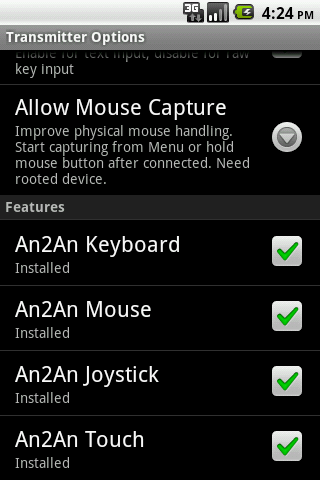
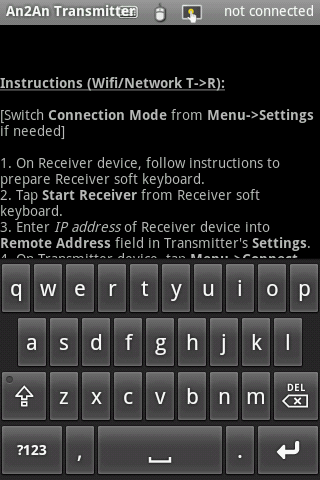
2. I-install ang An2an keyboard sa transmiter device, i-restart ang transmiter app kung tumatakbo.
3. Ikonekta ang an2an remote normal at simulan ang paggamit.
compatibility
Ang app na ito ay gumagana sa karamihan ng hardware keyboard / digital gamepad (eg dpad o xperia I-play ang mga pindutan) at key-based na keyboard ng software (hal. Ang aming GakeKeyboard app). Maaaring hindi ito gumagana nang maayos sa text-based soft keyboard na direktang manipulahin ang input field text. Ang aktibong soft keyboard sa transmiter device ay makakaapekto sa pisikal na keyboard, subukan ang paglipat sa isang "null" soft keyboard kapag may problema.

Impormasyon

  • Kategorya:
    Mga Tool
  • Pinakabagong bersyon:
    2.2.0
  • Na-update:
    2013-07-11
  • Nangangailangan ng Android:
    Android 0 or later
  • Developer:
    Locnet
  • ID:
    com.locnet.an2an
  • Available on:
Mga Review
  • avatar
    Nice
    2020-09-16 12:02
  • avatar
    i want refund, this app is useless.
    2019-07-28 07:24
  • avatar
    The keyboard works well on my *not* rooted Android 5.1 and 6.0 tablets with my PC keyboard, although the right shift and control don't work. Escape, Caps Lock and NumLock keys don't work as well. But PgUp, PgDown, Delete, Home/End, arrows and the rest WORK FINE. Highlighting -selecting text with left Shift works good, using left Control to invoke shortcuts works well (like Ctrl-a, Ctrl-c, Ctrl-x, Ctrl-v) AND using foreign language keyboard input works fine; all native language symbols come out fine. Alt-Tab works on the Transmitter tablet, not on the Receiver one. So the pros far outweight the cons. This is the only app that has such functionality and *really* works *without* rooting. On Android 5+ the settings icon is hidden by the keyboard layout selection (in Receiver mode) and you can get to these settings by going to Settings->"Language & Input"->"An2An Receiver" - just note that you have to first enable this app as your keyboard layout/input method. It takes a bit to get used to, but it works - I'm writing this using this app through Bluetooth. Two years ago, I tested this app on Android 4.2 using Wi-Fi and it also worked, and since then no other apps came that have such functionality.. I was using a Bluetooth keyboard until now, but it broke down and I'm looking for a new one, so until I get one, this app really helps. Hope the developers work on it more and give us full keyboard support (with F1-12 keys) and possibly more functionality and features. Still it's a lifesaver.
    2017-06-02 02:49
  • avatar
    So I purchased installed on phone and tablet It wouldn't work and now won't offer a refund only had it for a 5 minutes, rubbish.
    2016-03-08 05:06
  • avatar
    Purchased, and I keep getting the message that my Samsung keyboard has crashed. Using a galaxy s6 edge to pair with a Samsung tablet s 8.4....not asking for refund as I would like to use this with further development, just not working with my current setup.
    2015-08-25 12:05
  • avatar
    Thanks for nothing
    2015-07-07 12:34