
Manage your files efficiently and easily with
File Manager!
File Manager helps you handle all your files whether they are stored in your device's memory, microSD card, local area network, and cloud storage accounts.
By default,
File Manager allows you to copy, move, rename, delete or share files to and from any of your storages. It also lets you browse and access your files by category.
Key features
Experience and enjoy these features that
Manager has to offer:
- Your light and savvy file explorer: Search, access, save, move, delete, or share files that are stored in your smart device's internal storage to or from a microSD card, LAN, or Cloud storage accounts and vice-versa.
- Suave and smooth multimedia streamlining: Stream multimedia files such as music or videos or open documents, pictures, or photos stored in any of your Cloud storage accounts
- Save disk space by packaging files: Compress files to save space of your storage and extract compressed files in Zip and RAR formats
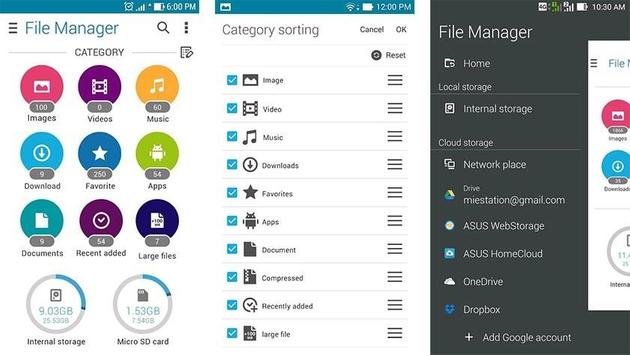
- Easy file browsing: Browse files easily by category right from File Manager’s home screen: images, videos, music, applications, downloaded, and favorites.
- Disk tools: Storage analyzer, recycle bin and hidden cabinet let you manage your disk easily.
Manage your files efficiently and easily with
File Manager!
File Manager helps you handle all your files whether they are stored in your device's main storage or microSD card.
-File category - Browse files easily by category right from
File Manager’s home screen: picture, music, videos, archive, documents and recent files. It’s quick and easy to access files in each category.
-File operations - allows you to copy, move, rename, delete, compress and decompress ZIP files, create encrypted ZIP files and share files.
-Storage info - Easily see the location of each category file and the SD card usage.
-One key transfer - One click to transfer all picture, music and video files from the phone’s internal storage to the external SD card. Transferred files are stored in the FileBrowser folder in the external SD card.
-Global search - Search in all folders and files of the device.
-Remote Management - Conveniently browse files on the device from your computer with remote management.

9Apps 4.9
















