

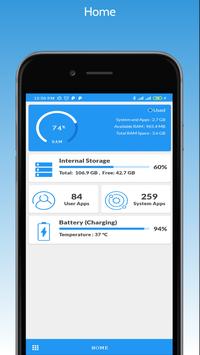

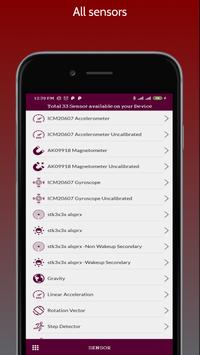
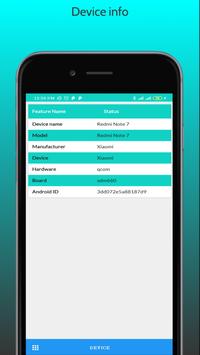

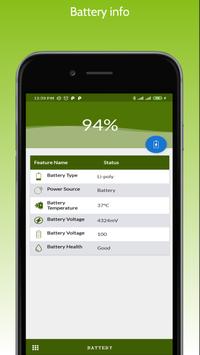
Device Info HW : View Device Information is a simple and powerful Android application that gives you complete information about your mobile device with advanced user interfaces. Device Info includes information about CPU, RAM, OS, Sensors, Storage, Battery, SIM, Bluetooth, Installed Apps, System Apps, Display, Camera, Thermal, etc.
★ What's Inside :
❯ Dashboard
RAM
ROM
Internal Storage
External Storage
Battery
CPU
Sensors Available
Apps Installed
★ ❯ Device
Device Name
Model
Manufacturer
Device
Board
Hardware
Brand
IMEI
Hardware Serial
SIM Serial
SIM Subscriber
Network Operator
Network Type
WiFi Mac Address
Build Fingerprint
USB Host
★❯ System
Version
Code Name
API Level
Security Patch Level
Bootloader
Build Number
Baseband
Java VM
Kernel
Language
Root Access
Root Management App
Treble
Seamless Updates
OpenGL ES
System Uptime
★❯ CPU
Processor
CPU Architecture
Supported ABIs
CPU Hardware
CPU Governor
Number of Cores
CPU Frequency
Running Cores
GPU Renderer
GPU Vendor
GPU Version
★❯ Battery
Health
Level
Status
Power Source
Technology
Temperature
Voltage
Capacity
★❯ Display
Resolution
Density
Font Scale
Physical Size
Refresh Rate
HDR
HDR Capabilities
Brightness Level & Mode
Orientation
★❯ Memory
RAM
ROM
Internal Storage
External Storage
★❯ Sensors
Sensor Name
Sensor Vendor
Type
Power
★❯ Apps
User Apps
Installed Apps
App Version
Minimum OS
Target OS
Installed Date
Updated Date
★❯ Temperature
★❯ Camera
★❯ Themes
Custom Colors
★★★
It's trying detect components of your smartphone to provide complete information about device's hardware.
Now detection is supported for lcd, touchscreen, cameras, sensors, memory, flash, audio, nfc, charger, wi-fi and battery; if that possible for your device.
I think app is interesting and useful for users and developers who build kernels or android.
App has a quick navigation, fresh design, and also supports a dark theme.
You can switch by tab or use navigation panel. Many items are clickable and you can go to another tab or menu.
★★ Components
LCD - model and sometimes vendor. For some platforms detection require root.
Also you can check the colors in lcd test.
Touchscreen - model, you can check how much fingers are supported in multi-touch test.
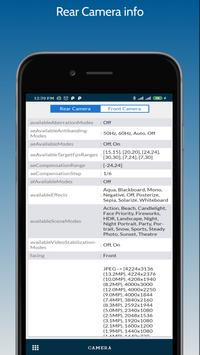
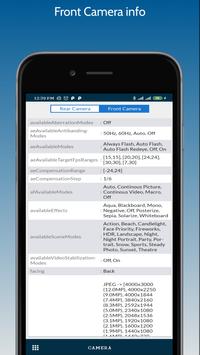
★★ Camera - model, vendor, resolution.
If can't detect, sometimes available a list of supported cameras.
Hardware info by camera model and software by API.
For 5.1 used camera2 api by default, if you grant camera permission, it will be use old api.
★★ Detailed info about SoC in you device.
★★ CPU : model, cores, clusters, family, abi, governor, frequency.
★★ GPU : model, vendor, opengl, frequency, list of extensions.
Click on the clock speed to open CPU monitor.
★★ System: complete info about your firmware build.
★★ Memory: type lpddr and operating frequency.
★★ Flash: chip and vendor emmc or ufs (scsi).
You can go to the memory tab and see usage of memory and storage.
★★ Battery: base info and for some devices available extra info:
- Discharging speed is current consumption
- Charging speed is charge current minus current consumption
- Profile from kernel. It's for reference and correct only for the factory battery
- Model
★★ Thermal: temperatures by thermal sensors.
★★ Sensors: availability of basic sensors and tests for them. Interacts with my app 'Sensor Test'.
★★ Drivers: you can find other chips used in your device.
★★ Partitions: list of partition and their sizes.
★★ PMIC: list of power regulator voltages which applied to the components.
★★ Input devices: list of input devices.
★★ Applications: you can quickly find apps and see info about it, also provided list of the system apps.
Ads problem solve





9Apps 4.9















