
What makes me unbelievable is that 20,000+ users downloaded TU MAPPITA 2.0 latest version on 9Apps for free every week! This makes the app feel more like a popular merchandise, which is very positive in my opinion. This hot app was released on 2018-11-17. Certainly you will love it after play.
La aplicación “TU MAPPITA 2.0” cuenta con la siguiente estructura:
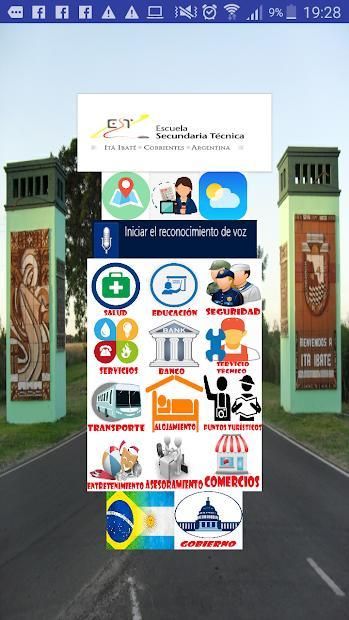
Una Pantalla de inicio con una foto del acceso a Itá Ibaté como fondo.
La pantalla de inicio cuenta con 13 botones a modo de menú principal.
Salud
Educación
Seguridad
Servicios
Banco
Servicio Técnico
Transporte
Alojamiento
Puntos turísticos
Entretenimiento
Asesoramiento
Comercios
Gobierno
Cada botón representa a un eje temático y se aplicaron en ellos imágenes “.png” para darle apariencia de ícono, sumando también un texto en la parte inferior para facilitar su interpretación.
El contenido de cada uno de los ejes temáticos se organiza en tablas utilizando un blog de la plataforma “Blogger”. De esta manera, cada modificación que se haga en las tablas de contenido se verá reflejada en la aplicación sin necesidad de descargar actualizaciones de la App.
Cabe destacar que el botón “puntos turísticos” incorpora una funcionalidad distinta, ya que agrupa iconos individuales de los lugares más trascendentes para habitantes y turistas. Por ello,
a través de una vinculación con la plataforma Google Maps y GPS se brinda indicación exacta de la ruta, distancia y tiempo aproximado para llegar.
En la parte superior de la pantalla inicial se encuentran 5 botones:
Un botón con el escudo de la Escuela Técnica Itá Ibaté que nos enlaza a la cuenta oficia
de Facebook de la Institución. https://www.facebook.com/etecnica.itaibate.7
Debajo del botón de la escuela, se encuentran 4 botones
Plano de Itá Ibaté: a través de una imagen alojada en la plataforma “blogger”.
Noticias de Itá Ibaté: a través del portal del periódico digital “El Muelle”
http://www.elmuelle.com.ar/locales
Previsión meteorológica para Itá Ibaté: a través de la plataforma “accuweather”
https://www.accuweather.com/es/ar/ita-ibate/8909/weather-forecast/8909
Reconocimiento de Voz: Utiliza la tecnología de Google para reconocimiento de voz y
permite abrir cada uno de los 13 ejes temáticos principales con tan solo decir su nombre:
Por ejemplo: “Seguridad”.
En la parte inferior de la pantalla de inicio se encuentran 2 botones:
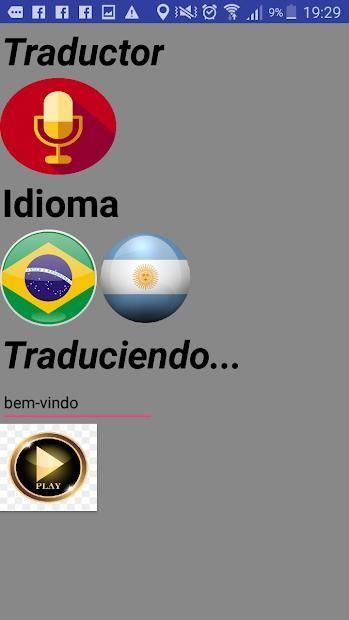
Un traductor de español a portugués/ portugués a español: Que es capaz de realizar la
traducción de una palabra a partir de 2 opciones: escribirla o decirla en voz. alta.
Posteriormente arroja el resultado en un cuadro de texto y también puede ser convertida
en voz. Utiliza la tecnología de reconocimiento de voz de google y los complementos de
de app inventor “traductor yandex” y “texto a voz”.
El espacio libre en el extremo inferior fue previsto para la incorporación de futuros elementos o
herramientas.
Ventanas (screen):
Contiene un total de 12 ventanas.
Una corresponde a la pantalla de inicio, otra a la presentación (splash screen) y una exclusiva para el traductor. Las 9 ventanas restantes se utilizan para albergar las tablas de contenidos con información sobre los distintos ejes temáticos: Seguridad, Salud, Servicios Generales, etc. Todas
esas tablas de contenidos que se visualizan están alojadas en un blog de la plataforma blogger.
The "TU MAPPITA 2.0" application has the following structure:
A Home screen with a photo of the access to Itá Ibaté as background.
The home screen has 13 buttons as the main menu.
Health
Education
Security
Services
Bank
Technical Service
Transportation
Accommodation
Tourist points
Entertainment
Advice
Businesses
Government
Each button represents a thematic axis and ".png" images were applied to give it the appearance of an icon, also adding a text in the lower part to facilitate its interpretation.
The content of each one of the thematic axes is organized in tables using a blog of the "Blogger" platform. In this way, each modification that is made in the tables of contents will be reflected in the application without the need to download updates of the App.
It should be noted that the button "tourist points" incorporates a different functionality, as it groups individual icons of the most transcendent places for inhabitants and tourists. Thus,
Through a link with the Google Maps and GPS platform, an exact indication of the route, distance and approximate time to arrive is provided.
At the top of the initial screen there are 5 buttons:
A button with the shield of the Itá Ibáte Technical School that links us to the official account
of the Institution's Facebook https://www.facebook.com/etecnica.itaibate.7
Under the school button, there are 4 buttons
Map of Itá Ibaté: through an image hosted on the "blogger" platform.
News from Itá Ibaté: through the portal of the digital newspaper "El Muelle"
http://www.elmuelle.com.ar/locales
Weather forecast for Itá Ibaté: through the "accuweather" platform
https://www.accuweather.com/en/ar/ita-ibate/8909/weather-forecast/8909
Voice Recognition: Uses Google technology for speech recognition and
It allows you to open each of the 13 main thematic axes just by saying your name:
For example: "Security".
At the bottom of the home screen there are 2 buttons:
A translator from Spanish to Portuguese / Portuguese to Spanish: Who is able to perform the
translation of a word from 2 options: write it or say it in voice. high.
Subsequently, the result is displayed in a text box and can also be converted
in voice. Uses google voice recognition technology and add-ons
of inventor app "yandex translator" and "text to speech".
The free space at the lower end was planned for the incorporation of future elements or
tools
Windows (screen):
It contains a total of 12 windows.
One corresponds to the home screen, another to the presentation (splash screen) and an exclusive one for the translator. The remaining 9 windows are used to house the tables of contents with information on the different thematic axes: Security, Health, General Services, etc. All
These tables of contents that are displayed are hosted on a blog blogger platform.
La versión 2.0 mantiene las funciones de la versión 1.0 e incorpora 2 mejoras: una pantalla de bienvenida institucional y el botón de "Gobierno".
es-419

9Apps 4.9















