

I'm glad to tell you that 10,000+ users downloaded SMART Video:Free latest version on 9Apps for free every week! You can find this multifunction app on 9Apps easily. This hot app was released on 2013-04-18. Don’t be hesitate, download and install it on your mobile phone now!
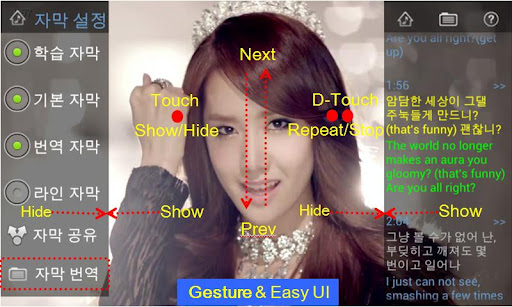
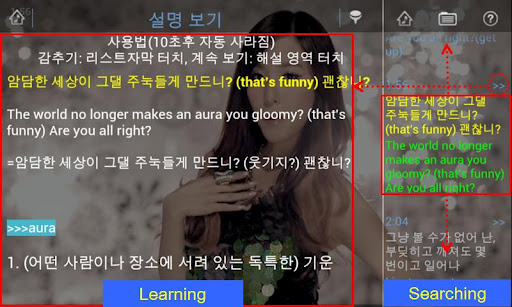
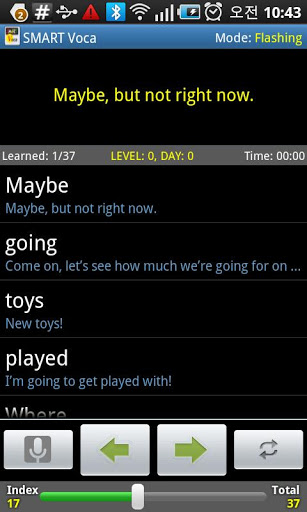
SMART Video amp; Voca: Korea Mobile Awards Best App. SMART Video See a scene that you want to see The SMART Video is allinone video player for movies with subtitle and caption.The subtitles are automatically organized.Use the SMART Video for learning and more fun anywhere in a short time. To use, Touch Touch and Sometimes Long Touch SMART Video FeaturesEasy to use: Easy video and subtitle management, bookmarks Various learning methods: List subtitle, Video repeat, Subtitle vocabulary, Automatic translationEasy to useTouch: Run Video and subtitleLong Touch: Setting learning features.Move UpDown: Fast Forward, Fast BackwardVarious learning methodsList Caption:See a scenethat you want to see flash Mode: Flash learning of scriptsRepeat a video automaticallyListening amp; Dictation using subtitleSpeech recognizeAutomatic translation: English, Chinese, Japanese, French, Arabic, Russian, More Automatically save learning info.Subtitle fileSubtitle Type: Line and List scriptsVocabulary: If we provide a subtitle file, Vocabulary is automatically organizedSupport SMI, SRT, SUB subtitle fileSupport Korean, English, Chinese, Japanese, French, Arabic, Russian encoding.Korean:EUCKR, KSC5601, ISO2022KRChinese:GB2312, Big5, ISO2022CNJapanese:ShiftJIS , EUCJP, ISO2022JPUSASCII, ISO88591245678Window12511256, KOI8R, TurkishUTF8, UTF16, UTF32etc: Automatic EncodingOnline dictionary Google, Naver and DaumNaver CafeBlog: Visit http:m.cafe.naver.comediconfor more informations. SMART Video and SMART TED are integrated TED: Ideas worth spreadingPlease.learn and share ideas with SMART TED in hand.TED means Technology Technology, Entertainment entertainment, Design designSMART TED can be used more quickly and easily for TED.Also Native language and English can be used simultaneously as using both subtitle on layer screen.SMART Video is developed forsubtitle learning, repeated listening and online dictionaries TED lectures are learning quickly and repeatedly,Please digest TED knowledge with SMART TED. SMART TED Features 1. SMART TED based onTED Translation for learning and spreading2. SMART Video Learning feature can learn faster and easier.TED videos automatically organize sentences, and words. Repeated listening, etc..3. TED Translation offers the world39;s languages, subtitles, quot;its subtitle,quot; and quot;English subtitlesquot; notation.4. English, Chinese, Japanese, etc. so that language learning can help provide accurate subtitle.5. You can share a TED talks with Twitter, Facebook, kakaohtok, email.6. Use Download and Favorites for easy using without comm. cost.7. Long clicks V in order to TED vocabulary and online dictionary Simple Usage of SMART Video 1. Scroll and Click each list subtitle to jump2. Long Clicks to make TED vocabulary.3. Use gesture on screen to move previousnext.4. See help for more usages.search SMART Video, SMART TED, Subtitle, edicon






9Apps 4.9














