

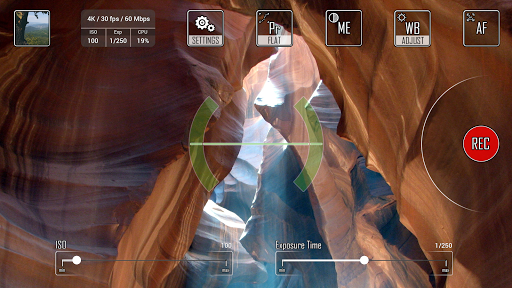
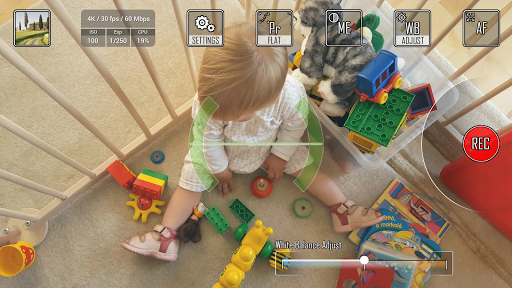
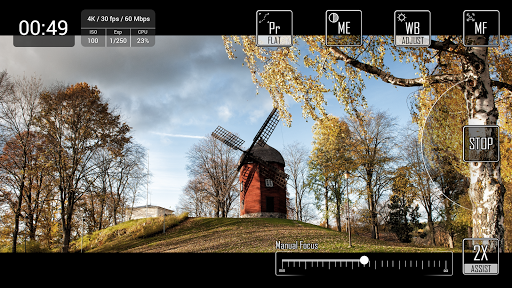
Professional video recorder app which supports 4K/UHD, Manual Focus, Exposure Settings and many more to get the most out of your Android Camera.
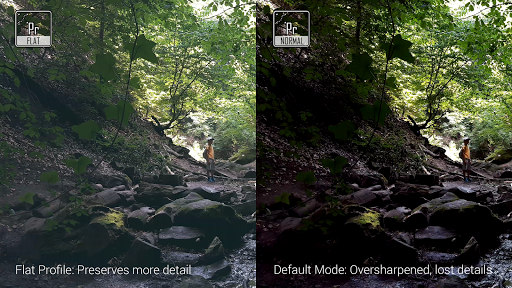
Cinema 4K is the first and only app which introduces Flat Profile (like Cinelike D, S-Log2, V-Log L or ProTune) to get more dynamic range of your videos for post production. In Flat Profile Mode the app disables the default sharpening effect to keep as many details as possible. The raw video might seem flat and dull at first sight, but this is the ideal footage for post processing and color grading.
In Trial mode Cinema 4K can record only 1 minute long clips.
- Resolutions: 4K/UHD (2160p), Full HD (1080p), HD (720p)
- Frame Rates: 24fps, 25fps, 30fps
- Video Bitrate: from 15 Mbps up to 200 Mbps
- Can save video files to external SD Card
- Auto White Balance with Lock and Adjust feature
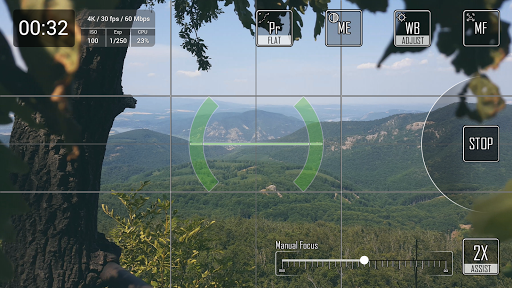
- Manual Focus with Focus Assist (2X, 4X)
- Exposure Compensation, Exposure Lock
- Manual Exposure (ISO and Exposure Time setting)*
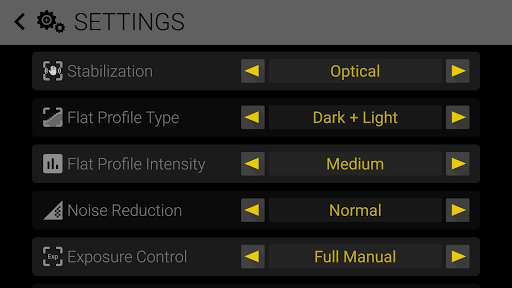
- Flat Profile (increased dynamic range)
- Noise Reduction configuration
- Grid Display (Rule of Thirds, Center Cross)
- Aspect Mark Display (16:9, 1.85:1, 2:1, 2.35:1)
- Digital Horizon Level display (based on accelerometer), calibration is possible by tap & hold over it
- Video Orientation settings (Nexus 5X owners can set "Upside down" option to get right orientation for the recorded video)
- Low disk space warning during recording (timer will be red in the last 10 sec)
*Device should support it. Currently tested and works on the supported Samsung Galaxy Phones.
TIP: You can modify Focus, White Balance and Exposure Settings during recording. These controls are hidden automatically when you start the recording, but you can bring them back by just simply tapping on the screen.
Cinema 4K app supports Camera2 API. To get the best result, your phone/tablet should support 4K video recoring, however Cinema 4K can also record Full HD or HD videos.
Please note that recording a 4K/UHD video is a very resource intensive task, so it is strongly recommended to close all the unnecessary background tasks prior to record high definition videos.
If you have any question or comment, don't hesitate, write us: info@frozenvolcano.com
This short clip is made by Cinema 4K app: https://www.youtube.com/watch?v=kBDB3huCrYc
IMPORTANT NOTICE: To use Cinema 4K app, Camera2 API should be implemented on your phone by the manufacturer of the device. Without it, Cinema 4K could not work. Only Camera2 API allows you to manipulate pixel data in such a deep. We really can do nothing, if the API is not implemented by the manufacturer.
We are aware of the problem about the encoding on new Marshmallow Samsung Galaxy models and also on LG G4.
This is related to the mp4 encoder engine. Unfortunately the whole mp4/h.264 encoding subsystem is independent from the application. That means we (and other developer who are using the camera2 API ) can not fix this issue from our application. Only the manufacturers (like Samsung or LG) can fix it. We have already reported this issue for them.
There is a workaround for this problem:
1) Restart your phone
2) Record a short a clip with Cinema 4K app after the fresh restart as a reference clip
3) Record videos (these videos might be corrupt ones, but all the frames and audio are in them)
4) There is an app "MP4Fix", download it from the Google Play
5) Use MP4Fix app to fix the corrupt mp4 file with the help of the reference video you recorded
We hope that manufacturers will correct this issue about their camera2 API implementation.
- Minor fixes






9Apps 4.9










