
With the development of technology, more and more apps appeared in the mobile market. 30,000+ users downloaded AnySoftKeyboard - Rick latest version on 9Apps for free every week! This is one of my favorite apps. This hot app was released on 2017-01-05. 9Apps has thousands of apps and updated daily!
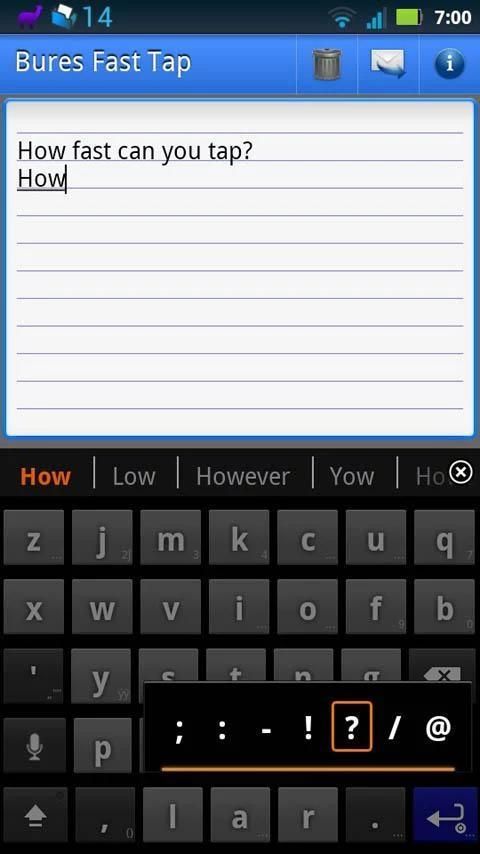
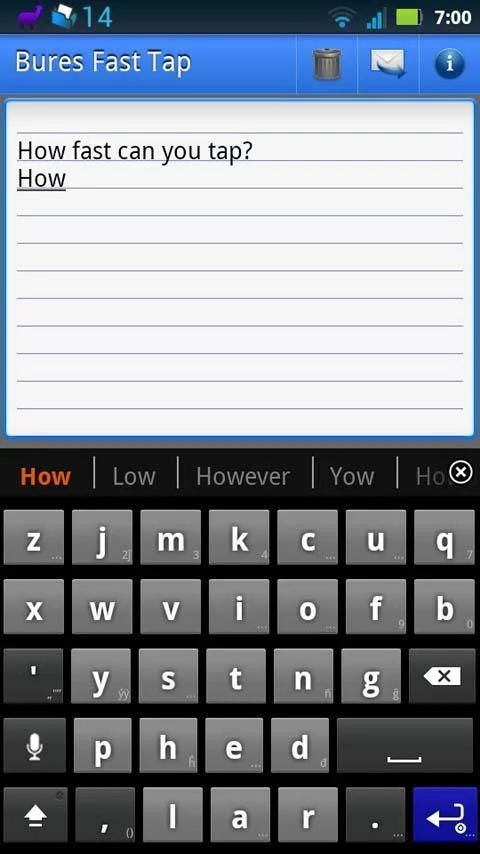
Note: To use this layout, you must first install AnySoftKeyboard. QWERTY key boards were originally designed to slow typists down, and are meant to be used with two hands. So why use something so inefficient for your phone? Designed by Rick Bures, this layout has one thing in mind: Speed. Once you get familiar with the layout, you should see an increase in your tapping speed. The layout achieves this through several means: 1. By increasing the number of rows and decreasing the number of columns over a QWERTY keyboard, the keys can be made larger, allowing for increased speed without sacrificing accuracy. 2. Speed decreases the farther your finger has to travel to find the next key, and increases when the next key you tap is near the one you just tapped. Written English has been analyzed to determine the most common letters, the most common digraphs (two-letter combinations), and the most common trigraphs (three-letter combinations). By grouping the most commonly used letters near the center, and positioning them relative to one-another so that adjacent letters complete the most common digraphs and trigraphs, the frequency that the next key you want to tap is near the one you just tapped is greatly increased over QWERTY. There are several layouts that could improve over QWERTY. This layout has the letters of each digraph adjacent to each other (horizontally, vertically, or diagonally) in 26 of the 32 most common digraphs in written English, and in all but one of the remaining 6 there is only one key interposed between the the letters of the digraph. It is harder to achieve that level of contiguity with trigraphs, but this layout still manages to have all the letters adjacent (when tapped in order) in 10 of the 16 most common trigraphs, and in half of the remaining 6 one of the letters is only distant by one interposing key. 3. The space bar is double-sized, since it is tapped so often. Within the constraints of the layout of the letters, I tried to place it near where familiarity with a QWERTY keyboard would lead you to find it. The shift key is similarly placed. In addition to offering a layout that you may find much faster than QWERTY (once you're used to it), this layout retains many of the best features of ASK: • Accepts themes • Dictionary • Word suggestions • Keyboard settings, Override default dictionary, and Change input method on long press of the return key. • Many, many alternate characters and punctuation selectable via the pop-up when you long-press many of the keys. • Voice input • Swipe to access additional keyboards • etc. Things to make note of: • Try long-pressing the period key. You'll find the question mark and many of the punctuation symbols originally found with both the period and the question mark. • “Center” on this keyboard is the letter E-- it is found center column, but in a low row. Everything else spreads from that point. Consider E your home base. By having as many rows above E as I do, I was able to maintain contiguity for a greater number of digraphs and trigraphs, in the hopes that the net result would be greater speed. • You can quickly get numbers by long pressing any of the keys on the top row, just like with the QWERTY layout-- except that because there are now only seven columns, some of the numbers have been moved to the second row. • This layout is optimized for portrait mode. Personally, I don't feel that five rows works well in landscape mode, but having something great for portrait meant compromising on landscape. Is this layout for everyone? Nope. But for those of you who are looking to increase your speed and accuracy when using a portrait mode keyboard, and don't mind a little time to get used to it, my hope is that you'll like it as much as I do. If you don't, I don't mind, but please don't bother Lado Kumsiashvili about it-- I designed the layout, he made it a reality for me and was kind enough to put it here for others to use.

9Apps 4.9









