

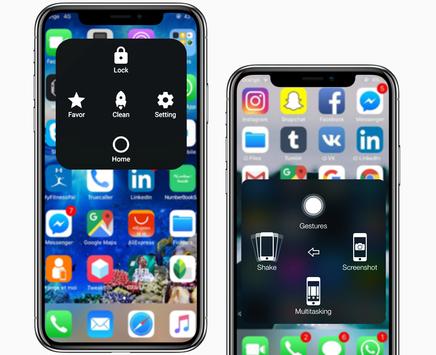
This app uses the Device Administrator permission." It is necessary and used only for locking the device when you use feature turn off the screen. You need to enable Administration before it can be used that feature. To uninstall the app, please open my app and click the "Uninstall" button.
"This app uses Accessibility services." It is necessary and used only to perform a global action. For example going back, going home, opening recent, power dialog, notification etc. You need grant this permission to use that action.
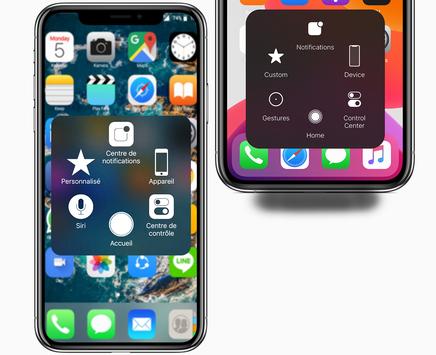
When you turn on Assistive Touch iOS 13, you’ll see the AssistiveTouch menu. You can drag it to any edge of the screen, then tap the menu to open it.
1. To turn on AssistiveTouch iOS 13:
Open my app > Switch on AssistiveTouch.
2. To use more actions:
Go to Settings > Accessibility > Services and turn on AssistiveTouch.
You can also use AssistiveTouch to access your Home screen, Recent screen and use Back Key. Just open the AssistiveTouch menu and tap Home, Recent, Back action.
To access your Notifications, open the AssistiveTouch menu and tap Notification. To get to the control, open the AssistiveTouch menu. From here, you'll be able to do things like turn Bluetooth on and off, use Wifi on and off, take screenshots, and more.
FEATURES:
- Control your device with Assistive Touch menu.
- Custom size and color Floating icon.
- Custom color Assistive Touch menu.
- And more.
Notice: Some new advance function such as capture screenshot, power popup...only support high software version 5.0 and up. If your phone dose not supported please do not give bad review. Thank for your support
What is Assistive Touch?
Assistive Touch is an easy touch tool for others OS, now has similar apps for Android. It's fast, it’s smooth, and it’s totally FREE.
With a floating panel on the screen, you can easily use your Android smart phone. More conveniently, you can quickly access to all your favorite apps, games, settings and quick toggle. You can use smart clean function to clean running background apps, help your phone faster. Assistive Touch is also an ideal app to protect the physical buttons (home button and volume button). It is very useful for big screen smart phone.
Assistive Touch for Android
- Virtual Home key, easy touch to lock screen and open recent task
- Virtual Volume key, quick touch to change volume and change sound mode
- Clean ram, boost speed, one touch boost
- Easy touch to open your favorite application
- Go to all setting very quick with a touch
Quick touch setting include:
- Capture Screenshot (5.0 and up)
- Screen Recording (5.0 and up)
- Power popup (5.0 and up)
- Back button
- Open Notification
- WiFi
- Bluetooth
- Location (GPS)
- Ring mode (Normal, Vibrate, Silent)
- Screen rotation
- Volume up & down
- Airplane mode
- Flashlight Bright
- All application on your device










9Apps 4.9










