𝐘𝐨𝐮𝐫 𝐚𝐜𝐜𝐨𝐮𝐧𝐭 𝐰𝐨𝐧'𝐭 𝐛𝐞 𝐛𝐚𝐧𝐧𝐞𝐝, 𝐚𝐬 𝐟𝐚𝐫 𝐚𝐬 𝐰𝐞 𝐤𝐧𝐨𝐰 𝐆𝐅𝐗 𝐭𝐨𝐨𝐥𝐬 𝐚𝐫𝐞 𝐧𝐨𝐭 𝐢𝐧 𝐭𝐡𝐞 𝐥𝐢𝐬𝐭 𝐨𝐟 𝐭𝐡𝐢𝐫𝐝-𝐩𝐚𝐫𝐭𝐲 𝐚𝐩𝐩𝐬. 𝐇𝐨𝐩𝐞 𝐭𝐡𝐢𝐬 𝐡𝐞𝐥𝐩𝐬 :
FEATURES for PUBGM 𝐆𝐅𝐗 𝐭𝐨𝐨𝐥𝐬 :-
🔧 1080 Resolution: Change the resolution of the game.
🔧 HDR Game Graphic: Unlock the HDR graphics on low-end devices
🔧 Extreme FPS: Unlock the Extreme FPS level
🔧 Style: Change graphics style setting
🔧 Shadow: Enable and disable shadow.
🔧 Shadow Quality: Select the shadow quality
🔧 4xMSAA: Enable and disable Anti Aliasing
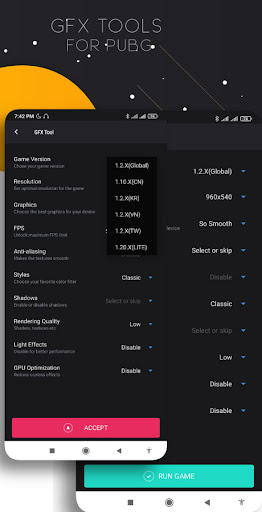
1. Select the game version
When you have installed one of the GFX tools in the play store, go to the main screen, there you have to choose the PUB version of the mobile PUB you have.
2. Resolution
Select the resolution that matches your cellphone. If you use a cell with a low spec, just choose 960x540. This will minimize the resolution of the game that will be rendered by our smartphone. The smaller the resolution, the game will become lighter to run.
If you want smooth performance, choose the lowest setting that is 960x540.
3. Graphics
Here we choose what graphics settings the game wants to run on our cellphone. Unlike the previous resolution, in graphics, we choose the quality of the rendering of the graph, what do we want PUBG GFX Tool Pro
There are options starting from
So smooth
Smooth HD
Smooth
Balanced
HD
Smooth HDR
HDR
Well from that choice, if you choose so smooth, then the images that appear will be rendered faster, but the results are not detailed. For example, you will see grass that is not sharp, looks squares, or trees will look at the leaf boxes, and so on.
That's because the cellphone is forced to render it as well as possible.
If you attach importance to smooth game performance, just choose smooth.
4. FPS (frames per second)
You already know that games that run with low fps will not give satisfaction. The higher the fps, the more smoothly our movement in the game You can choose yourself comfortable at which FPS. There are 3 options, namely 30 fps, 50 fps or 60 fps.
GFX Tool PUBG
5. Anti-aliasing
This anti-aliasing is about texture, such as grass or trees. If the anti-alias is disabled, then the texture of the grass or tree will not look smooth GFX Tool PUBG
6. Style
In the PUB game there are 5 display options, namely:
Classic Colorful Realistic Soft Movie
GFX Tool PUBG Pro




9Apps 4.9