ezeCalc now lets you control your calculator with your voice! You can say simple or complex calculations and it will respond with your results. You can also control the menu, options or view your history.
Like the original, it's elegantly designed to make your calculations quick and easy. It's the perfect companion for everyday tasks like doing homework 📚, shopping 🛒, balancing check-books 🗃 or even doing your taxes 🗄!
Features
✅ You can speak commands, or type, to input numbers and math functions
✅ Your calculation results are spoken back to you
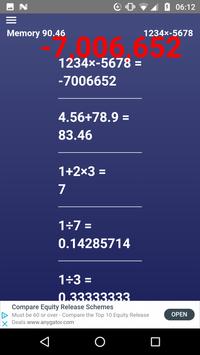
✅ Your most recent calculations are stored in your history. Tap on an item to restore it, or swipe horizontally to delete it.
✅ Use the memory functions to keep running totals of your calculations
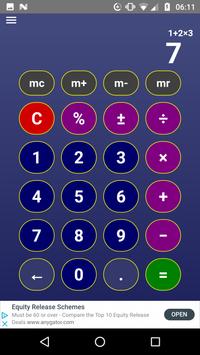
✅ Operator precedence (or BODMAS) works as expected (e.g. 1 + 2 x 3 = 7 and not 9!)
✅ Use the backspace (delete) key to make corrections as you type
✅ Clear your history and memory at any time
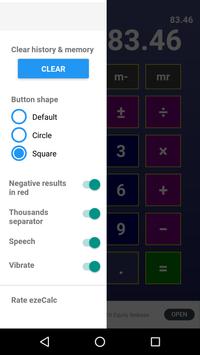
✅ Change keypad button shapes to circle, oval or square to suit your tastes!
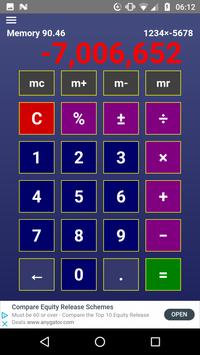
✅ Display negative totals in red
✅ Thousands separator support for large numbers
✅ Settings include: vibrate on key press, button shapes, clear data and other options
Usage
ezeCalc Voice has a large set of commands. The best way to learn them is by practising the basics. Here are some examples to get you started:
➕ To calculate 1 + 2, say "one plus two equals". The result "three" will be spoken back to you.
✔️ Saying "equals" tells the app you've finished your input. That way you can chain together longer operations before getting the answer.
🔚 Say "clear" or "wipe" to start a new calculation.
🔙 Say "back", "delete" or "edit" to remove the last digit or symbol.
Longer examples
🔚 Say "clear"
➕✖️ To calculate 1 + 2 x 3, say "one plus two times three equals", or "one plus two times three is". The result "seven" will be spoken back to you.
Here are some longer examples:
➕✖️ To calculate (1 + 2) x 3, say "left one plus two right times three equals". Spoken result is "nine".
🔝✖️ To calculate 2 ^ 2 x 3, say "two square times three is" or "two power two times three is". Spoken result is "twelve".
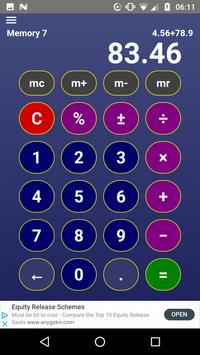
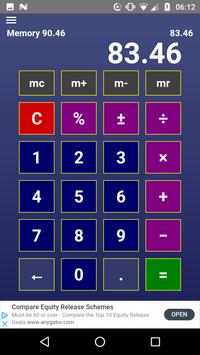
➕ To calculate 4.56 + 78.9, say "four point five six plus seventy eight point nine is". Spoken result is "eighty three point four six".
➕ To calculate 1000000 + 4.56, say "one million plus four point five six is". Spoken result is "one million and four point five six".
➕ To calculate 2060 + 10%, say "twenty sixty plus 10 percent". Spoken result is "two thousand two hundred and sixty six".
Memory functions
🔚 Say "clear" to reset display. Then
➕ "one memory add" or "one mad", and one is added to the working memory. (Memory now holds 1)
Now say:
🔚 "clear" then
➖ "two memory subtract" or "two mub", and two is subtracted from the working memory. (Memory now holds -1)
🔚 Say "clear" then:
Ⓜ️ "memory recall" or "recall" and -1 is displayed.
🔚 Finally say "memory clear" or "mec" to clear the memory.
Now you've got the hang of the basics, head over to the menu and click on
commands
to view the complete list!
Voice reset
Sometimes the audio listening feature is inactive when you load the app, or after a result has been spoken. If it becomes inactive you can reset it by clicking on the menu icon and then the "VOICE RESET" button 🔴. You should hear the audio prompts when it is ready. 🎵
Limitations
❗️Only works for English language speakers
❗️If you have a strong regional dialect, or are a non native speaker, the translation may be less accurate or may not work
❗️Stay within microphone range of your phone for the app to pick up your voice
❗️App may not function correctly if you are on medication, drugs or have a voice related illness or disability
🖥 https://smashappz.com/speak-tell-calculator-app/
❤️💙💚 Make calculators great again with ezeCalc Voice! Install it and give it a try! 💚💙❤️
Bug fixes and performance improvements!

9Apps 4.9