


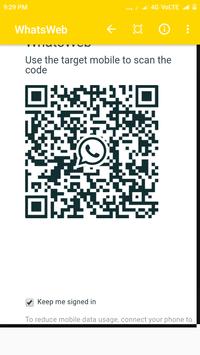
1. Install and Open Whatsweb Gold on device (Phone/Tablet) you want to sync/clone your whatsapp to
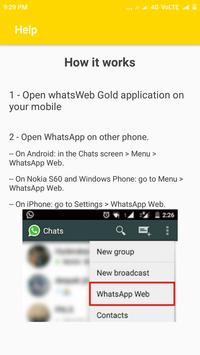
2. Open whatsapp on your main phone (the account you want to clone)
- On Android: Scroll to the Chats screen -> Menu -> whatsapp Web.
- On iPhone: Click Settings -> whatsapp Web.
- On Nokia S60 and Windows Phone: Go to Menu -> whatsapp Web.
- On Nokia S40: Swipe up from bottom of screen -> whatsapp Web.
- On BlackBerry: Go to Chats -> Menu -> whatsapp Web.
- On BlackBerry 10: Swipe down from top of the screen -> whatsapp Web.
3. After clicking "whatsapp web", you should see a camera QR scanning screen.
4. Now scan the QR code displayed on whatsweb
5. Done! Sync complete! Now you can access the same whatsapp account on both devices!
6. Enjoy 2 whatsapp in 1 device!
For more info, see the video above.
----------
HOW IT WORKS
----------
To ensure best performance:
1. Ensure that the main phone with the whatsapp account you wish to sync to is connected to the internet. Wifi is best.
2. Remove un-used chat list and chat groups. This reduces the data required to transfer, therefore speeding up performance.
WhatsWeb Additional features
- Support every single mobile (All devices)
- Faster load (Cashe support)
- 110% Zoomed for more visibility
Stay tuned for more very soon ;)
PS: This app is an independent one and is not affiliated with any other company including WhatsApp inc.
Rate, Share and leave a good review.
More Features





9Apps 4.9













![국세청 홈택스 [손택스] on 9Apps](https://go.getnew.app/sg/res/jpg/f7/df/69cc2f90120ec331db2630e0f5b6-6dh.jpg?x-oss-process=style/jmq200)


