




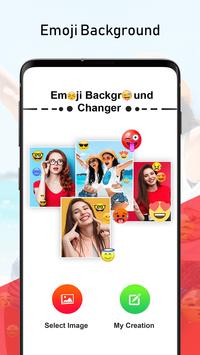




In the era of social media applications, people express their viewpoints, feelings, etc via the aid of emojis. Emojis give an anime look to the photo montages. Emoji background photo frames are a trendy photo-editing feature. Various emojis are present that reflect the tone of your image like laughing emoji, smiling emoji, angry emoji, crying emoji, frustrated emoji, prank emoji, etc.
To provide Android users with the best user experience of working with Emoji background photo montages, an articulate Emoji Background Changer Auto Photo Editor app is designed. Emoji Background Changer Auto Photo Editor app employs professionally feature-rich photo-editing tools like photo maker, emoji background photo editor, background remover, background changer, and background editor tools for the creation of incredible and magnificent Emoji background photo frames.
Steps to create Emoji background photo montage via Emoji Background Changer Auto Photo Editor app:
Step 1: Install the Emoji Background Changer Auto Photo Editor app.
Step 2: Browse an image from phone gallery.
Step 3: Otherwise, click an image via camera.
Step 4: Select one of the innovative emoji background photo frames from the various emoji background photo frames presented by the Emoji Background Changer Auto Photo Editor app.
Step 5: Set the opacity of the Emoji background effect via the slider.
Step 6: Invoke one of the vibrant and lively overlay effects from the various overlay effects presented by the Emoji Background Changer Auto Photo Editor app.
Step 7: Manually set the opacity level of the overlay effect in the Emoji background photo frame via the slider mechanism.
Step 8: Easily save the created Emoji background photo frame.
Step 9: An emoji background photo montage preview screen is displayed which facilitates the user to either share, set as, or delete the create Emoji background photo frame.
Step 10: Your Creation section of the Emoji Background Changer Auto Photo Editor app stores all the created and saved Emoji background photo montages.
Features:
- Browse any image from phone gallery.
- Click an image via camera.
- A huge array of Emoji background photo frames.
- Creative collection overlay effects.
- Opacity is modifiable by the user manually via the slider mechanism.
- Image quality is maintained throughout the editing process.
- Emoji Background Changer Auto Photo Editor app is completely free and easy to install and operate.
- Emoji Background Changer Auto Photo Editor app presents an attractive and intuitive design along with user-friendly and addictive GUI.
- Emoji Background Changer Auto Photo Editor is a lightweight application, will not drain device battery, memory or other resources.
- Emoji Background Changer Auto Photo Editor app supports all screen resolutions of mobile and tablet devices.
- Once installed, no further internet connection is required by the Emoji Background Changer Auto Photo Editor app.
Hurry Up!!! Create explicit photo montages embellished with Emoji background photo frames and flaunt them on social media within seconds!
Install the Emoji Background Changer Auto Photo Editor app ASAP!!!
![[New version] Emoji background changer - emoji photo editor screenshot 1](https://i.ytimg.com/vi/MjwiVGDdsj0/mqdefault.jpg)



9Apps 4.9













